Accommodation Hotel Motel Booking Plugin MotoPress 3.7.5

Accommodation Hotel Motel Booking Plugin MotoPress 3.7.5

Accommodation Hotel Motel Booking Plugin MotoPress 3.7.5

Professional WordPress Hotel Booking plugin for building and managing a property rental website. Use it to list unlimited accommodations and services, accept direct online reservations and don’t pay any commission, synchronize all bookings across OTAs. WordPress hotel booking plugin is perfect for running any hospitality business establishment regardless of the size, function or cost: a […]

Professional WordPress Hotel Booking plugin for building and managing a property rental website. Use it to list unlimited accommodations and services, accept direct online reservations and don’t pay any commission, synchronize all bookings across OTAs. WordPress hotel booking plugin is perfect for running any hospitality business establishment regardless of the size, function or cost: a hotel, vacation rental, apartments agency, hostel and more.

Features

Online Search Availability Form

The site visitors will be able to place their bookings via a user-friendly website form (search availability + reservation forms). It’ll take 3 steps:

  1. input check-in and check-out dates
  2. choose from a search results list
  3. provide personal data to complete a booking

Accommodation Details

Each accommodation type is fully customizable: add its description, capacity, all facilities of a chosen type, bed size available in the room, and other significant information.

Make the room more attractive by adding a featured image or even the entire gallery to show all room advantages.

Bookings Calendar

With WordPress Rental plugin all received requests and their current statuses are stored at one place, easily sorted and displayed in a calendar view.

Search all needed bookings by a room type, period of booking and room status (booked, pending, available, etc).

Seasonal Pricing

Regulate your prices within any custom period. Set any prices depending on a season or specific days/dates. “Season” is a general term and you can label it anyhow to reflect your pricing changes.

The difference in price can be applied for both long periods and short ones (e.g. 2 days).

Variety of Rates

Based on a number of advantages offered for a specific room, you can set different prices for the same room type – room rates (e.g. non-refundable double room rate, refundable double room rate, etc).

Your guests will choose the preferable one on the checkout page.

Weekly and Monthly Rates

You can set any room rate depending on a season (any term). To create different price points based on the length of stay, you can add weekly, monthly or other customizable rates. For example, you can set any number of days and apply a needed per-night price based on the length of stay.

The system will automatically discount the properties according to your rate rules. The longer the stay, the better per-night rate!

Extra Services in WordPress Hotel Booking Plugin

Offer additional guest services such as spa, airport-to-hotel delivery, swimming pool, childcare, etc.

Add the entire list of services to the admin system and then supply any room with available extra services (optionally chargeable). Set prices either per person or per room.

Booking Multiple Accommodations

One guest can reserve multiple accommodations during one booking process. You may also turn on the wp hotel booking plugin to recommend the best set of accommodations according to a number of guests.

This quick and smart automation will help you serve your guests faster in their dynamic journey!

Booking Rules

The property management system is very flexible: set min / max days to stay and available check-in and check-out dates for the entire hotel establishment, accommodations individually or seasons.

You may also block booking option for all accommodations or any one individually for a chosen period of time (set not check-in, not check-out or not stay-in rules).

iCal to Sync Bookings with OTAs

This WordPress booking system can serve as a hotel channel manager! Synchronize the bookings submitted through your website with those from online travel channels like Booking.com, Airbnb, TripAdvisor or HomeAway and avoid overbooking.

Thanks to iCal file format support, the plugin generates unique calendars to export to external online channels and provides the system to import from OTAs. All synced calendars for all properties will keep your hotel availability up to date.

Variable Pricing in WordPress Hotel Booking Plugin

The accommodation rate can be changed automatically depending on a number of guests. You simply need to add a needed number of the per-guest price variables that will be different from the base accommodation price.

Your guests will see a relative price once they input their search parameters.

Multilanguage Support

Run a non-English website? No problem. Switch to one of the professional translations or translate it yourself with any translation program. The plugin is officially compatible with WPML – one of the most popular WordPress multilingual plugins.

The frontend and backend of the plugin are translated into 14 languages: Portuguese, Polish, Russian, Spanish, Turkish, Swedish, Italian, Hungarian, Czech, Chinese, Dutch, French, Arabic and German (more on the way).

Online and Offline Payments

Confirm submitted booking requests manually, automatically or instantly upon payment. Charge a full amount of money or deposit. Send email notifications either automatically or manually. Accept payments through built-in PayPal, 2Checkout, Braintree, Stripe, Beanstream/Bambora (more coming soon).

WooCommerce Payments Add-on

Use WooCommerce payment gateways to rent out your accommodations.

Hotel Booking WooCommerce Payments plugin integrates WooCommerce payment gateways with MotoPress Hotel Booking plugin for WordPress. Use it to extend a number of payment gateways needed to handle online reservation of accommodations.

Taxes & Fees

Complete and correct tax, fee and pricing information of all accommodation charges. Add mandatory fees, accommodation taxes, service taxes and fee taxes – customize their types and charges to fit your needs. Keep track on pricing information of all bookings in the admin dashboard and provide your guests with all pricing details.

Discount Coupons in WordPress Hotel Booking Plugin

Easily create personalized discount coupons via the admin dashboard and provide your guests with them. You’ll be able to set a discount amount, an expiration date, select accommodation types, set check-in and check-out dates, minimum and maximum days to stay and apply other settings to customize your coupons. For the automatic discounts based on the length of stay, you’ll need to configure property rates.

Email Notifications

Website administrator and guests will receive the appropriate emails with booking details, booking status, cancellation notifications, etc.

Edit the content of confirmation, cancellation and other email templates easily with a help of various macros. Choose colors, upload logo, etc.

Booking Confirmation

Confirm booking requests in a preferable way – give control over booking approval to either user (by clicking on a confirmation link in email), to yourself (you approve it manually via admin panel) or confirm a booking automatically upon payment.

For the payments, you can set the system to charge a full price or deposit (a fixed price or percentage).

Attributes – Advanced Sorting Options

Attributes menu allows you to add unlimited custom info to the property details (location, accommodation types, price range etc) and add advanced search fields to the search availability form.

By using a wide range of attributes your guests will sort the results and find the most appropriate offers on the spot.

Generate Booking Reports

Generate booking reports in a single click of a button! Get a CSV file containing detailed information on all bookings made over a specified period of time filtering the bookings to be exported by 4 custom criteria: check-in date, check-out date, date of reservation or total period of stay.

The obtained reports can be opened and edited in Excel, Google Sheets or any other spreadsheet program and further printed out, locally saved or shared via email.

Shortcodes & Widgets

You have a list of available shortcodes to output on the needed pages: availability search form, availability search results, room types listing, services listing, etc.

Each shortcode comes with a detailed explanation, parameters and notes.

In Harmony with Your Theme

You may not worry that your content will look different from your original website appearance – we’ve made sure that everything will work in harmony.

The plugin content will look like a natural part of your design. It’s also possible to take the advantage of WordPress Slider and enrich the theme with it in order to engage more guests.

For Developers

Developers get a pretty good list of actions, filters, instructions on how to override templates, and other useful tutorials.

Setting up and customizing the plugin for your clients should be a smooth process.

 

https://ift.tt/2WIAggM

https://ift.tt/30J29Ux https://ift.tt/2wrENth

MotoPress Hotel Booking Google Map Addon 1.4.2

MotoPress Hotel Booking Google Map Addon 1.4.2

MotoPress Hotel Booking Google Map Addon 1.4.2

Make Google maps of your WordPress site more interactive with custom markers, fonts, icons and colors. Customize them with a user-friendly toolkit. Perfect adjustments for mobile devices. MotoPress Google Maps addon is an advanced widget for MotoPress WordPress Page Builder. It makes possible to fully customize your maps without any coding. Using this widget you are able […]

Make Google maps of your WordPress site more interactive with custom markers, fonts, icons and colors. Customize them with a user-friendly toolkit. Perfect adjustments for mobile devices.

MotoPress Google Maps addon is an advanced widget for MotoPress WordPress Page Builder. It makes possible to fully customize your maps without any coding.

Using this widget you are able to place multiple custom markers to your maps, select font icons, define their size and color. It is easy to add your custom description to the marker tooltip as you can use visual editor for this. You are able to add media files or any additional information like working hours to the description area of each marker on your map. In order to prevent scrolling confusion on mobile devices it’s possible to disable draggable feature, scrollwheel zoom and even hide the map controls for convenient view.

You do not need to worry that MotoPress Google Maps might not fit your theme style because you can apply 1000+ custom styles and even add your own ones with the free service like Snazzy Maps

Core Features

  • ability to embed ready map code
  • unlimited location markers
  • visual editing of marker description with media, links, etc.
  • driving directions for each marker
  • display the list of locations
  • custom marker (media and font awesome icons)
  • ability to show/hide map controls
  • 6 preset map styles and ability to apply 1000+ custom styles
  • 4 map types (Road Map, Hybrid, Satellite, and Terrain)
  • ability to enable/disable scrollwheel zoom and draggable features
  • ability to display list of markers below the map

.

https://ift.tt/3ahswGd

https://ift.tt/30J29Ux https://ift.tt/2xr5CgZ

MotoPress Hotel Booking Payment Request 1.1.1

MotoPress Hotel Booking Payment Request 1.1.1

MotoPress Hotel Booking Payment Request 1.1.1

This add-on will automate your workflow of requesting and collecting rental payments from your clients. Allow your guests to secure their bookings by paying the full or remaining balance in a certain number of days before arrival. Email the balance payment request link automatically or manually. Always receive on-time payments without a need to handle […]

This add-on will automate your workflow of requesting and collecting rental payments from your clients. Allow your guests to secure their bookings by paying the full or remaining balance in a certain number of days before arrival. Email the balance payment request link automatically or manually. Always receive on-time payments without a need to handle repetitive tasks.

Features

Automatic Payment Reminders

No matter the booking confirmation mode you use, it’s easy to request, process and record payments automatically through your website.

Set up automated balance payment requests by scheduling emails: designate the number of days prior to check-in date to send reminders.

All paid bookings will be accounted automatically.

Manual Payment Reminders

You can opt out of the automatic balance due requests for individual bookings. Send request payment emails with a button click.

An automatically generated payment request link, which is unique for each reservation, can be copied manually and sent in any convenient way.

You can send manually copied links via any messenger, anytime, as many times as needed.

Customizable Emails

Create branded “Request payment” emails to send to your clients using fully customizable templates.

Personalize automatic emails with handy macros, state your policy, include any promo info, coupons, etc. Once the balance is paid by the customer, they receive a receipt and you get an email notification.

You are free to add multiple recipients of admin notifications.

hotel booking payment requestDifferent Payment Methods

The payment request link sent in the email redirects clients to the checkout page on your website, which includes booking details, a payment history and the available payment gateways.

Balance payments can be processed via any gateway enabled in the Hotel Booking plugin. All payment information is automatically recorded in the database.

hotel booking payment requestPayments Tracking

Get complete booking history on individual reservations.

The system automatically tracks all logged actions on each booking to help you optimize your workflow with every client. Changes of a booking status, the remaining balance, the paid amount – this add-on brings all range of tools to help you keep records effortlessly.


https://ift.tt/39bqMgw

https://ift.tt/3dpjBEK https://ift.tt/3ael4vA

Hotel Booking WooCommerce Payments 1.0.3

Hotel Booking WooCommerce Payments 1.0.3

Hotel Booking WooCommerce Payments 1.0.3

This plugin integrates WooCommerce payment gateways with MotoPress Hotel Booking plugin for WordPress. Use it to extend a number of payment gateways needed to handle online reservation of accommodations.  

This plugin integrates WooCommerce payment gateways with MotoPress Hotel Booking plugin for WordPress. Use it to extend a number of payment gateways needed to handle online reservation of accommodations.


https://ift.tt/2wEuDFF

https://ift.tt/30J29Ux https://ift.tt/2JcyFYt

Hotel Booking Reviews MotoPress 1.2.2

Hotel Booking Reviews MotoPress 1.2.2

Hotel Booking Reviews MotoPress 1.2.2

Build trust with travelers by featuring real user-generated reviews. This easy-to-implement WordPress property rating system allows guests to submit written reviews and star ratings evaluating your accommodation by different criteria. Manage reviews with a power and flexibility of the native WordPress comment system, customize reviews layout, display them on any page or widget. Five-star Rating […]

Build trust with travelers by featuring real user-generated reviews. This easy-to-implement WordPress property rating system allows guests to submit written reviews and star ratings evaluating your accommodation by different criteria. Manage reviews with a power and flexibility of the native WordPress comment system, customize reviews layout, display them on any page or widget.

Five-star Rating System

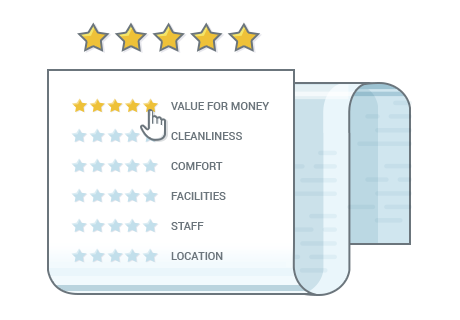
Incorporate guest experiences into a popular five-star rating system. Travelers can grant a selected accommodation up to five starts by each parameter and provide feedback through written reviews. Grades of all ratings from all users will produce an aggregate accommodation rating.

Show real people with photos and names, let a customer voice help you promote your property.

Unlimited Rating Criteria

You can add unlimited custom property evaluation criteria – cleanliness, value for money, services, etc. that will add weight to the final average rating.

Guests will be required to evaluate the property/room by each criterion before sending it for you to moderate. Since rating criteria are provided by means of the native WordPress taxonomy, you’ll be able to translate rating parameters with any WordPress translation plugin like WPML.

Built with Native WordPress Comments

Instead of locking you down with one plugin, we managed to embrace the flexibility of the native WordPress comment system.

The comments will be literally converted to reviews on the accommodation-related pages.

That yields huge benefits:

  1. Easily moderate, approve, delete and reply to property reviews via the WordPress comments menu (as you would normally do with comments).
  2. Customize the behavior of the review system extensively via WordPress Discussion settings.
  3. Never lose your reviews should you deactivate or uninstall the add-on. They’ll still be displayed as regular comments (however, without star ratings).

Works with WordPress Comment Plugins

Third-party specialist WordPress plugins that extend the functionality of WordPress comments will work with this add-on.

Easily deal with spam reviews using popular solutions like Akismet, implement ‘Useful / unuseful’ review rating system, enable users to add images to their reviews or integrate any other plugin to make your rating system more tailor-made.

Embed Reviews in Pages, Posts and Widgets

In addition to the actual “Accommodation type” pages, you can embed a selection of the already submitted ratings and reviews to any page or widget zone of your WordPress theme, hence, employ extra promotion!

To embed user-submitted reviews into separate pages and posts, you’ll be able to use a shortcode with multiple parameters, while the “Accommodation Reviews” widget comes with a user-friendly interface for applying your settings.

Customize the Look of Reviews

When you need to add selected reviews to any other website page, the shortcode provides a good bunch of options to display them in a beautiful way.

To keep consistency and aesthetics of your theme design, you’ll be able to predefine a layout for your reviews: list or grid (with a tunable number of columns), the number of reviews on a page, the review length before the Read more link, hidden or visible review criteria and more.

https://ift.tt/3alEYEU

https://ift.tt/2WFp9F4 https://ift.tt/2xZx0mD

WordPress Testing Environment Demo Builder MOTOPRESS 1.6.1

WordPress Testing Environment Demo Builder MOTOPRESS 1.6.1

WordPress Testing Environment Demo Builder MOTOPRESS 1.6.1

This WordPress demo plugin will help you present key benefits of your products via custom front-end demos and provide the prospects with personal back-end trial accounts. Don’t fuss with in-house solution for months, create awesome demos of your WordPress plugins and themes in clicks. Plugin features: Tuneable Demo Lifetime Definite what amount of time is […]

This WordPress demo plugin will help you present key benefits of your products via custom front-end demos and provide the prospects with personal back-end trial accounts. Don’t fuss with in-house solution for months, create awesome demos of your WordPress plugins and themes in clicks.

Plugin features:

Tuneable Demo Lifetime

Definite what amount of time is enough for testing your WordPress products on the backend and easily set a demo lifetime.

Each new demo user will be able to use a personal demo website (sandbox) during this time. You should not worry about any permanent unused data on the server as upon the account expiration date all modifications will be automatically cleaned up.

WordPress Demo Builder automatic data clean-upAutomatic Cleanups

All expired accounts will be automatically cleaned up.

Every account confirmation email by default contains information about a demo lifetime, so all sandbox owners are aware that after some period of time their accounts will be deactivated. It means you should not receive any complaints on demo data loss.

isolated sandboxesIsolated Sandboxes in WordPress Demonstration

Each demo user gets their personal accounts (sandboxes), which are insensitive to the changes other users apply.

All backend tweaks stay intact till the end of a trial period. When a demo lifetime is finished, all sandbox data is permanently deleted.

WordPress Demo Builder user role restrictionsUser Roles and Restrictions

It’s not necessary to provide sandboxes with access to all tools and pages of a WordPress demo product. As a network administrator, you can restrict access to all needed pages by managing user roles of sandboxes.

For example, you may either block access to all posts or to just some chosen ones.

WordPress Demo Builder responsive toolbarResponsive Toolbar

Why not let the users of demo accounts know more about your other products?

With WordPress Demo Site plugin, you may optionally set a responsive toolbar right in the demo dashboard to feature the list of related products and show your logo. This tool is especially useful for presenting WordPress themes and plugins, so the user can quickly switch the products and preview or test each.

mailchimp integrationMailChimp Integration

MailChimp is a well-known email marketing service. It was implemented into the plugin to help you collect the addresses of your users and keep them posted with your latest news even after their accounts are no longer in use. That’s a great way to help you transform a casual user into a client.

You may also group your potential users by interests to achieve better results.

managemenet of demosEasy Management of Created Demos

There is a flexible set of tools within the plugin settings to easily manage all demo accounts. Each network administrator has control over created demos: to view, modify and delete them. Moreover, by visiting user accounts you can view and analyze what are the most tested tools/features of your WordPress products.

WordPress Demo Builder StatisticsStatistics in WordPress Demo Builder

With WordPress Demonstration plugin you get access to a detailed statistic on created and activated demos during a chosen period of time.

The data presented in a table also shows a number of demos that were already deleted from the database. Statistics information is a great resource to analyze how many users are actually interested in installing/buying your WordPress products during a certain period of time.

WordPress Demo Builder professional supportEmail Confirmation

Nobody likes spam.

Secure account confirmation by email will free you from spam attacks maximum simplifying demo accounts management process. A new sandbox is created only in case the confirmation link is clicked ensuring that you’ll deal with real people only.

https://ift.tt/2UBeTeA

https://ift.tt/3bq3zZm https://ift.tt/2QJmcj8

Restaurant Menu Toppings MOTOPRESS 1.1.2

Restaurant Menu Toppings MOTOPRESS 1.1.2

Restaurant Menu Toppings MOTOPRESS 1.1.2

This add-on drives your WordPress website to sell more. Create toppings available for additional purchase and sell them along with needed menu items created with a free MotoPress Restaurant menu plugin. Features WordPress Restaurant Menu Toppings Highlights Ingredients for additional purchase People have different tastes and love to customize their orders. Let them choose any […]

This add-on drives your WordPress website to sell more. Create toppings available for additional purchase and sell them along with needed menu items created with a free MotoPress Restaurant menu plugin.

Features

WordPress Restaurant Menu Toppings Highlights

ingredients for additional purchaseIngredients for additional purchase

People have different tastes and love to customize their orders. Let them choose any additional ingredients that can be added along with a particular menu item.

You are free to add unlimited toppings, set their prices (or offer for free), set their featured images, and customize selection controls.

Side dishesSide dishes

You topping that comes as additional proposition is not necessary an ingredient for the available menu item. You may add other side dishes that you think may complement the order in a cart: be it a soft drink, coffee, pudding, salad, etc.

topping selection controlsToppings selection controls

The admin tools allow to choose the most suitable selection controls that will be displayed on the frontend when choosing a topping.

You can choose from checkboxes, radio buttons or stepper (for minimum and maximum item quantity) depending on the logical specifics of the topping.

quick checkout processQuick checkout process

There is no extra mess or troubles for the customer with adding additional items to the cart.

The available toppings are listed right next to the Add to cart button of the main menu item and are added in the same way. In the final order details the customer will see all added extras and their prices.

pizza builderPizza builder

It may be pizza or any other proposition from your menu which is available for complete customization: let customers build their own dish choosing from the ingredients given. Pizza builders are especially popular as they can even increase the sum of the order in comparison to standard pizza offers.

sell more with motopress restaurant menuSelling more

The more toppings you offer, the more odds that users want to have something else it in their cart!

It’s beneficial for both sides: you can sell more and the customers get more customized orders. More satisfied clients are also a huge bonus for your business.

Topping featured imageTopping featured image

Take a picture of your topping and set it in the admin area to make the customers even more interested in a purchase.

Most people are visuals, and especially when it comes about food, they want to see what they get. The menu item image can also increase your chances that the topping will be finally purchased.

Easy admin managementEasy admin management

Adding a topping is a quick process that requires putting its name, and optionally a price & image.

In the plugin settings you may also customize Add a topping button label and the texts to be shown to custom

https://ift.tt/2UE3Hhn

https://ift.tt/3dsF9jU https://ift.tt/2vOlbPF

Envira Gallery Breadcrumbs Addon 1.2.1

Envira Gallery Breadcrumbs Addon 1.2.1

Envira Gallery Breadcrumbs Addon 1.2.1

Envira Gallery Album Breadcrumbs for WordPress allows you to add breadcrumb navigation links to your WordPress galleries allowing your users to easily browse through your albums. Want to add breadcrumb navigation to your WordPress galleries and albums? Envira Gallery’s Breadcrumbs addon allows you to add breadcrumb navigation on galleries accessed from an Album. Breadcrumb navigation […]

Envira Gallery Album Breadcrumbs for WordPress allows you to add breadcrumb navigation links to your WordPress galleries allowing your users to easily browse through your albums.

Want to add breadcrumb navigation to your WordPress galleries and albums?

Envira Gallery’s Breadcrumbs addon allows you to add breadcrumb navigation on galleries accessed from an Album.

Breadcrumb navigation is a term used to describe a hierarchical navigation menu presented as a trail of links.

https://ift.tt/3ajoLjA

http://img.youtube.com/vi/qEsw50Q0zTw/0.jpg https://ift.tt/39idQp8

Envira Gallery CSS Addon 1.3.2

Envira Gallery CSS Addon 1.3.2

Envira Gallery CSS Addon 1.3.2

Place your own custom CSS into each individual gallery with the CSS addon, giving you endless possibilities for your gallery style and display views. Do you want to customize your WordPress galleries? Aside from our pre-made gallery templates, you can also use our CSS addon to add custom styles to your gallery display. The CSS […]

Place your own custom CSS into each individual gallery with the CSS addon, giving you endless possibilities for your gallery style and display views.

Do you want to customize your WordPress galleries?

Aside from our pre-made gallery templates, you can also use our CSS addon to add custom styles to your gallery display.

The CSS addon is a perfect, free utility addon to allow you to tailor customizations to specific galleries.

Once activated, a CSS box will be available under the Misc tab for your gallery where you can add your custom CSS styles. Information on how to style the gallery is available right there in the UI, and if you need more help, there is a dedicated doc piece for using the CSS addon.

https://ift.tt/2Uyg4LD

http://img.youtube.com/vi/ZH9zHpj-iio/0.jpg https://ift.tt/2Uyg5iF

Envira Gallery Deeplinking Addon 1.4.3

Envira Gallery Deeplinking Addon 1.4.3

Envira Gallery Deeplinking Addon 1.4.3

Get full SEO benefits and granular control over your galleries with the Deeplinking addon. Create unique, indexable URLs for each item in your gallery. Do you want to get maximum SEO benefit for your WordPress galleries? Then you’re going to love our Deeplinking Addon. The deeplinking addon is a very powerful and useful feature for […]

Get full SEO benefits and granular control over your galleries with the Deeplinking addon. Create unique, indexable URLs for each item in your gallery.

Do you want to get maximum SEO benefit for your WordPress galleries?

Then you’re going to love our Deeplinking Addon.

The deeplinking addon is a very powerful and useful feature for your galleries. It allows you to link to any image in your gallery uniquely, providing you with easy URLs for your visitors or clients.

This also provides you with an indexible URL for search engines which is great for SEO, and it allows you to easily query an image in your gallery using hashes.

Once activated, there is one setting to enable/disable deeplinking in the Config tab of the gallery.

When enabled, deeplinking will work automatically. You can test it out by opening up your gallery and notice how the URL changes with each transition to a different image. The hashes are cleared once the lightbox is closed.

To share an individual gallery image, all you need to do is copy the link address for the image you want to link to, and with the deeplinking addon, you will always have dedicated access to it!

https://ift.tt/3akCZRl

http://img.youtube.com/vi/yZArUpSQvU4/0.jpg https://ift.tt/2xk6BQe