Restrict Content Pro 3.1

Restrict Content Pro 3.1

Restrict Content Pro 3.1

Restrict Content Pro is a simple membership plugin that enables you to easily restrict access to your content to logged-in users only. Content restriction works both with partial content restrictions using shortcodes, as well as full page restrictions for post, pages, and most custom post types. Restrict Content also includes frontend forms for user registration, […]

Restrict Content Pro is a simple membership plugin that enables you to easily restrict access to your content to logged-in users only.

Content restriction works both with partial content restrictions using shortcodes, as well as full page restrictions for post, pages, and most custom post types.

Restrict Content also includes frontend forms for user registration, login, and password reset so your members can do all these actions on the front end of your site without going to the wp-admin or wp-login.php pages. Display these with the [login_form] and [register_form] shortcodes.

FEATURES OF THE PLUGIN

  • Limit access to content with a shortcode, i.e. [restrict]This content is limited to logged in users.[/restrict].
  • Limit access to full content via a simple interface on the edit post, page, and custom post type screens.
  • Display a registration form for new accounts on any page of your website with [register_form].
  • Display a log in form for existing users on any page of your website with [login_form].

Discount Codes

Create an unlimited number of discount codes and offer percentage or flat rate based discounts.

Built-in Integrations

Accept credit cards with Stripe, Braintree, 2Checkout, Authorize.net or PayPal Website Payments Pro. Restrict Content Pro also supports PayPal Standard and Express, as well as multiple payment options at the same time.

Reports

Elegant and easy-to-use reports to show you exactly how well your membership site is performing. Easily see the current month’s performance or any other time period.

Data Export

Generate a CSV of all active members of any particular subscription level or a CSV of every member in the system. You can also generate a CSV of every payment that has been made.

Extensive Help

Contextual help inside the WordPress admin provides you with relevant information at your fingertips.

Live Demonstration

To help provide a better idea of what Restrict Content Pro looks like for subscribers, visit the live demonstration site and test the registration process yourself.

RESTRICT CONTENT PRO FEATURES

  • Payments – including one-time payments and recurring subscriptions.
  • Integration with popular payment systems, including Stripe, PayPal Standard, PayPal Express, PayPal Pro, Authorize.net, 2Checkout, and Braintree.
  • Discount codes
  • Printable HTML invoices
  • Complete member management
  • Prevent account sharing
  • WooCommerce integration
  • And much more. See the Features page for additional details.

https://ift.tt/2KmXr8e

https://ift.tt/30J29Ux https://ift.tt/336rx8B

Give Wepay Gateway 1.3.1

Give Wepay Gateway 1.3.1

Give Wepay Gateway 1.3.1

Accept Donations via Credit Cards and Bank Accounts with WePay WePay is known as one of the best payment gateways for collecting donations. The service is easy to set up, backed by some excellent support, and features 2.9% + 30¢ per transaction rates. You can collect donations with or without an SSL certificate, can accept […]

Accept Donations via Credit Cards and Bank Accounts with WePay

WePay is known as one of the best payment gateways for collecting donations. The service is easy to set up, backed by some excellent support, and features 2.9% + 30¢ per transaction rates. You can collect donations with or without an SSL certificate, can accept bank account payments, and can choose whether the donor or recipient pays the gateway fees.

Flexible Donations with WePay

The Give WePay Add-on provides the option to either redirect customers to the secure hosted pay page to collect donation payment information or keep them on site (SSL required). With the off-site payment options donor payment information is directed through WePay’s secure servers, allowing you to benefit from their secure payment processing and ensure security. What’s this mean?

You don’t need an SSL with WePay offsite payments. For some, setting up an SSL certificate is time-consuming, complicated, or expensive. By using WePay secure servers, you can collect credit card information AND ensure your donors have a modern and secure payment flow.

Do You Have an SSL Certificate?

That’s great! SSL certificates ensure information that users input on your site in encrypted and secured. This means you can securely accept credit cards directly on your site with Give and WePay. No redirects off site, just one page to give on without any unnecessary clicks.

Preapprove donations with WePay

Often you want to accept donations, but not charge the donors until a later date. Setup your campaigns, collect donations, and then directly approve the charges directly within Give.

Choose who Pays the Gateway Fees

Often times you may want the donor to be the one to collect the payment processing fees. With WePay you can choose whether you, the recipient, pays the fees or the donor.

Why Use WePay with Give?

  • Fast Setup – Accept your first payment in under 5 minutes
  • Option to iframe or redirect the secure checkout
  • Benefit from using WePay’s secure servers to process payments and avoid PCI headaches
  • Clear Pricing – No contracts, monthly fees, or hidden fees. Just 2.9% + 30¢ for all credit cards and 1% + 30¢ for bank payments
  • Safe and Secure – First-in-class security with daily monitoring to protect your information
  • Live WePay Support – available by phone, email or live chat
  • Accepts Major Credit Cards / Debit Cards – Visa, MasterCard, American Express, Discover, and bank accounts
  • Choose whether you or the customer pays processing fees
  • Virtual terminal available to process phone and mail orders

https://ift.tt/336rt8R

https://ift.tt/2Kkgyjr https://ift.tt/2Kgqf2o

Give Zapier 1.2.2

Give Zapier 1.2.2

Give Zapier 1.2.2

Connect your Give install to Zapier and integrate with many of today’s top web services and applications. A simple and powerful way to integrate Give with 1,000+ third party web services, including SalesForce, Google Docs, Twilio, Campaign Monitor, MailChimp, Xero, Zendesk, Dropbox and more! Here are just a few of the ways you can use […]

Connect your Give install to Zapier and integrate with many of today’s top web services and applications.

A simple and powerful way to integrate Give with 1,000+ third party web services, including SalesForce, Google Docs, Twilio, Campaign Monitor, MailChimp, Xero, Zendesk, Dropbox and more!

Here are just a few of the ways you can use Zapier and Give together:

  • Email & SMS: Send notifications when a new donation is made (e.g. Twilio, Gmail)
  • CRM: Add leads/contacts and notes to your CRM (e.g Highrise, Salesforce)
  • Accounting: Create invoices and contacts in your accounting system (e.g. Xero)
  • Mailing List: Update your mailing list through MailChimp, Campaign Monitor, AWeber, SendGrid, and others
  • Spreadsheets: Add donations to a shared spreadsheet or CSV file, perhaps through Google Docs, Dropbox, or Google Drive
  • Contacts: Add donor details to your address book (Google Contacts)
  • Help Desk: Add a ticket to your help desk system powered by Zendesk, Desk.com, or others
  • Team Chat: Send an instant message to your team’s chat room using Hall, Slack, Hipchat, and others

https://ift.tt/335tORu

https://ift.tt/2KexcRy https://ift.tt/2KgNf1g

Give Tributes 1.5.4

Give Tributes 1.5.4

Give Tributes 1.5.4

Allow donors to give to your cause via customizable tributes like “In honor of,” “In memory of,” or any dedication you prefer. Also, you are able to send eCards and produce customizable mailable cards that your donors and their honorees will love. What is a Tribute? Many donors are moved to give in honor or in memory […]

Allow donors to give to your cause via customizable tributes like “In honor of,” “In memory of,” or any dedication you prefer. Also, you are able to send eCards and produce customizable mailable cards that your donors and their honorees will love.

What is a Tribute?

Many donors are moved to give in honor or in memory of a loved one. As well, donors may want to give on behalf of someone or in support of an event. By offering your donors the choice to give in tribute of someone or something, they will be more likely to donate to your cause.

Customizable Tributes

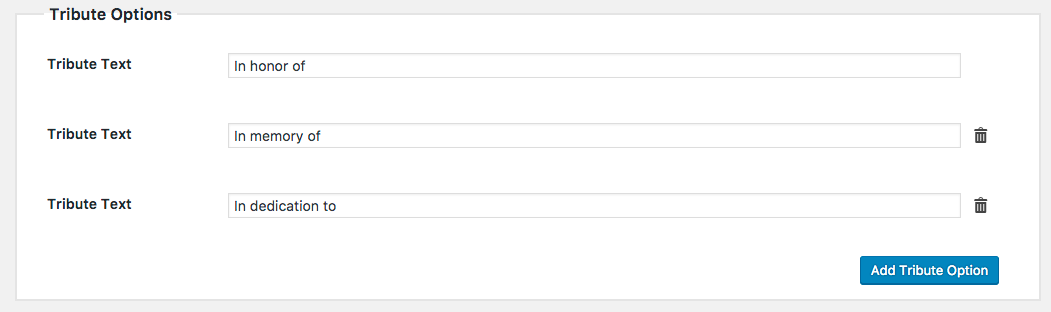
With the Tributes Add-on you are not limited by set option of tributes. You can easily add your own tribute types to suit your needs:

Add as many Tribute options as you'd like!
Add as many Tribute options as you’d like!

These tributes display on the front-end of the site and allow your donor to choose the tribute type they would like to donate using:

A donation form displaying tribute options
A example of tribute options within a donation form.

Send eCards to Honorees

Often donors would like to notify an honoree that they have given on behalf of them or a loved one. Using the eCards option built into the Tributes Add-on you can easily send honorees a customizable eCard. As well, you can allow the donor to include a message for a personal touch that can go a long way.

An example eCard sent to the honoree.

Mailable Tribute Cards

Many organizations want to send physical cards to their donor’s honorees. With the Tributes Add-on you can easily design, print, and mail cards as well as keep track of which cards have been sent. Additionally, you can create portrait or landscape style cards and choose from a variety of page sizes to suit your needs.

An example mailable card generated by the Tributes add-on
An example “Portrait” style mailable card generated by the Tributes add-on

Advanced Reporting

The Tributes Add-on includes the ability to track only the donors who gave in tribute of another. You can mark cards as mailed, resend eCards, and also export the data for other use.

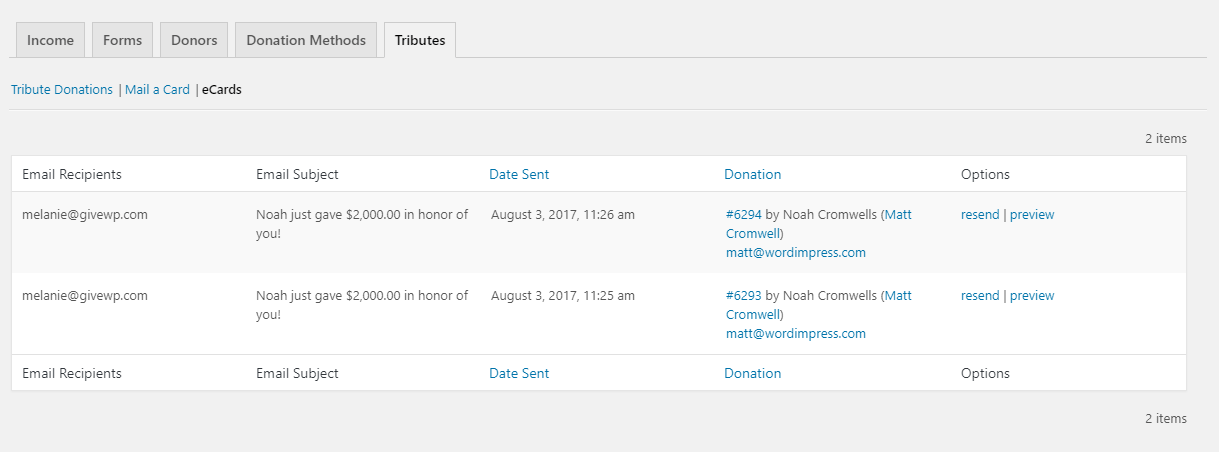
eCard Report

The Give Tributes eCard Report.

Tribute Donations Report

The Give Tributes Donations Report.

Mail a Card Exporter

The Give Tributes Mail a Card Export tool.

Feature Rundown

The tributes plugin is feature rich, thoroughly documented, and well supported. Here is a breakdown of the various features of the plugin:

  • General Options
    • Easily enable or disable both eCards and Mail a Card features to suit your needs.
    • Quickly customize the contents of the Tributes field-set within your donation forms.
    • Customize how you describe the honoree.
    • Display tribute options with radio buttons, a select dropdown, or buttons.
    • You can easily override the global settings per donation form or only enable for certain donation forms.
  • eCards
    • Easily customize the eCard graphics and content.
    • Provide a personalized email subject line using template tags.
    • Easily send a test email of the eCard so you can preview how it looks within your own email client.
    • Allow donors to provide a personalized message to their honorees that is sent within the eCard.
    • Resend eCards with the click of a button.
    • Reporting provides in depth analysis for your executive team
  • Mail a Card
    • Portrait or Landscape? You have the power to decide which card works best for your brand and graphics.
    • Multiple card sizes available. Select the appropriate paper size for your printing needs. Support for Letter, A4, A5, and A6 page sizes.
    • Who send the card the Donor or Admin? Specify whether the donor or admin should be responsible for sending the card.
    • Customizable card content and graphics.
    • Easily generate and preview the PDFs printable cards with the click of a button.
    • Send notification emails that inform your donors you mailed their tribute card.
    • Allow donors to provide a personalized message to their honorees.
  • Reports and Exports
    • See which eCards have been mailed and as well as preview and resend the eCard email.
    • Review and manage which cards have been mailed and which have yet to be sent using the Mail a Card report.
    • Download an export of addresses for donors who gave in tribute and opted to mail a card.

https://ift.tt/2KlROqY

https://ift.tt/336XfT9 https://ift.tt/336TJIq

Give Stripe Gateway 2.2.0

Give Stripe Gateway 2.2.0

Give Stripe Gateway 2.2.0

This Give Stripe Add-on allows you to collect donations through Give using the Stripe payment gateway without the additional 2% transaction fee. With the Stripe Add-on, you can accept Apple Pay, Google Pay in addition to the standard Visa, MasterCard, American Express, Discover, JCB, and Diners Club cards. The best part is that Stripe allows […]

This Give Stripe Add-on allows you to collect donations through Give using the Stripe payment gateway without the additional 2% transaction fee. With the Stripe Add-on, you can accept Apple Pay, Google Pay in addition to the standard Visa, MasterCard, American Express, Discover, JCB, and Diners Club cards. The best part is that Stripe allows your donors to made their payments directly on your website.

About Stripe

The Stripe add-on allows your donors to enter their credit card details during the giving process and never leave your site, resulting in a better experience for the donor, and more successful conversions for you.

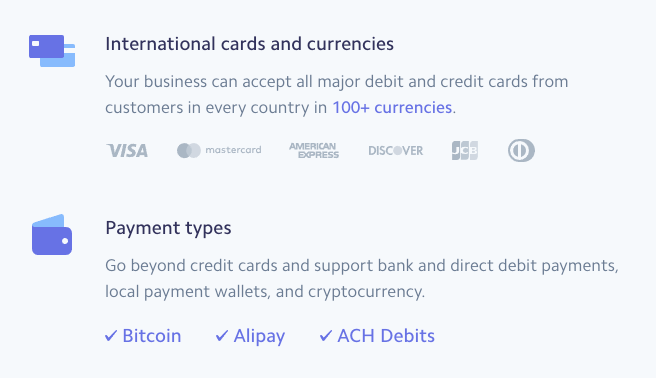
Stripe has a very simple merchant fee policy. Every transaction is charged 2.9% plus $0.30 by Stripe for their credit card processing expenses with NO monthly charges at all. You can also accept many types of cards and payment types:

Accept international cards and currencies

Stripe is also available in many currencies and currently supports a growing list of 25+ countries:

Stripe is available in 25+ countries

See “What countries does stripe support?” for all the supported countries.

With excellent features, competitive rates, and wide ranging support it’s no wonder why more-and-more nonprofits, organizations, and personal causes are putting their trust in Stripe to process their online donations. For more information, read a comprehensive list of why Stripe believes it’s the best payment gateway available.

Google and Apple Pay Integration

With the Stripe Add-on you can accept donations using Google and Apple pay. This feature isn’t available in the core plugin because it requires access to the priority support team. Apple and Google Pay allow your donors to give without ever having to grab their wallet. How does it work? Simple! If they’re on iOS or Safari then they will see the Apple Pay option. Similarly, if the donor visits your donation campaign on an Android device or the Chrome browser, they will see the Google Pay option.

Accept donations using G Pay or Apple Pay with GiveWP!

Support for 3D Secure Payments? No Problem!

Reduce fraud and ensure every donation you receive is legitimate with 3D Secure payment support via Stripe. We have built in support to ensure your donor’s 3D secure payments process quickly and efficiently.

Accept donations via 3D Secure payment verification

Accept Payments with Stripe + iDEAL

iDEAL is the most popular payment method in the Netherlands. If you’re looking for a rock solid solution to accept donations with Stripe + iDEAL look no further! Give’s Stripe Add-on has the complete integration.

Stripe + iDEAL
Accept payment using Stripe + iDEAL

Add-on Features

https://ift.tt/333P4qT

https://ift.tt/2Kcji28 https://ift.tt/2Kj8xv5

Give Recurring Donations 1.9.1

Give Recurring Donations 1.9.1

Give Recurring Donations 1.9.1

Increase Giving with Recurring Donations Recurring donations are great for your organization because of their regularity. They are also better for the donor because they can make smaller, regular donations that fit better into their budget each month rather than one large lump sum. But don’t just take our word for it. There are excellent studies that […]

Increase Giving with Recurring Donations

Recurring donations are great for your organization because of their regularity. They are also better for the donor because they can make smaller, regular donations that fit better into their budget each month rather than one large lump sum.

But don’t just take our word for it. There are excellent studies that describe the benefits of recurring donations:

  • According to the Network for Good, the “average recurring donor gives 42% more per year than the average one-time donor.”
  • According to NonprofitHub, ActBlue almost doubled their donations by asking for recurring donations rather than one-time donations.
  • Network for Good noticed that Millennials are 52% more likely to give on a recurring basis rather than a larger one-time donation.

So now that you understand the impact recurring donations can have, how do you implement it?

Introducing Recurring Donations for Give

Accepting recurring donations has never been easier or more powerful. This Give Add-on allows you to create even more powerful donation forms with support for daily, weekly, monthly, and annual subscriptions. You can also customize the number of times you would like to run the subscription, for example “Give $20 a Month for a Year”, or give the donor the choice whether or not make their donation recurring or one-time .

Recurring Donations is our premier add-on. See a live demo here

Flexible Recurring Options

Recurring Donations gives you several ways to configure subscriptions donations within your Give donation forms. For example, you may want to create a form that accepts donations every month for one year. This Add-on makes it easy! Simply create a new “Donor’s choice” recurring form, select “Monthly” as period, and “12” as the number times the subscription should run and you’ll get a form like this:

A familiar checkbox allows donors to easily opt-in to subscription giving

The form above uses a checkbox to easily provide the donor the option to make a subscription or one-time donation with one easy click. Of course, you can also provide additional recurring options

Want to provide your donors with more flexibility? No problem, you can allow donor’s to choose their own subscription frequency as well:

Donors can choose whether to make a donation recurring and also select the giving frequency.

Powerful Multi-level Recurring Options

Built into the plugin is the ability to select which of your donations levels is recurring, and which isn’t. You can even specify various times and periods per level!

The result is truly powerful subscription donation forms with recurring and non-recurring levels:

A Multilevel Recurring Donation Form
A “Multilevel” Recurring Donation Form

Using the example above, the donor has the choice to donate monthly for 12 months at various amounts. They can also specify a custom amount to Give as well.

Custom Subscription Reporting

Reporting is essential to understanding how well your Cause is raising donations. With Recurring Donations you can see exactly how much you’re bringing in for recurring revenue with the Subscription Revenue report:

Subscription Donations Report

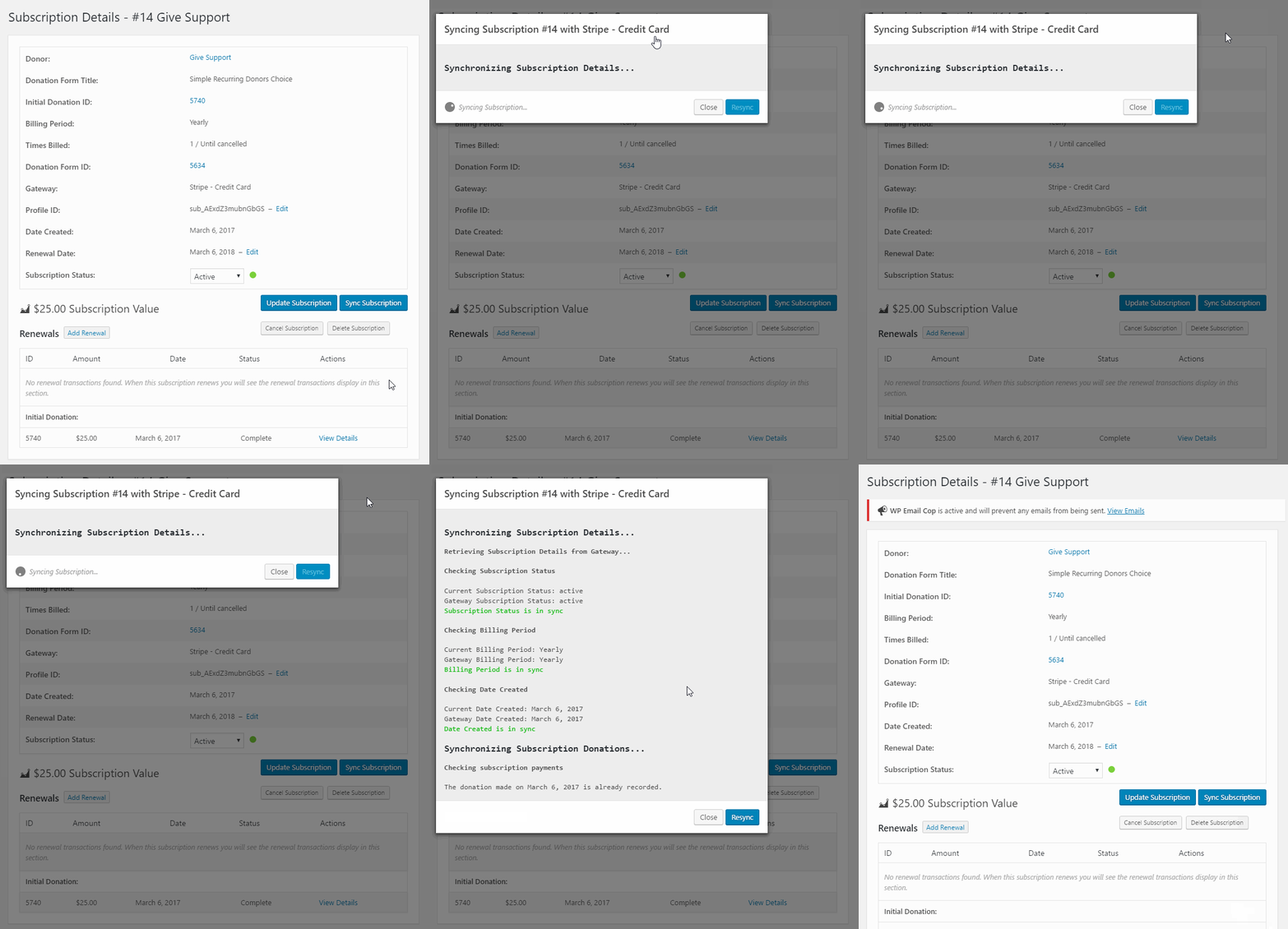
Subscription Syncing

You can sync your Give subscription history with your payment gateway with one click.

Sync your subscription with Give Recurring 1.3

Custom Recurring Emails

We know it’s important to keep your donors informed of the donations they are making. With Recurring Donations you can automatically send your donors an email receipt that their card was charged for a recurring payment, and another email when their subscription is expired ††.

The Subscription Payment Receipt email option
The “Subscription Donation Receipt” email option

Thoroughly Documented and Supported

When you purchase a Give Add-on, you have our team behind you to ensure you get up and running quickly and to answer any questions you may have. Recurring Donations is our most popular Add-on and we’re continually working to improve the plugin with additional gateways, code optimizations and enhancements, documentation and video. Support is US-based and via private email correspondence. We also have a 30-day money-back guarantee if you don’t 100% enjoy this Add-on.

Top Notch US-based Support from WordPress Developers
Top Notch US-based Support from Real WordPress Developers

Currently Supported Gateways:

We’re working to continually add more supported gateways to the Recurring Add-on.


FOOTNOTES:

 – The support for billing times and periods varies per gateway. See here for details.

†† – Subscription reminder emails will be added in the near future.

https://ift.tt/2ZkyNLX

https://ift.tt/2GJhKvU https://ift.tt/2GGk9HE

Give Razorpay Gateway 1.2.1

Give Razorpay Gateway 1.2.1

Give Razorpay Gateway 1.2.1

Razorpay is a popular payments platform in India that allows you to accept online payments via Credit Card, Debit Card, Net banking and Wallets from your donors. The donation experience with Give and Razorpay is modern and seamless which keeps your donors happy and your conversion rates high. Donating with Razorpay One of the most notable […]

Razorpay is a popular payments platform in India that allows you to accept online payments via Credit Card, Debit Card, Net banking and Wallets from your donors. The donation experience with Give and Razorpay is modern and seamless which keeps your donors happy and your conversion rates high.

Donating with Razorpay

One of the most notable features of Razorpay is the Checkout. Donors can complete payments on the same page without annoying redirects on your website. All necessary redirection is handled within the Razorpay popup. Your donor never leaves your website:

The Razorpay Checkout Popup:

The Razorpay checkout popup available payment options.

Once the Razorpay popup opens the donor can then select a payment option. Here is the OTP payment option:

Razorpay OTP payment option

The donor can then choose to verify and complete the donation, or choose another payment option. If the donor’s payment fails Razorpay has a “smart retry” button which helps increase success rates:

The Razorpay "Retry" Button
The Razorpay “Retry” Button

As you can see, the Razorpay checkout has been designed with the best possible donor experience in mind. It is simple, intuitive, and facilitates giving.

Give and Razorpay Features

This add-on makes integrating Give with Razorpay a breeze so you can begin accepting donations within minutes. The following is a feature breakdown of the Give Razorpay add-on.

Add-on Features:

  1. Easy integration via Razorpay API keys
  2. Customize the Razorpay checkout logo
  3. Customize the checkout colors
  4. Pre-populate the phone number field
  5. Thoroughly supported and documented

Payment Support:

  • UPI
  • Credit Cards
  • EMI
  • Netbanking
  • Wallets
Security: Industry standard 100% PCI DSS Compliant & Certified solution. No need for your site to be HTTPS secured or PCI DSS certified as all card info is submitted directly to Razorpay’s PCI DSS certified system over HTTPS.

https://ift.tt/2GHHnx7

https://ift.tt/2ZA46lS https://ift.tt/2ZqTB4r

Give Per Form Gateways 1.0.2

Give Per Form Gateways 1.0.2

Give Per Form Gateways 1.0.2

Choose on a per form basis which payment gateways you would like enabled for donors. Full control is provided on each donation form for selecting enabled gateways and customizing the default payment option. Imagine you are running multiple fundraisers on your WordPress website. For some donation forms, you may only want to receive Offline Donations. For […]

Choose on a per form basis which payment gateways you would like enabled for donors. Full control is provided on each donation form for selecting enabled gateways and customizing the default payment option.

Imagine you are running multiple fundraisers on your WordPress website. For some donation forms, you may only want to receive Offline Donations. For others, you may only want to accept payment via Stripe (credit card) or PayPal. This plugin provides the granular control for the payment gateways displayed on each donation form.

About Per Form Gateways

Give allows you to enable or disable gateways “globally” right out-of-the-box; meaning, all donation forms inherit these the enabled gateways. Many times, your fundraising needs require specific gateways be allowed for certain donation forms. This Add-on allows you to customize each donation form’s payment gateway. As well, you can

Features Include:

  • Toggle payment gateways per donation form
  • Set the default payment gateway per donation form
  • Works with all payment gateways

https://ift.tt/2ZpSkdT

https://ift.tt/2GGwco6 https://ift.tt/2GGwdsa

Give Per Form Emails 1.1

Give Per Form Emails 1.1

Give Per Form Emails 1.1

Give Per Form Emails is a WordPress Plugin being developed by Give. Give Per Form Emails allow you to customize everything from the logo, subject, content, and even template per donation form. Give Per Form Emails Features : • Easy Setup in Minutes • Send custom emails per donation form • Custom emails can use […]

Give Per Form Emails is a WordPress Plugin being developed by Give. Give Per Form Emails allow you to customize everything from the logo, subject, content, and even template per donation form.

Give Per Form Emails Features :

• Easy Setup in Minutes

• Send custom emails per donation form

• Custom emails can use a different email template, logo, and more

• And more…


https://ift.tt/2GHHhpf

https://ift.tt/2ZrxgUi https://ift.tt/2ZrBZWe

Give PDF Receipts 2.3.4

Give PDF Receipts 2.3.4

Give PDF Receipts 2.3.4

PDF Receipts makes it easy for your donors to print their tax deductible receipts by making PDF downloadable copies of them easily available. Donors can get a link to their receipt provided to them in the confirmation email, there is also a link in the donation confirmation screen, and a link in their Donation History page. […]

PDF Receipts makes it easy for your donors to print their tax deductible receipts by making PDF downloadable copies of them easily available. Donors can get a link to their receipt provided to them in the confirmation email, there is also a link in the donation confirmation screen, and a link in their Donation History page.

Easily Create Customized PDF Donation Receipts

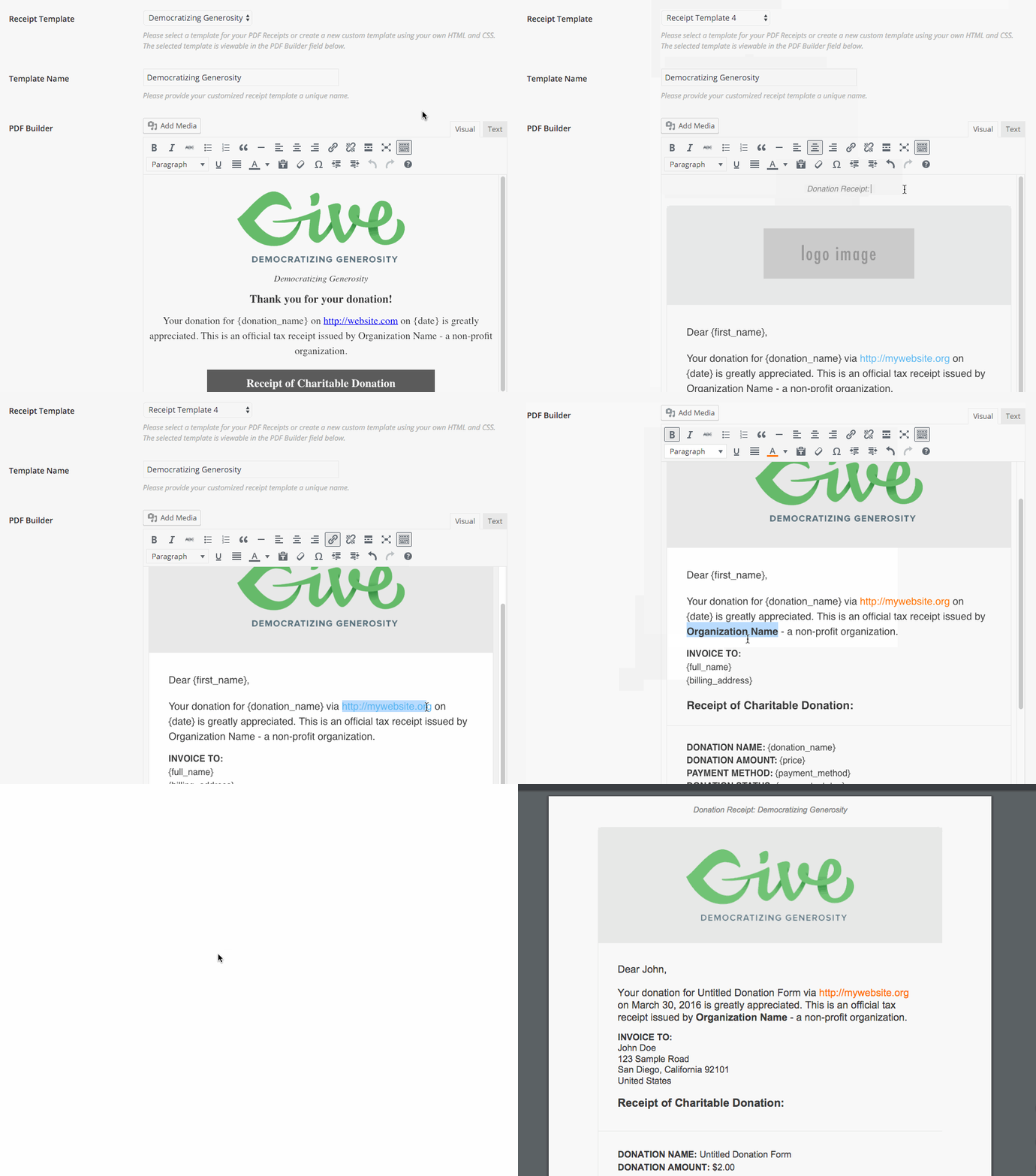
PDF Receipts is very simple to configure. With the Add-on you can visually build your PDF receipts to suit your brand and organization’s needs without any code knowledge at all. See it in action:

A Preview of the Give PDF Receipt Builder in Action

The image animation above demonstrates the ability to customize PDF based off the provided pre-configured templates. Notice how you can add images, custom text, html and styles, and template tags which output relevant information such as the donor’s name, donation amount, and donation date, payment method, etc.

Highly Configurable and Flexible PDF Creation

With this Add-on you are given the ability to choose between pre-configured templates or to build your own. There are 12 attractive and clean set PDF templates available complete with fields for your organization’s contact info, header text, footer text, and additional notes, and a field to upload your custom logo to be added to the PDF receipt.

Looking for more customization? The “Custom PDF Builder” option (shown above) allows you to use an visual editor to add your own greetings, template tags, images, and html to create the perfect PDF receipt for your use case.

Seamless Donor Access to PDF Receipts

Many organizations and causes want to provide their donors easy access to download PDF receipts on their website and via email. Out of the box the PDF Receipts Add-on automagically adds links on the “Donation Confirmation” and “Donation History” pages without having to configure anything.

Download PDF Receipts from the Donation History page

You can also add a link to download the PDF receipt directly in your “Donation Receipt” emails:

A Give Donation Receipt Email with PDF Receipt

Add-on Feature Highlights

  1. Customizable and Set PDF Creation Methods
  2. Create global and per form PDF donation receipts with flexibility and ease.
  3. Add a link to download a PDF receipt to your donation confirmation emails
  4. Seamless integration with donation confirmation and history shortcodes
  5. Resend emails with a link to PDF Receipts to past donors
  6. Template tags to output specific donor data as you see fit
  7. Customization capabilities for developers to add their own PDF templates via HTML and CSS

Add PDF Receipts to your donation workflow and make your donors happy.

Extensive Documentation and Priority Support

At Give we take documentation and support seriously. If you want to learn more about how the plugin works check out the Add-on’s documentation. Having trouble or need to ask a question? No problem. Every license comes with access to our priority support where our team of experts will help you achieve your goals.

https://ift.tt/2KaXVPW

https://ift.tt/2YzbVqV https://ift.tt/2YzbWuZ