MainWP Piwik Extension 4.0

MainWP Piwik Extension 4.0

MainWP Piwik Extension 4.0

Piwik The MainWP Piwik Extension gives you the ability to view your Piwik data for your child sites in your MainWP Dashboard. It adds a widget to your main dashboard where you can monitor Piwik data from. Why Use Matomo (ex Piwik)? We can’t say it much better then Matomo does themselves on their Privacy Page but I will quote […]

Piwik


The MainWP Piwik Extension gives you the ability to view your Piwik data for your child sites in your MainWP Dashboard. It adds a widget to your main dashboard where you can monitor Piwik data from.

Why Use Matomo (ex Piwik)?

We can’t say it much better then Matomo does themselves on their Privacy Page but I will quote some of the more important parts for our users.

“If you use Google Analytics on your website, Google would not only know all of the IP addresses (and other browser unique identifiers) of visitors to your website (and which pages they looked at on your site), but because most other websites use GA as well (or another Google product), Google would also, for example, know the 6 other websites that person visited earlier that day and the 367 websites he looked at in the last month. Because more than 60% of all websites on the Internet use GA , Google Adsense or another Google product using tracking beacons – “Only 36.5% of the web is Google-free” – Google is able to build a very accurate picture of most websites visited by any given user. “

“Piwik is the leading self-hosted, privacy compliant, decentralized, modern & Free (GPL License) web analytics platform, a building block of the free and open Internet. By using Piwik and configuring a few options as explained in this guide, you will ensure that all of your valuable information is private and owned by one person (you!) and that your website also, just as importantly, respects your visitors’ privacy.”

Use this Extension To Track:

  • Visits
  • Pageviews
  • Pages/Visit
  • Bounce Rate
  • Average Time on Site
  • New Visits

Boost your sales

By getting to know your visitors better you will be able to improve their experience and your online business.

Track statistics from one place

Monitor all statistics from one central dashboard for all of your MainWP Child sites.

Profile your audience

This extension will help you analyze visitor traffic data and optimize your site based on visitor’s needs.

Discover your users’ journey

Learn about your users’ behavior – where they come from, what they are doing and where they are going.

https://ift.tt/31O0eyN

https://ift.tt/30J29Ux https://ift.tt/31Q4ZYK

MainWP Page Speed Extension 4.0.1

MainWP Page Speed Extension 4.0.1

MainWP Page Speed Extension 4.0.1

Page Speed The extension shows you the average speed score for each of your child sites by calculating the average load time of your Pages, Posts and Categories and showing you tips and tricks to increase that score. The Speed monitor will be visible in both your Sites list and in your Extension settings page […]

Page Speed


The extension shows you the average speed score for each of your child sites by calculating the average load time of your Pages, Posts and Categories and showing you tips and tricks to increase that score. The Speed monitor will be visible in both your Sites list and in your Extension settings page utilizing a widget that is added to your Main and Individual sites Dashboards ensuring you access to the information.

MainWP Page Speed Extension and the Google Pagespeed Insights Plugin

This extension seamlessly integrates with the Google Pagespeed Insights for WordPress plugin enabling you to monitor your child site performances directly from your MainWP Dashboard.

The extension shows you the average speed score for each of your child sites by calculating the average load time of your Pages, Posts, and Categories and showing you tips and tricks to increase that score.

The Speed monitor will be visible on both your Sites list and in your Extension settings page utilizing a widget that is added to your Main and Individual sites Dashboards ensuring you access to the information.

Schedule Notifications

This powerful tool will notify you in the event that your sites score drops below a predetermined speed threshold. To enable notifications and set the minimum speed value you feel is acceptable for you or your clients. Your new Extension will notify you by email should one of your sites drop below that value allowing you to investigate the issue/s and possible solutions.

Bulk Mange Google Pagespeed Insights Settings

The MainWP Page Speed extension allows you to manage all settings for the Google Pagespeed Insight for WordPress plugin. You can easily make bulk changes for all child sites or tweak settings for individual sites.

You can also update or activate the plugin directly from the extension dashboard, leaving you virtually no reason to login directly to perform your child site maintenance.

Increase Performance, Ranking and Browsing experience

Use the helpful tips to increase the performance of your websites, Google Ranking and overall browsing experience for your visitors.

Manage all Settings from One Place

The MainWP Page Speed extension will allow you to manage all settings for the Google Pagespeed Insights plugin without logging into each site.

Smart Notifications

Set the minimum speed score you would like to see for your pages. If your score ever falls past this level, the extension will send you a warning email allowing you to correct the issue before your clients realize there is one..

Easy To Use

All of the great features that come with this extension are intuitive and easy to use.

https://ift.tt/2AKkKEP

https://ift.tt/30J29Ux https://ift.tt/2oQSQEq

MainWP Maintenance Extension 1.6

MainWP Maintenance Extension 1.6

MainWP Maintenance Extension 1.6

Maintenance MainWP Maintenance is a MainWP extension that allows you to clean the databases of your child sites. With just a few clicks you can easily delete all post revisions, auto drafts, trash posts, spam comments and remove all unwanted content from multiple databases at once. Which Maintenance Options Are Supported? Delete all post revisions […]

Maintenance


MainWP Maintenance is a MainWP extension that allows you to clean the databases of your child sites. With just a few clicks you can easily delete all post revisions, auto drafts, trash posts, spam comments and remove all unwanted content from multiple databases at once.

Which Maintenance Options Are Supported?

  • Delete all post revisions
  • Delete all auto draft posts
  • Delete trash posts
  • Delete spam comments
  • Delete pending comments
  • Delete trash comments
  • Delete tags with 0 posts associated
  • Delete categories with 0 posts associated
  • Optimize database tables

Clear all unwanted content and Optimize your Database Tables

MainWP Maintenance is a MainWP extension that allows you to clean the databases of your child sites. With just a few clicks you can easily delete all post revisions, auto drafts, trash posts, spam comments and remove all unwanted content from multiple databases at once.

That’s not all, our intuitive scheduling system will enable you to schedule multiple tasks and have your sites cleaned on a regular basis. The MainWP plugin will automatically perform maintenance as per your instructions.

Another great feature that this extension provides is Database optimization, with just a click of a button you can quickly optimize all your child site databases to reduce storage space and increase I/O efficiency.

Why Should You Use MainWP Maintenance Extension?

WordPress adds to or modifies the database of your site with pretty much everything you do. A lot of these changes do not need to be kept and just bloat your database and slow down your website.

Google, other Search Engines and your users are obsessed with site speed, and it’s an important factor of their search ranking algorithms. The MainWP Maintenance Extension allows you to automate this cleanup quickly and easily on all your child sites.

404 Email Alerts

No need to hunt down 404 pages manually or installing and maintaining another plugin. MainWP Maintenance Extension enables you to monitor your child sites for 404 errors. It will email you as soon as somebody hits a un-existing page on your child site.

Speed up your site

Decrease your websites load time with optimizing a database and removing all redundant content on a regular basis.

Save storage space

MySQL is awesome database, but it won’t clean itself. This extension will enable you to avoid wasted space in your database.

Better search rank

Every search engine loves fast websites. Using this Extension may help speed your site possibly helping to increase your ranking.

Better efficiency

If your site is slow, you are subjected to lose visitors. Visitors are traffic, traffic affects reputation and they can potentially generate revenue.

https://ift.tt/2LNlMpJ

https://ift.tt/30J29Ux https://ift.tt/35iDxVU

MainWP Links Manager Extension 2.1

MainWP Links Manager Extension 2.1

MainWP Links Manager Extension 2.1

Manage Links Across Your Network The Links Manager is an extension built for the purpose of allowing you to easily control both external and internal links from within your posts and pages. Is there a keyword that you want to link across your network? Just add it to your keyword list and select the sites […]

Manage Links Across Your Network

The Links Manager is an extension built for the purpose of allowing you to easily control both external and internal links from within your posts and pages.

Is there a keyword that you want to link across your network? Just add it to your keyword list and select the sites you want that link to be on.

The Automatic Internal Linking feature allows cross-linking of posts based on the page title (Automatic Internal Linking is on a per-site basis and not network wide)

The created links can be stylized with custom CSS and cloaked so the linking page appears to be on the same site, while it creates a redirect to a new site.

Support for link redirection/link cloaking

The MainWP Links Manager extension enables you to use easy re-directions or cloak your links. You can specify a base permalink for redirection (default /goto/) and define the link for your keywords.

All Links are served and processed from your Child site so your Dashboard is not exposed.

Benefits

  • Easily Create, Edit and Remove Links across your network
  • Track click statistics for each of your links
  • Easier Affiliate marketing – create affiliate marketing links with advanced options like link cloaking
  • Link Grouping for easy management

Automatically Interlink Your Blog Content

The MainWP Links Manager extension determines your keyword’s matching post names, page names or a custom list of keywords throughout your blog and auto links them to the related content. (Automatic Internal Linking is on a per-site basis and not network wide)

Improve Search Engine Ranking

The MainWP Links Manager automagically interlinks your original content to key pages a user (or crawler bot) might not find which may improve search engine rankings (using relevant anchor text as your links).

Link Style Customization

Apply custom CSS classes and style the content any way you like.

Detailed Graphs and Reports

Track your clicks with our custom stats, charts are also included for any client reports.

https://ift.tt/2pG54jw

https://ift.tt/30J29Ux https://ift.tt/2oQSQnU

MainWP iThemes Security Extension 4.0

MainWP iThemes Security Extension 4.0

MainWP iThemes Security Extension 4.0

MainWP: iThemes Security MainWP iThemes Security Extension allows you to control the iThemes Security settings for all your child sites directly from your MainWP Dashboard. MainWP iThemes Security Extension Features : Secure your Child Sites Control Security from one Place Integrates with iThemes Security And More… Secure your Child Sites! The MainWP iThemes Security Extension combines the power […]

MainWP: iThemes Security


MainWP iThemes Security Extension allows you to control the iThemes Security settings for all your child sites directly from your MainWP Dashboard.

MainWP iThemes Security Extension

MainWP iThemes Security Extension Features :

  • Secure your Child Sites
  • Control Security from one Place
  • Integrates with iThemes Security
  • And More…

Secure your Child Sites!

The MainWP iThemes Security Extension combines the power of your MainWP Dashboard with the popular iThemes Security Plugin (over 600,000 Active Installs).

The iThemes Security Extension allows you to control the iThemes Security settings for all your child sites directly from your MainWP Dashboard.

Some of the things you can do directly from your MainWP Dashboard include:

  • Update, Activate and Deactivate the iThemes Security plugin from your MainWP Dashboard
  • Mass configure your Ithemes Security settings across your network or customize them on individual child sites
  • Manage iThemes Security plugin features from your MainWP Dashboard such as

    • Global Settings
    • 404 Detection
    • Away Mode
    • Banned Users
    • Brute Force Protection
    • Database Backups
    • File Change Detection
    • Hide Login Area
    • Malware Scanning
    • Secure Socket Layers (SSL)
    • Strong Password
    • System Tweaks
    • WordPress Tweaks
    • Admin User
    • Database Prefix

  • Monitor iThemes Security Status
  • Monitor iThemes Active Lockouts

The Extension also adds the iThemes Security overview widget to each individual site’s dashboard allowing you to check security status

Take Control

You should secure your sites to avoid potential disasters.

Control Security from One Place

Monitor Security status from individual child site dashboard

Easy To Use

All of the great features that come with this extension are intuitive and easy to use.

https://ift.tt/2OkIWWk

https://ift.tt/2nhYpv6 https://ift.tt/2OoNTxk

MainWP Google Analytics Extension 4.0.1

MainWP Google Analytics Extension 4.0.1

MainWP Google Analytics Extension 4.0.1

MainWP: Google Analytics The MainWP Google Analytics Extension gives you the ability to view your Google Analytics data for your child sites in your MainWP Dashboard. It adds a widget to your main dashboard where you can monitor Google Analytics data from. Extension Description Why Should You Care? The MainWP Google Analytics Extension gives you […]

MainWP: Google Analytics


The MainWP Google Analytics Extension gives you the ability to view your Google Analytics data for your child sites in your MainWP Dashboard. It adds a widget to your main dashboard where you can monitor Google Analytics data from.

Extension Description

Why Should You Care?

The MainWP Google Analytics Extension gives you the ability to view your Google Analytics data for your child sites in your MainWP Dashboard. It adds a widget to your main dashboard where you can monitor Google Analytics data from.

This widget provides a look at the number of visitors on your websites with a percentage breakdown of the source of that traffic. It will quickly and easily show you insights on your upticks in traffic, particularly from social and referral sources. When you see the number of active users jump, this widget offers understanding as to where those visitors are coming from.

Use this Extension To See:

  • Visits
  • Pageviews
  • Pages/Visit
  • Bounce Rate
  • Average Time on Site
  • New Visits

Boost your sales

By knowing your visitors better you will be able to improve your business.

Track statistics from one place

Monitor all statistics from one central dashboard for all of your sites.

Know your audience

This extension will help you analyze visitor traffic and learn their needs.

Follow your customer’s path

Find out where your visitors come from. It can be as critical as who they are.

https://ift.tt/30QCrwW

https://ift.tt/30J29Ux https://ift.tt/2ImCmKX

MainWP File Uploader Extension 4.0

MainWP File Uploader Extension 4.0

MainWP File Uploader Extension 4.0

MainWP: File Uploader MainWP File Uploader is a Extensions being developed by Mainwp.com. MainWP File Uploader Extension gives you ability to upload multiple files to all of your child sites at the same time. MainWP File Uploader Extension Features : Monitor Your Stores from One Place Quick Access to your WooCommerce Stores Easy To Use And More… The Quickest Way to Upload […]

MainWP: File Uploader


MainWP File Uploader is a Extensions being developed by Mainwp.com. MainWP File Uploader Extension gives you ability to upload multiple files to all of your child sites at the same time.

MainWP File Uploader Extension

MainWP File Uploader Extension Features :

  • Monitor Your Stores from One Place
  • Quick Access to your WooCommerce Stores
  • Easy To Use
  • And More…

The Quickest Way to Upload Files to your WordPress Sites

The MainWP File Uploader Extension is a simple way to upload files to your child sites from one centralized location. It gives you the ability to upload multiple files to all of your child sites at the same time.

There are multiple ways to upload files to your servers, but the MainWP File Uploader extension is the only way that doesn’t require logging into each sites cPanel or FTP individually. With just a few click, you can upload a file to any of your sites (see supported file types below).

With the MainWP File Uploader Extension

  • Upload files to multiple sites at once
  • Upload multiple files to multiple sites at once
  • Use existing folders or create new ones
  • Overwrite existing files

Supported File Types

  • .php
  • .css
  • .xml
  • .js
  • .txt
  • .zip
  • .rar
  • .ico
  • .html
  • .po
  • .mo

  • .jpg
  • .jpeg
  • .png
  • .bmp
  • .gif

  • .pdf
  • .doc, .docx
  • .ppt, .pptx, .pps, .ppsx
  • .odt
  • .xls, .xlsx

  • .mp3
  • .m4a
  • .ogg
  • .wav

  • .mp4, .m4v
  • .mov
  • .wmv
  • .avi
  • .mpg
  • .ogv
  • .3gp
  • .3g2

Save Time

Upload multiple files to multiple sites at once.

Speed up your workflow

Send repetitive files to all sites from a single centralized location.

Speed up the Cloning or Restoring Process

Quickly send your backup files to your child sites.

https://ift.tt/336tG3r

https://ift.tt/2VfJLkB https://ift.tt/31NMtQZ

MainWP Broken Links Checker Extension 4.0

MainWP Broken Links Checker Extension 4.0

MainWP Broken Links Checker Extension 4.0

Broken Links Checker The Broken Link Checker Extension combines the power of your MainWP Dashboard with the popular WordPress Broken Link Checker Plugin to display any broken links across your network in an easy to use central location. Find the broken links on all your Child sites! The Broken Link Checker Extension combines the power […]

Broken Links Checker

The Broken Link Checker Extension combines the power of your MainWP Dashboard with the popular WordPress Broken Link Checker Plugin to display any broken links across your network in an easy to use central location.

Find the broken links on all your Child sites!

The Broken Link Checker Extension combines the power of your MainWP Dashboard with the popular WordPress Broken Link Checker Plugin to display any broken links across your network in an easy to use central location.

You are able to Edit, Link/Unlink and Dismiss links quickly and easily with no need to login to your child site to fix problems!

Broken Link Checker Dashboard

In the Broken Links Checker dashboard page, quickly see if the Broken Links Checker plugin needs an update on any of child site or take a quick visual inventory of the link status across all your child sites.

Broken Links Checker Widget

On the main dashboard page, the Broken Links Checker widget show you overall statistic for your network. On the individual site dashboard, the widget will show only statistic for the child site.

https://ift.tt/2IpYYup

https://ift.tt/30J29Ux https://ift.tt/338O9ou

MainWP Branding Extension 4.0

MainWP Branding Extension 4.0

MainWP Branding Extension 4.0

Branding Extension If you are managing websites on behalf of your clients and want to promote your brand and not the fact you use MainWP then this is the Extension for you!! With this Extension, you can easily change the branding of the MainWP Child plugin, remove and disable functions on the child and offer […]

Branding Extension

If you are managing websites on behalf of your clients and want to promote your brand and not the fact you use MainWP then this is the Extension for you!! With this Extension, you can easily change the branding of the MainWP Child plugin, remove and disable functions on the child and offer an on-site support contact option for your clients! Are you running multiple Brands or want to customize what each of your clients sees in order to provide a more personal feel? That’s great, with the Branding Extension you can customize every option for each of your clients individually.

Branding Options:

The Branding Options section allows you to alter how the plugin appears on your clients’ site. You can easily display your company’s name, along with your explanation of what the plugin does in place of the normal MainWP credits and Author information. You can even select to not allow the MainWP Child plugin to appear at all to your clients!

  • Plugin Name

  • Plugin Description

  • Plugin URL

  • Plugin Author

  • Author URL

Remove or Disable Functions

The MainWP Branding Extension enables you to restrict the ability of your clients to edit and delete plugins and themes and creates a more secure place for them to work in. You can use this as a way to prevent unwanted changes by clients with less experience. That’s not all, you can also prevent users from accessing the WP Admin Settings and WordPress Tools sections.

Remove:

  • Plugins Menu
  • Appearance Menu
  • Remove Permalinks Menu
  • Settings Menu
  • Tools Menu
  • MainWP Settings Page
  • MainWP Restore Page

WordPress Branding Options

The MainWP Branding Extension allows you to easily white-label the entire WordPress admin area, from the admin bar to the dashboard and a whole lot more.

This extension makes it quick and easy to do everything, from replacing the WordPress logo with your own company logo to completely customizing the admin area, favicons, dashboard and more.

Here Are Just a Few Things You Can Do With Our Extension:

  • Change the Login Screen Logo
  • Change the Favicon
  • Enable/Disable WordPress Dashboard Widgets
  • Add/Change the Global Footer Content
  • Add/Change the Admin Footer Content
  • Change the Site Generator
  • Apply a Custom Login Screen CSS
  • Apply a Custom WP Admin CSS
  • Replace any Text on your child sites.

Provide First Class Support

If your clients need support, this section will give them the fastest way to contact you. If there is anything that they need to ask you, or if your clients need any kind of assistance, they can use this easy contact form directly from the WP Admin interface. The contact form will then be sent via email with your clients’ request and provide you with the page they were on when they contacted you which may help you determine or even replicate the issue they are experiencing.

Control your brand’s image

Display your company’s name, along with a description of what your company does.

Hide your remote connection

Completely hide the MainWP Child plugin if you don’t want your clients to know that you control their sites remotely.

Stay in touch with clients

Your clients are just a few clicks away from contacting you directly through your email support form.

Remove or Disable Functions

Disable all plugin and theme changes for your client’s website by turning on the disable option in your Dashboard Site.

https://ift.tt/2IkoIZ6

https://ift.tt/30J29Ux https://ift.tt/32XzGva

MainWP Boilerplate Extension 4.0

MainWP Boilerplate Extension 4.0

MainWP Boilerplate Extension 4.0

Boilerplate The Boilerplate extension is the perfect solution for commonly repeated pages such as your “Privacy Policy”, “About Us”, “Terms of Use”, “Support Policy”, or any other page with standard text that needs to be distributed across your network. What is the MainWP Boilerplate Extension? Boilerplate gives you the ability to easily create, edit and […]

Boilerplate

The Boilerplate extension is the perfect solution for commonly repeated pages such as your “Privacy Policy”, “About Us”, “Terms of Use”, “Support Policy”, or any other page with standard text that needs to be distributed across your network.

What is the MainWP Boilerplate Extension?

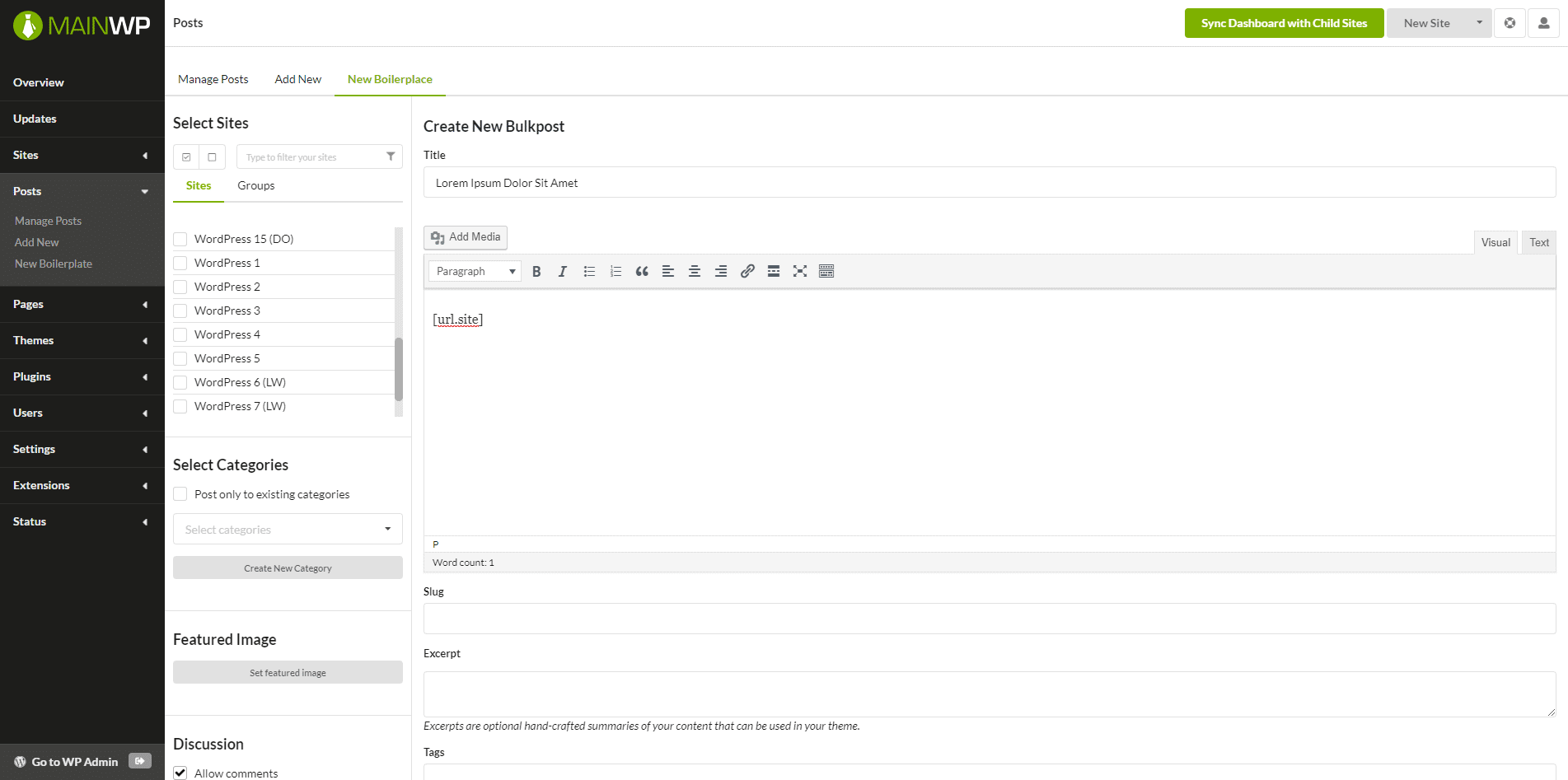
Boilerplate gives you the ability to easily create, edit and remove repetitive pages or posts across your network of child sites.

Using the available placeholders (Tokens) these pages can be customized for each site without needing to be rewritten. The Boilerplate extension is the perfect solution for commonly repeated pages such as your “Privacy Policy”, “About Us”, “Terms of Use”, “Support Policy”, or any other page with standard text that needs to be distributed across your network.

How the Boilerplate Extension Works?

After installing the extension you are able to create custom placeholders (Tokens) that you will need in your commonly used pages and posts. For each of your child sites add values for the tokens. When you are done with the setup, you are able to create one page, with this placeholders and post to all wanted sites. On each child site, the placeholders will be replaced with the custom values for the site.

All your Boilerplate Pages and Posts will be saved and fully editable. With just a few clicks you will be able to tweak a page in all your sites at once.

Use this Extension To:

  • Create, Edit and Remove Commonly Used Pages
  • Create Edit and Remove Commonly Used Posts
  • Integrates with the Spinner Extension

https://ift.tt/2o2rif5

https://ift.tt/2n9U3WY https://ift.tt/2oJqZFW