Woocommerce Anti-Fraud 2.5

Woocommerce Anti-Fraud 2.5

Woocommerce Anti-Fraud 2.5
Quickly detect fraudulent transactions on your WooCommerce store It is unfortunate, but true, that fraudulent transactions fuel a large sector of the eCommerce industry. When a fraudulent transaction is made via your online store, it is of paramount importance to act swiftly to 1) ensure your customers aren’t affected and 2) minimise hassles for you, […]

Quickly detect fraudulent transactions on your WooCommerce store

It is unfortunate, but true, that fraudulent transactions fuel a large sector of the eCommerce industry. When a fraudulent transaction is made via your online store, it is of paramount importance to act swiftly to 1) ensure your customers aren’t affected and 2) minimise hassles for you, as the store owner.

WooCommerce Anti-Fraud is designed to help you pick up fraudulent transactions and catch them as they happen – by scanning and providing a score for each transaction made via your online store, based on a set of advanced scoring rules.

This WooCommerce plugin is ideal for store-owners who want to:

  • Automatically block or pause fraudulent orders.
  • Easily view risks and warnings associated with each order
  • Receive notifications when a fraudulent or unsafe order is placed.
  • Reduce store management time by easily filtering out illegitimate orders.

Check the ‘risk’ of each order

WooCommerce Anti-Fraud automatically assigns a score out of 100 to each order. This is called the risk score. The higher the number, the more likely the order is to be fraudulent. Examining the risk score allows you to quickly evaluate the potential risk level of the transaction and act accordingly.

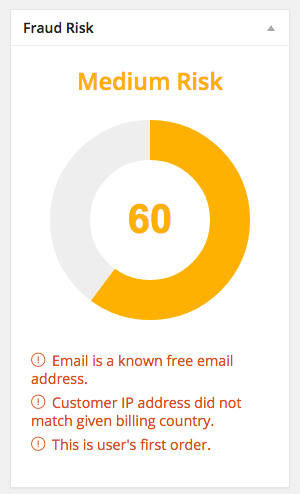
A risk score and advice, given for an order via the WooCommerce admin.

Underneath the risk score, the user can view warnings associated with the order. The advice provided is related to the rules in place (for example, if a customer’s IP address doesn’t match the billing country). The higher this number is, the more likely it is that the order is illegitimate.


Automatically cancel or pause suspicious orders

If a potentially fraudulent transaction is detected, the WooCommerce Anti-Fraud can be configured to perform one or more of the following automated actions:

  • Cancel the order
  • Hold the order
  • Notify the administrator via email, without changing the order status

In the plugin’s settings, you can change when these actions are triggered according to their risk score. For example, you may only want to automatically cancel orders if their risk score is higher than 90.
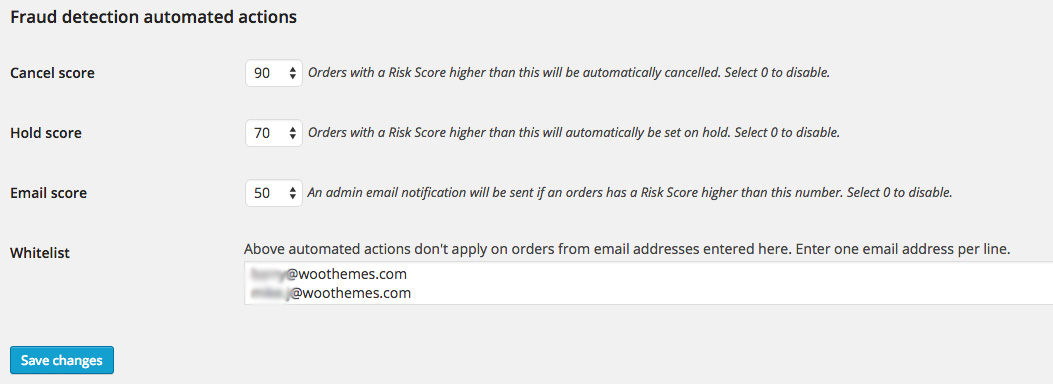
The automated actions provided by WooCommerce Anti-Fraud.

Pre-Configured Rules

WooCommerce Anti-Fraud works out of the box – with no additional rules configuration required. We have defined a collection of default rules, by which the system scores each transaction. These pre-configured rules will be suitable for most online stores. However, the rules can be customised via the plugin’s settings to place higher or lower importance on specific factors.

Customize the importance of each risk factor

Our Anti-Fraud plugin lets you assign a ‘risk weight’ to each risk factor. This means that you can decide how important each risk is. The higher the risk weight is for each category, the higher the risk score will be when the risk is detected.

You can also set risk weight to “0” to disable


Anti-Fraud Plugin Features:
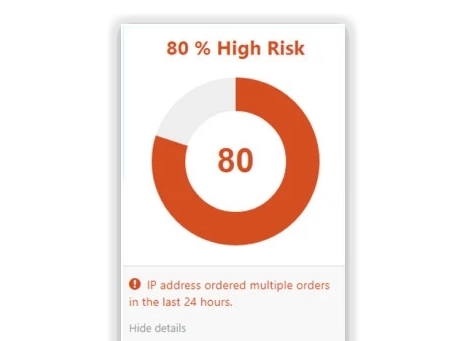
 

IP Address Checker

The plugin will let you know if a user has made several orders using the same IP address. It will also determine if the customer has ordered behind a proxy.
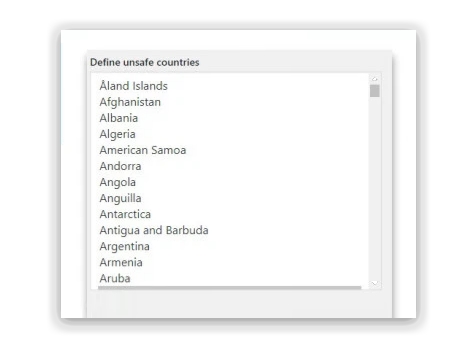
 

Set a list of unsafe countries

You can now define which countries are considered unsafe or high risk. If an order is placed from an unsafe country, it will be reflected in their risk score.


Be notified about suspicious email addresses

Enter a list of domains that are associated with fraudulent transactions. Users with email addresses under these domains will be considered a higher risk. This feature is useful for detecting customers who use disposable or temporary email services.


Require verified PayPal accounts

Limit PayPal payments to verified email addresses. The customer will receive a customizable email from your shop, prompting them to authenticate their PayPal account before the purchase can be shipped.


Blacklist fraudulent email addresses

You can easily blacklist emails that you know are unsafe. This will notify you when they place an order and allow you to put it on hold. Emails that have bene linked to fraudulent purchases will automatically be added to this blacklist.


Cancel suspicious orders before they are processed

If an order’s risk score is high enough, the plugin can automatically change the order’s status from “Processing” to “Cancelled” or “On Hold”. The threshold for this can be changed within the plugin’s settings.


Detect multiple orders from the same IP address

If multiple orders are coming from the same location over a short period of time, they are much more likely to be illegitimate. WooCommerce Anti Fraud allows you to see when this happens.


https://ift.tt/349cr1r

https://ift.tt/2PduvDz https://ift.tt/2EaHeQZ

WooCommerce Ambassador Affiliate Program Integration 1.1.5

WooCommerce Ambassador Affiliate Program Integration 1.1.5

WooCommerce Ambassador Affiliate Program Integration 1.1.5

WooCommerce Ambassador Affiliate Program Integration is a WooCommerce Extensions being developed by Woothemes. WooCommerce Ambassador Affiliate Program Integration offers you a way to seamlessly integrate Ambassador service into your WooCommerce store. Requires an Ambassador account to use this extensions WooCommerce Ambassador Affiliate Program Integration will tracks visitors who came to the site using an affiliate’s link and gives the […]

WooCommerce Ambassador Affiliate Program Integration is a WooCommerce Extensions being developed by Woothemes. WooCommerce Ambassador Affiliate Program Integration offers you a way to seamlessly integrate Ambassador service into your WooCommerce store.

Requires an Ambassador account to use this extensions

WooCommerce Ambassador Affiliate Program Integration

WooCommerce Ambassador Affiliate Program Integration will tracks visitors who came to the site using an affiliate’s link and gives the relevant affiliate their sales commission based on your Ambassador campaign settings.

https://ift.tt/2LMfrKW

https://ift.tt/38y5WZp https://ift.tt/2RK3gSQ

WooCommerce Amazon S3 Storage 2.1.15

WooCommerce Amazon S3 Storage 2.1.15

WooCommerce Amazon S3 Storage 2.1.15

Amazon S3 Storage The Amazon S3 Storage plugin for WooCommerce enables you to serve digital products through your Amazon AWS S3 service. Amazon S3 Storage is fully automated allowing you to simply specify the bucket and object name of your file using shortcodes in the download file paths, and when a customer downloads their purchase […]

Amazon S3 Storage

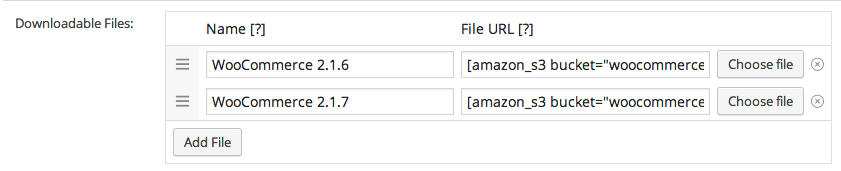
The Amazon S3 Storage plugin for WooCommerce enables you to serve digital products through your Amazon AWS S3 service. Amazon S3 Storage is fully automated allowing you to simply specify the bucket and object name of your file using shortcodes in the download file paths, and when a customer downloads their purchase the extension will translate this into a Amazon S3 URL and serve that file as the download.

WooCommerce Amazon S3

Using Amazon S3 storage to serve your digital products give you room for better scalability, offers more reliability, especially when serving big files, and greater download speeds for your customers.

The Amazon S3 extension for WooCommerce also support multiple buckets within one product so you can easily provide download access to files stored on different Amazon buckets when purchasing one product.

https://ift.tt/2Pc3SPe

https://ift.tt/2RKX6BY https://ift.tt/2E93BWX

WooCommerce Alipay Cross Border Payment Gateway 2.9.2

WooCommerce Alipay Cross Border Payment Gateway 2.9.2

WooCommerce Alipay Cross Border Payment Gateway 2.9.2

Reach 1.3 billion potential customers with AliPay. The Alipay Cross-Border Payment Gateway plugin for WooCommerce allows you to tap into the 1.3 billion-person Chinese market. With over 700 million users, Alipay is the most-used payment gateway in China, dwarfing all others, including PayPal.  With the Alipay Cross-Border plugin, your website will be able to accept payments from […]

Reach 1.3 billion potential customers with AliPay.

The Alipay Cross-Border Payment Gateway plugin for WooCommerce allows you to tap into the 1.3 billion-person Chinese market.

With over 700 million users, Alipay is the most-used payment gateway in China, dwarfing all others, including PayPal.  With the Alipay Cross-Border plugin, your website will be able to accept payments from residents and businesses inside Mainland China using a payment method they are familiar and comfortable with.  It accounts for roughly half of all online payment transactions within China.

This one plugin alone will give you access to a massive potential customer base.

Easy setup + premium support.

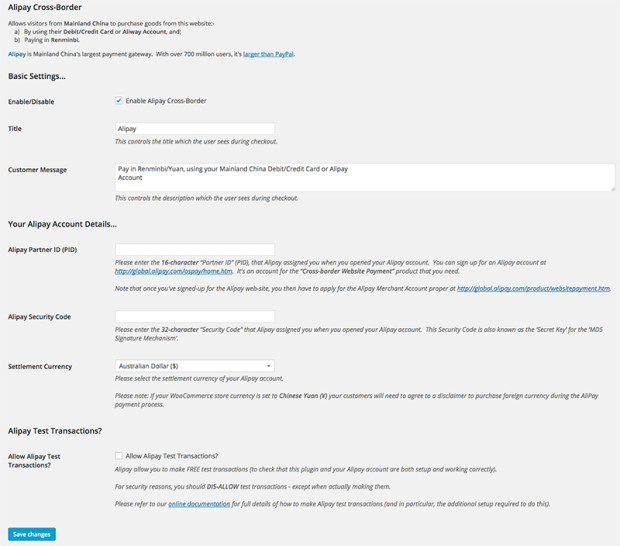
To set up the plugin, just enter your AliPay Partner ID and AliPay Security Code in the plugin’s settings. The checkout will then be connected to your AliPay account. For troubleshooting, you can enable Test Mode to make test payments or contact us for premium support services.

alipay
The WooCommerce Alipay Cross-Border Payment Gateway Plugin Settings Screen

Key Features

  • Standard WooCommerce approved payment gateway.
  • Fully integrated into WooCommerce (with standard Woocommerce Payment Gateway Settings screen, adapted for Alipay).
  • Quick easy setup.  Just enter your Alipay “Partner ID” and “Security Code” into the settings screen.
  • Fully supports the Alipay test account.  The Merchant can use this to perform FREE test transactions (to check that the plugin, and their Alipay account, are both setup and working correctly).
  • Includes comprehensive documentation.  This documentation is translated into the 64 languages supported by Google Translate, which is important, since the Alipay payment screens are in Chinese only (with NO translations available).  The screens are also quite complicated since Alipay not only takes security seriously, but also support a wide variety of Mainland China payment methods and cards.  Thus, navigating and using these screens (to make the test transactions for example) is next to impossible for those who don’t read Chinese.  But with our multi-language documentation and screenshots, it becomes quite straightforward.
  • Supports payment in Renminbi – Add support for transactions using China’s most used currency.
  • Customers can pay via their Alipay account – When making purchase through Alipay, the customer will have the option to pay through their account, where their payment info is already saved.

https://ift.tt/2M1KX83

https://ift.tt/2EbgTlO https://ift.tt/38ztFZA

WooCommerce Ajax Layered Navigation 1.4.18

WooCommerce Ajax Layered Navigation 1.4.18

WooCommerce Ajax Layered Navigation 1.4.18

WooCommerce Ajax Layered Navigation is a WooCommerce Extensions being developed by Woothemes. WooCommerce Ajax Layered Navigation provides a richer user-experience for your customer and is particularly well-suited for stores that have a lot of variable products or products with a number of attributes. Ajax-Enabled, Enhanced Layered Navigation The Ajax-Enabled, Layered Navigation extension for WooCommerce provides a […]

WooCommerce Ajax Layered Navigation is a WooCommerce Extensions being developed by Woothemes. WooCommerce Ajax Layered Navigation provides a richer user-experience for your customer and is particularly well-suited for stores that have a lot of variable products or products with a number of attributes.

Ajax-Enabled, Enhanced Layered Navigation

The Ajax-Enabled, Layered Navigation extension for WooCommerce provides a richer user experience for your customer and is particularly well suited for stores that have a lot of variable products or products with a number of attributes.

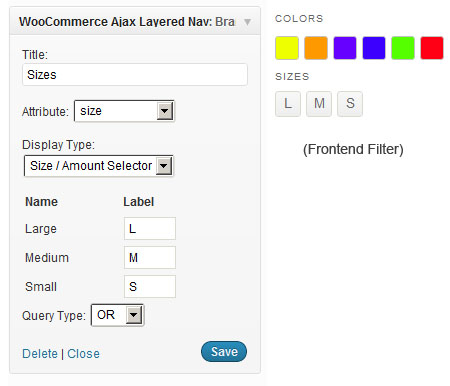
Not only does the layered navigation use Ajax calls to reload content on the page, but the extension also provides a number of additional user-interface elements for the layered navigation, such as color swatches, size selectors and checkboxes. These useful options help you create a more meaningful, interactive experience for your user.

Instead of only link filters, you can now offer customers filterable color swatches, size selectors and checkboxes. All of these used in combination create an easy-to-use layered navigation that helps customers find what they’re looking for.

No need to worry about impact to SEO because the plugin preserves the attribute links.

Coupled with an intuitive setup, this extension is a must-have for the store owner looking for a way to make their shop stand out.

https://ift.tt/35grojJ

https://ift.tt/35fyi91 https://ift.tt/2Pfb0dR

WooCommerce Advanced Product Labels 1.1.6

WooCommerce Advanced Product Labels 1.1.6

WooCommerce Advanced Product Labels 1.1.6

WooCommerce Advanced Product Labels is a WooCommerce Extensions being developed by Woothemes. WooCommerce Advanced Product Labels allows you to create custom product labels easily and quickly based on conditions system. WooCommerce Advanced Product Labels Conditions included: Product Product category Product type In sale Bestsellers Product age Price Sale price Stock status Stock quantity Shipping class Tag Total sales Featured […]

WooCommerce Advanced Product Labels is a WooCommerce Extensions being developed by Woothemes. WooCommerce Advanced Product Labels allows you to create custom product labels easily and quickly based on conditions system.

WooCommerce Advanced Product Labels Conditions included:

  • Product
  • Product category
  • Product type
  • In sale
  • Bestsellers
  • Product age
  • Price
  • Sale price
  • Stock status
  • Stock quantity
  • Shipping class
  • Tag
  • Total sales
  • Featured produc

https://ift.tt/2PIUTEu

https://ift.tt/30J29Ux https://ift.tt/2PhrBOd

WooCommerce Advanced Notifications 1.2.18

WooCommerce Advanced Notifications 1.2.18

WooCommerce Advanced Notifications 1.2.18

Set up order and stock notifications for multiple users and third parties The Advanced Notifications extension for WooCommerce lets you set up order and stock notifications for users other than the admin. These can be used for notifying staff and users of sales, sending stock notices to suppliers, or even sending new orders to drop […]

Set up order and stock notifications for multiple users and third parties

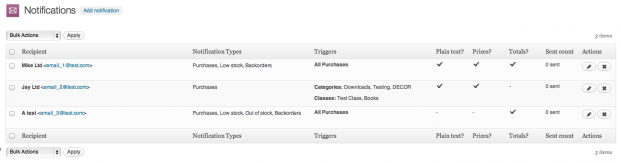
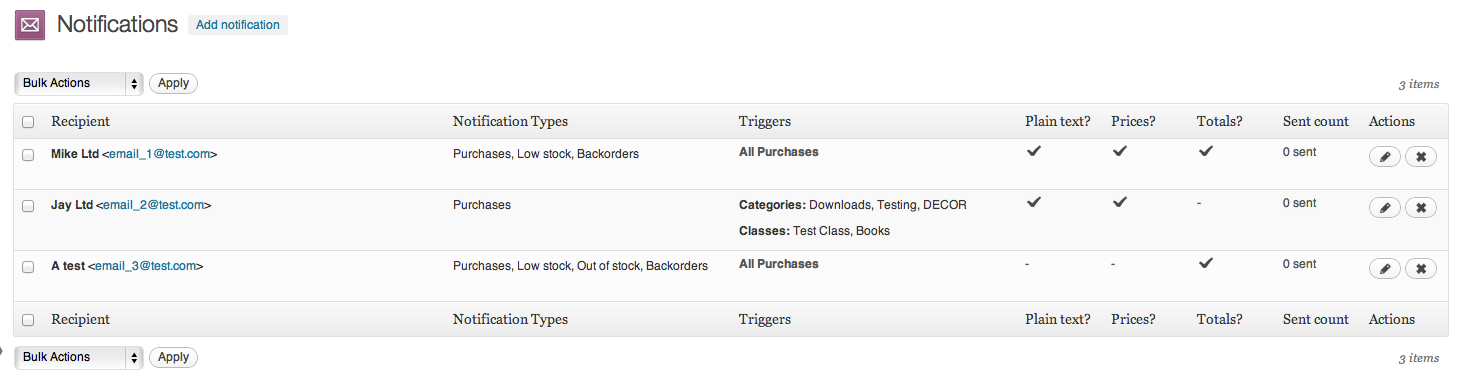
The Advanced Notifications extension for WooCommerce lets you set up order and stock notifications for users other than the admin. These can be used for notifying staff and users of sales, sending stock notices to suppliers, or even sending new orders to drop shippers.

Within the plugin, you can create a recipient, give them a name, email address and other details. This new recipient can then be assigned notifications for events, such as:

  • Low stock
  • No stock
  • Backorders
  • New orders

Setup multiple recipients to receive emails

You can add criteria to notifications should you wish to exclude some products:

  • Send notifications for products in a category
  • Send notifications for products in a shipping class
  • Set up per-product notifications

Choose per-product notifications

The notifications themselves, based on WooCommerce’s own emails, can be configured to include or exclude prices and order totals, and also only show data that is relevant. For example, if you set up notifications for a t-shirt, the notifications only list this product and ignore other items in the order. Woo!

https://ift.tt/2YPYAfL

https://ift.tt/2qI9U0A https://ift.tt/2PcWYsW

WooCommerce Admin Custom Order Fields 1.13.1

WooCommerce Admin Custom Order Fields 1.13.1

WooCommerce Admin Custom Order Fields 1.13.1

Use Admin Custom Order Fields to Streamline Order Processing and Details Do you find yourself putting a lot of information in your “Order Notes” or using outside software, such as Excel, to keep track of order details? Say goodbye to all of the hassle of keeping track of order information in a million different places! […]

Use Admin Custom Order Fields to Streamline Order Processing and Details

Do you find yourself putting a lot of information in your “Order Notes” or using outside software, such as Excel, to keep track of order details? Say goodbye to all of the hassle of keeping track of order information in a million different places! The Admin Custom Order Fields extension will allow your team to use WooCommerce as a complete Customer Relationship Management system so order information is centralized where the orders actually happen — right within your WooCommerce dashboard.

All order details, notes, fields, and information addition can be streamlined right within the order itself, allowing you to standardize order details, keep all order information in WooCommerce and not scattered across multiple systems, and sort or filter orders based on your custom order information. Keep all of your order details where they belong: tied to the original order!

WooCommerce Admin Custom Order Fields add a field
Creating an Admin Order Field

Let’s say that you’re using WooCommerce to book helicopter tours, and you need a way to assign times, pilots, or other details to an order. Admin Custom Order Fields allows you to add these details from the Orders Dashboard, and even optionally display them to the customer on the “My Orders” page.

Using WooCommerce to sell other services? You can add dates for coaching sessions, assign multiple case managers to a consulting account, or manage any other order details you wish. Stop jotting down everything in the order notes and start to organize and compartmentalize with Admin Custom Order Fields!

What Can Admin Custom Order Fields Do?

  • Create order details to add/edit from the admin Orders Dashboard
  • Centralize order details that can easily be edited by all team members
  • Sort or filter orders displayed based on your custom order fields
  • Optionally display order fields/details to customers
  • Eliminate the need for spreadsheets or other external systems to manage order notes/details
  • Streamline your CRM system by centralizing everything in WooCommerce

Make Your Order Management Efficient

If you’ve been using order notes to add order details, or even worse, been using an outside system to track order details, you know that it’s a pain to keep all of this information updated, especially if it needs to be shared between team members (don’t worry, we know how it’s tough to use Google Docs for all of this!).

Adding all of these details as order fields will simplify record-keeping so that all details are managed right within WooCommerce and visible to all team members. By default, all admin order fields are hidden from customers. Even better, you can sort or filter orders based on these fields.

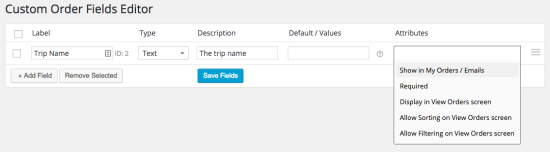
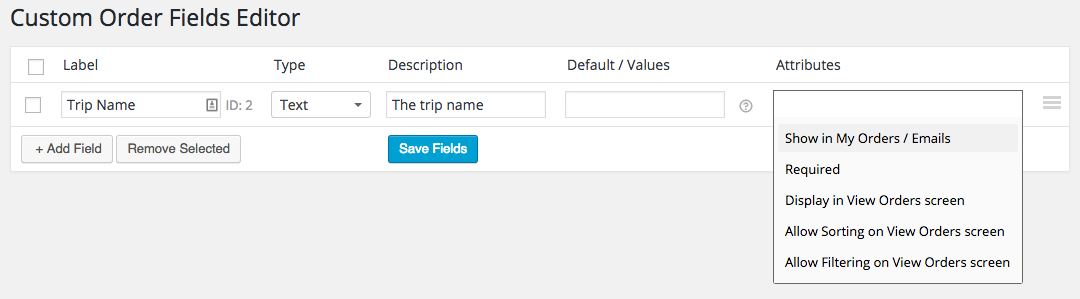
WooCommerce Admin Custom Order fields Examples of Types, Values, and Attributes
Admin Custom Order Fields Examples

Optionally Display Order Fields to Customers

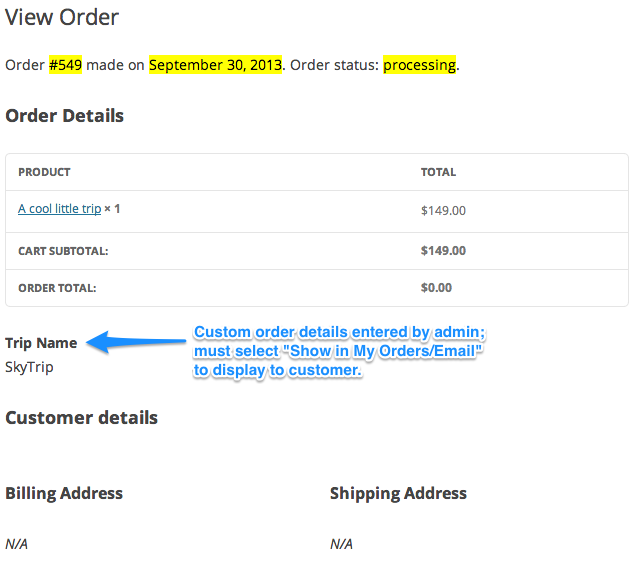
Need to assign customers to a trip or tour group after their order has been placed? Want to let them know who their tour guide or pilot will be? Doing so is easy with Admin Custom Order Fields. Set the order field attribute to “Show in My Orders/Email”, and customers will be able to view that field with the rest of their order details.

WooCommerce Admin Custom Order Fields Customer Experience
Customer Experience: Viewing Order Fields set by the Admin

How to Get Started

  1. Buy this extension 🙂
  2. Download and install into your WooCommerce store
  3. Create some order fields under WooCommerce > Custom Order Fields
  4. Add or edit fields by viewing an order’s details
  5. That’s it! Sit back and enjoy efficient built-in order management!

https://ift.tt/2LOc0TZ

https://ift.tt/2RIMFyA https://ift.tt/2RKVVSM

WooCommerce Additional Variation Images 1.7.17

WooCommerce Additional Variation Images 1.7.17

WooCommerce Additional Variation Images 1.7.17

WooCommerce Additional Variation Images is a WooCommerce Extensions being developed by Woothemes. WooCommerce Additional Variation Images allows you to add additional gallery images per variation to your woocommerce store. Add any number of images to your variable product variations The WooCommerce Additional Variation Images extension allows you to add additional gallery images per variation on variable products within […]

WooCommerce Additional Variation Images is a WooCommerce Extensions being developed by Woothemes. WooCommerce Additional Variation Images allows you to add additional gallery images per variation to your woocommerce store.

Add any number of images to your variable product variations

The WooCommerce Additional Variation Images extension allows you to add additional gallery images per variation on variable products within WooCommerce.

By default WooCommerce will only swap the main variation image when you select a product variation, not the gallery images below it.

This extension allows visitors to your online store to be able to swap different gallery images when they select a product variation. Adding this feature will let visitors see different images of a product variation all in the same colour and style.

Note: Your product must have a default set of gallery images.

sells-images

https://ift.tt/2rrPkSJ

https://ift.tt/2LMqF2e https://ift.tt/2rFHpkB

WooCommerce 2Checkout Inline Checkout 1.1.15

WooCommerce 2Checkout Inline Checkout 1.1.15

WooCommerce 2Checkout Inline Checkout 1.1.15

WooCommerce 2Checkout Inline Checkout is a WooCommerce Extensions being developed by Woothemes. WooCommerce WooCommerce 2Checkout Inline Checkout allows your store to receive transactions from 196 countries through 87 currencies and 15 languages via 2Checkout Gateway without leaving your store What is it you were looking for? Examining, refining and streamlining our product offering is of paramount importance to us […]

WooCommerce 2Checkout Inline Checkout is a WooCommerce Extensions being developed by Woothemes. WooCommerce WooCommerce 2Checkout Inline Checkout allows your store to receive transactions from 196 countries through 87 currencies and 15 languages via 2Checkout Gateway without leaving your store

What is it you were looking for?

Examining, refining and streamlining our product offering is of paramount importance to us at WooCommerce. Retiring older products helps to ensure you receive the best possible offering across our various product ranges. Have a look at our latest themes and extensions or reach out via support.

https://ift.tt/2EdD3nn

https://ift.tt/30J29Ux https://ift.tt/2PD0xrl