WooCommerce Braintree 3.3.3

WooCommerce Braintree 3.3.3

WooCommerce Braintree 3.3.3

Accept PayPal, credit cards and debit cards directly at your store This complete payment solution enables U.S. and non-U.S. store owners to accept PayPal, credit card and debit card payments using one simple signup flow for activation. An easy setup has you up and running quickly. Customers can complete their purchase without leaving your online store. […]

Accept PayPal, credit cards and debit cards directly at your store

This complete payment solution enables U.S. and non-U.S. store owners to accept PayPal, credit card and debit card payments using one simple signup flow for activation. An easy setup has you up and running quickly. Customers can complete their purchase without leaving your online store.

Why Use PayPal Powered by Braintree for WooCommerce?

  • Process PayPal and/or all major credit and debit cards including Visa®, MasterCard®, American Express®, Discover®, Diner’s Club and JCB
  • Sign up and get started with this extension for free
  • Support recurring payments from WooCommerce Subscriptions
  • Help detect and prevent fraud by enabling AVS, CVV and custom risk thresholds
  • Process refunds, voids and capture authorized transactions within WooCommerce
  • Achieve PCI DSS v3.0 SAQ-A compliance using Hosted Fields functionality for card detail collection
  • PayPal powered by Braintree supports Strong Customer Authentication (SCA) as required in the European Economic Area (EEA)

Features & Benefits

One-click onboarding

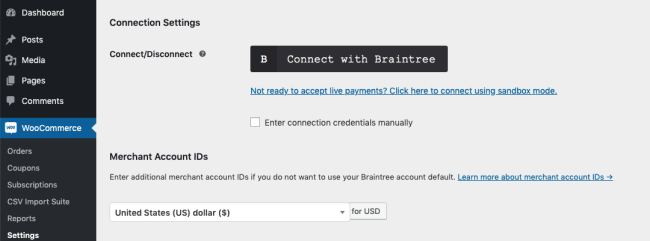
After clicking the Connect with Braintree button in your WooCommerce control panel, you’ll complete the account setup process for Braintree and PayPal. This activates a complete payment solution, allowing your site to launch right away with PayPal, credit and debit payment options.

Looking for API keys to cut and paste? There are none. Once connected and your account creation is complete, all you have to do is customize a few short text fields and you’re in business.

PayPal powered by BrainTree onboarding

A complete, secure payment solution

PayPal Powered by Braintree enables you to securely receive online payments for the products and subscriptions in your WooCommerce store. Accept all the major credit and debit cards along with PayPal. The PayPal checkout button sits on both the shopping cart and main checkout pages. We do all the technical work so you can help future-proof payments to accept whatever emerges next. It also includes brilliant features like recurring billing. Best of all – there’s no fee.

One TouchTM checkout experience

PayPal Powered by Braintree includes the One TouchTM checkout experience, which eliminates the need for PayPal customers to enter a password or card details for up to six months. PayPal customers can pay with fewer clicks wherever and however they shop. Fewer screens, fewer clicks, and less friction can help improve conversion rates – especially on mobile.

Choices in fraud protection

You can enable and customize fraud tools, including AVS and CVV checks, and risk threshold rules, to reduce the likelihood of fraudulent activity. No developer work is required — just turn them on.

Capture of prior authorized transactions

With PayPal Powered by Braintree you can opt to capture previously authorized transactions directly from the WooCommerce Edit Order screen. Automating this task helps you get paid faster.

Refund processing from within WooCommerce

Process refunds for orders paid with credit cards or PayPal directly from within WooCommerce, reducing store management time. Issue full or partial refunds from the Edit Order screen and send the transaction automatically to Braintree by clicking “Refund via Credit Card” or “Refund via PayPal.”

PCI DSS v3.0 SAQ-A compliance

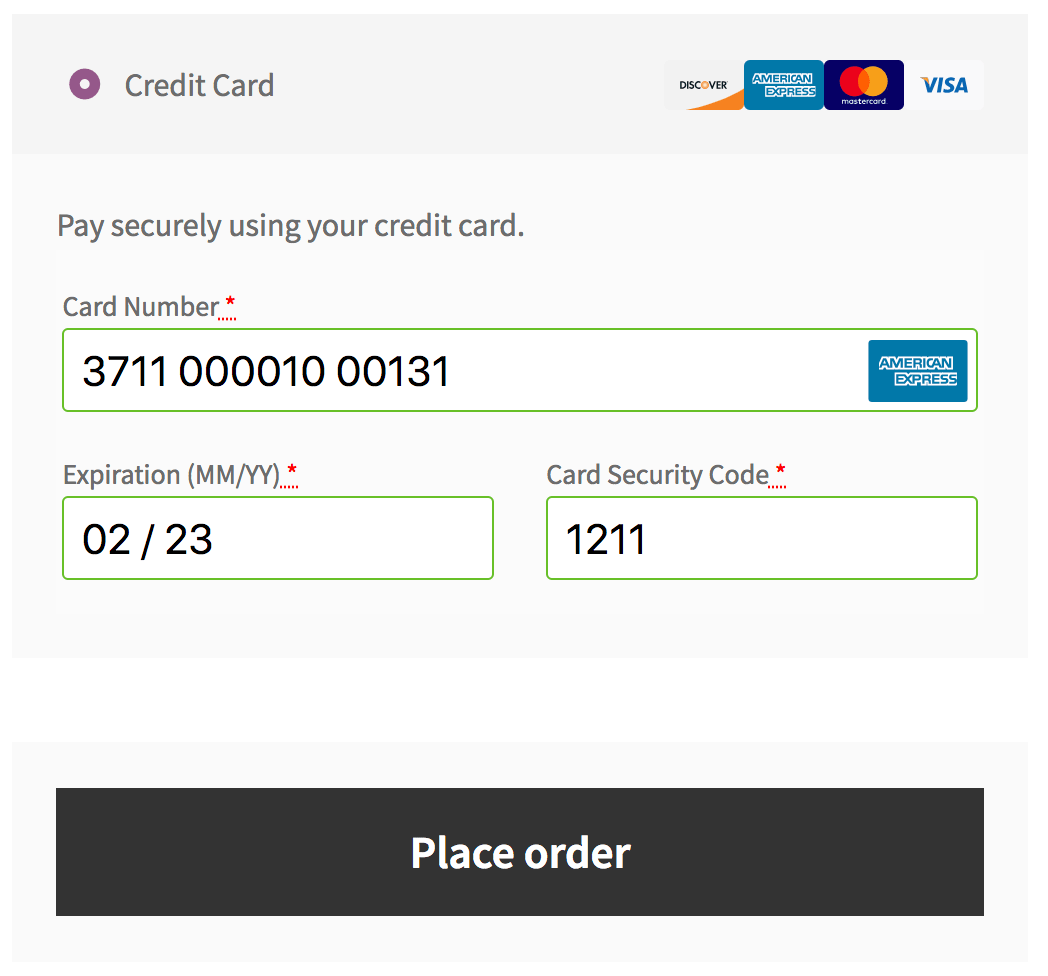
Using Hosted Fields – which create iFrames that are hosted on our servers and fit inside checkout form elements – you provide a secure, customizable way for customers to enter their credit card information without impacting your theme. Hosted Fields make your operations PCI DSS v3.0 SAQ-A compliant. Sensitive payment information is posted directly to Braintree, bypassing servers. Customers get a seamless checkout, and you get worry-free, necessary security.

https://ift.tt/2PCjQ4n

https://ift.tt/2t3BDto https://ift.tt/34fSVjS

WooCommerce Box Office 1.1.15

WooCommerce Box Office 1.1.15

WooCommerce Box Office 1.1.15

Sell tickets for your next event, concert, function, fundraiser or conference directly on your own site with Box Office Box Office for WooCommerce allows you to create and sell tickets directly to customers — no need for them to visit or use a third-party site or service anymore! Get ticket sales for your next event […]

Sell tickets for your next event, concert, function, fundraiser or conference directly on your own site with Box Office

Box Office for WooCommerce allows you to create and sell tickets directly to customers — no need for them to visit or use a third-party site or service anymore! Get ticket sales for your next event or conference up and running within minutes and start making additional income today.

We successfully used Box Office to manage all ticket sales, coupons, live-stream tickets and onsite registration and checkin for WooConf 2016 in Austin, Texas.

Why use Box Office?

Box-Office-Ticket@2x

Keep ticket sales on your site

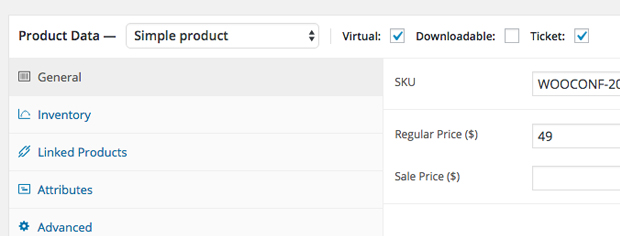
With Box Office, you can create an ‘event’ product and sell it directly in your store, keeping your customers onsite.

Box-Office-Emails@2x

Connect with attendees

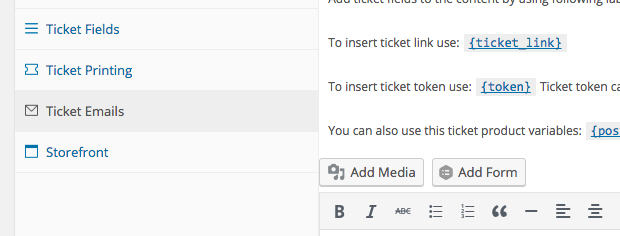
Add custom fields to signup forms to learn more about attendees and personalize their experience. Customize emails sent after a ticket purchase and send bulk emails to attendees.

Box-Office-Export@2x

Attendee CSV export

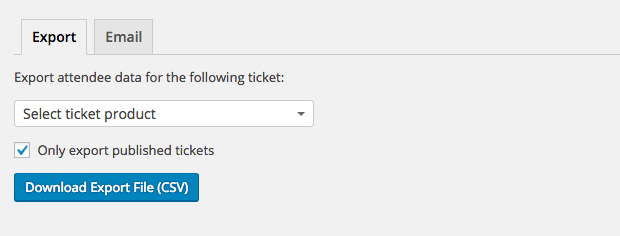
Download a CSV export for all ticket holders based on ticket type.

Box-Office-Stock@2x

Ticket inventory management

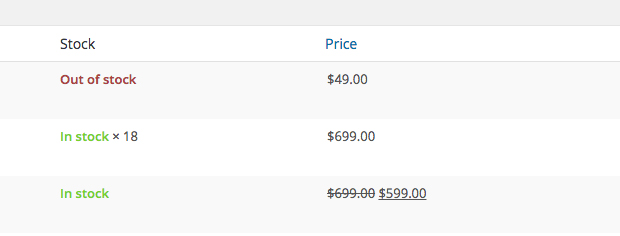
Automate ticket sales by setting individual ticket limits for each ticket you create and ensure that you don’t oversell tickets for a certain event or ticket type on your site.

Box-Office-Tickets@2x

Offer multiple ticket types

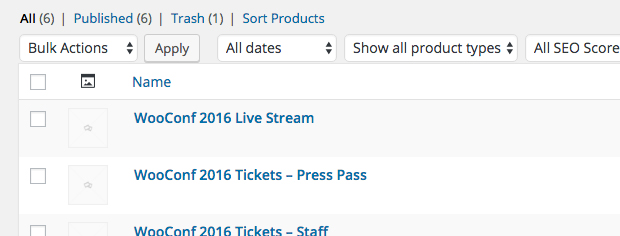
Create unlimited ticket types, each with their own pricing, benefits and/or private content, and manage stock levels independently.

Box-Office-Private@2x

Restrict content to ticket holders

Do you want to offer a private webinar, a live-stream of your event or give your attendees access to downloadable content after the event? It’s all possible with Box Office and Groups.

Box-Office-Attend@2x

Find attendees with ease

Search for attendees by name, ticket ID, email or even company.

Box-Office-Coupons@2x

Offer discount codes

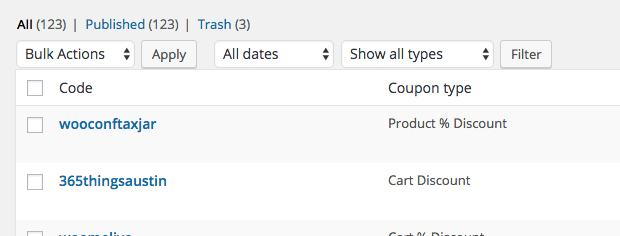
Offer coupon codes to event partners and sponsors to help drive ticket sales and easily track and manage coupon usage from your WooCommerce admin dashboard

https://ift.tt/38yCSkw

https://ift.tt/2PfguFk https://ift.tt/38yCToA

WooCommerce Bluepay Payment Gateway 1.1.8

WooCommerce Bluepay Payment Gateway 1.1.8

WooCommerce Bluepay Payment Gateway 1.1.8

WooCommerce Bluepay Payment Gateway is a WooCommerce Extensions being developed by Woothemes. WooCommerce Bluepay Payment Gateway allows you to accept payments via BluePay Credit Card gateway and BluePay ECheck. Features : Accept BluePay Credit Card Accept BluePay ECheck

WooCommerce Bluepay Payment Gateway is a WooCommerce Extensions being developed by Woothemes. WooCommerce Bluepay Payment Gateway allows you to accept payments via BluePay Credit Card gateway and BluePay ECheck.

Features :

  • Accept BluePay Credit Card
  • Accept BluePay ECheck

https://ift.tt/2RI44az

https://ift.tt/30J29Ux https://ift.tt/2PhWIct

WooCommerce Beanstream Payment Gateway 2.2.1

WooCommerce Beanstream Payment Gateway 2.2.1

WooCommerce Beanstream Payment Gateway 2.2.1

Easily and securely accept credit cards with Bambora The WooCommerce Bambora (formerly Beanstream) extension provides a completely integrated checkout experience between WooCommerce and Bambora. Payments take place directly on your website so you have maximum control over what the checkout looks like, and customers never have to leave your site to make a payment. Even […]

Easily and securely accept credit cards with Bambora

The WooCommerce Bambora (formerly Beanstream) extension provides a completely integrated checkout experience between WooCommerce and Bambora. Payments take place directly on your website so you have maximum control over what the checkout looks like, and customers never have to leave your site to make a payment.

Even better, using Bambora’s Custom Checkout implementation, your seamless checkout also meets PCI compliance at SAQ-A levels, giving you a checkout that’s beautiful, seamless, and secure.

WooCommerce Bambora checkout

Let your customers save their credit cards and bank accounts to their WooCommerce account for fast and easy checkout. Includes full support for WooCommerce Subscriptions!

Why WooCommerce Bambora?

WooCommerce Bambora has added tons of useful new features in version 2.0:

  • Process refunds / voids automatically from within WooCommerce NEW
  • Capture prior authorized transactions right from the WooCommerce edit order screen, including partial captures NEW
  • Force charges for orders with only virtual items instead of authorizing them NEW
  • Automatically capture transactions when order status changes to a paid status NEW
  • Full Support for WooCommerce Subscriptions NEW
  • Full support for WooCommerce Pre-Orders NEW
  • Customers can securely save their payment method to their account for easier checkout NEW
  • Supports Bambora Custom Checkout for improved security, meeting PCI SAQ A compliance standards NEW
  • Updated payment form at checkout with retina icons
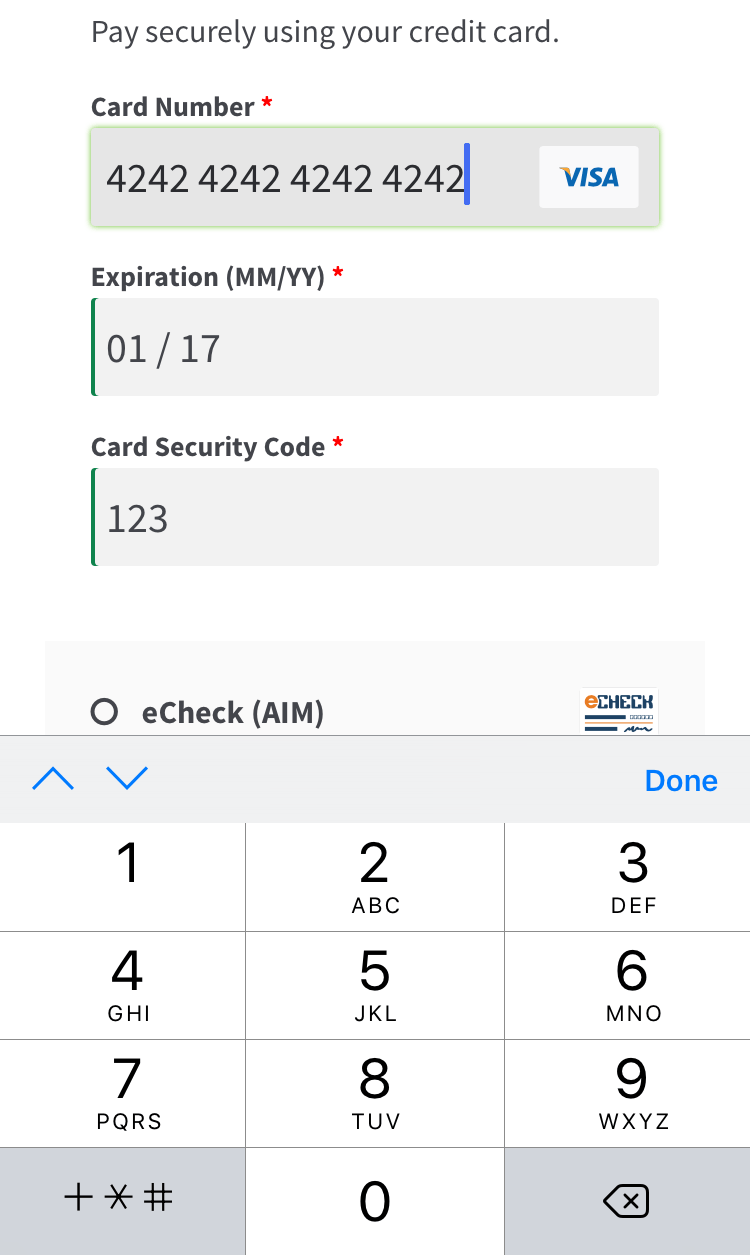
  • Adds a mobile-friendly checkout with numerical inputs for card type and security code
  • Customers can add saved payment methods to their accounts without going through checkout NEW
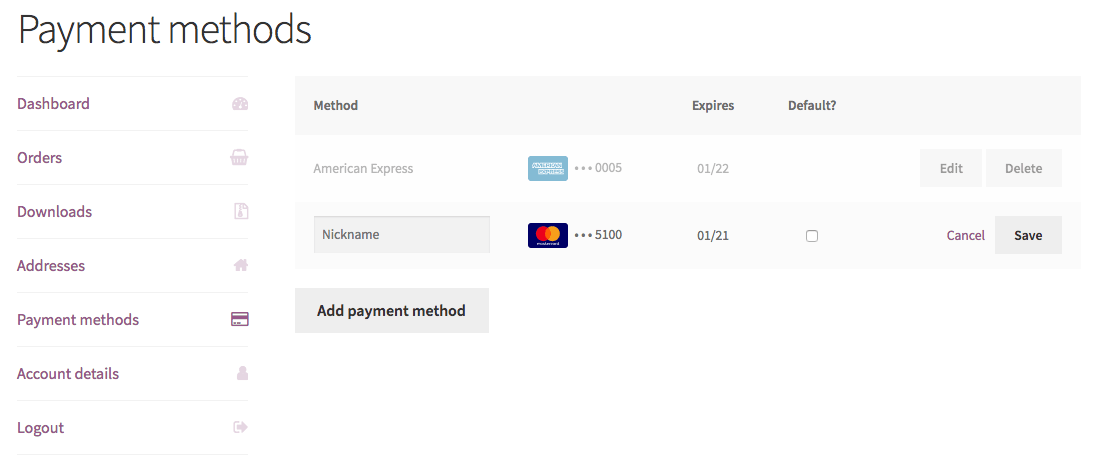
  • Customers can add a nickname for a saved payment method to make checkout even smoother NEW
  • Show detailed decline messages at checkout instead of generic errors
  • Customers never leave your site during checkout
  • Accept Major Credit Cards / Debit Cards – Visa®, MasterCard®, American Express®, Discover®, Diner’s, JCB

Simple, Integrated Checkout

Using the Bambora extension allows you to decide what your checkout process will look like, while keeping the customer on your site for the entire process. This gives you maximum control over this experience, providing a slick checkout process for the user and maximum customizability for the business owner.

WooCommerce SkyVerge gateways saved methods with nicknames
Using Saved Cards

Mobile checkout is enhanced as well, offering automated card formatting and numerical (tel type) fields for easier input.

WooCommerce SkyVerge Payment Gateway mobile checkout form
Mobile Credit Card Form

You can now opt to show detailed decline messages to your customers, no more “an error occurred” error messages!

WooCommerce Bambora detailed decline messages
Detailed Decline Message

Support for Automatic Refunds & Voids

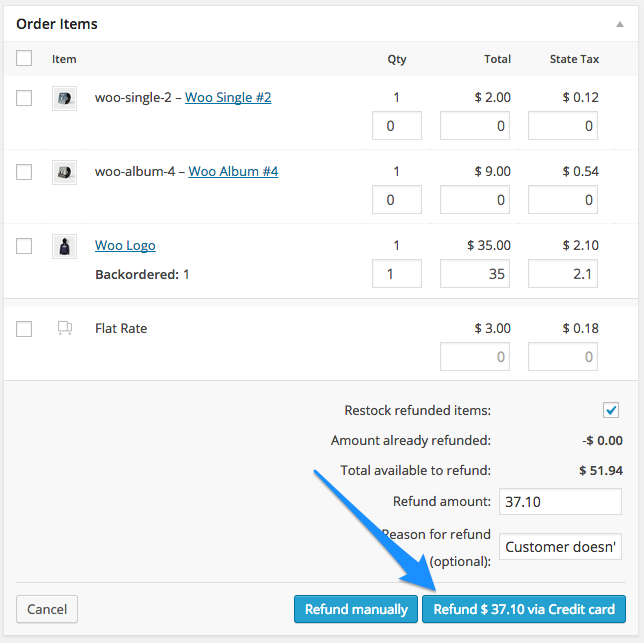
Shop employees can now process refunds for an order paid for with Bambora directly from within WooCommerce — no more logging into your merchant account to process refunds! Speed up your store management by creating full or partial refunds from the “Edit Order” screen and sending the transaction automatically to Bambora by clicking “Refund via Credit Card”.

WooCommerce Begin Automatic Credit Card Refund

If the transaction has not been captured or settled, a transaction void will be performed automatically instead to cancel the order.

Securely Save Customer Payment Methods

Customers can easily & securely save multiple payment methods to their account for faster checkout, which are displayed in unified “My Payments” section of their account. Payment data is stored on Bambora’s secure servers, so your responsibility for PCI compliance is significantly reduced. Customers can even add a nickname for a saved method for easier reference.

WooCommerce Intuit Payments enhanced saved payment methods
Saved payment methods

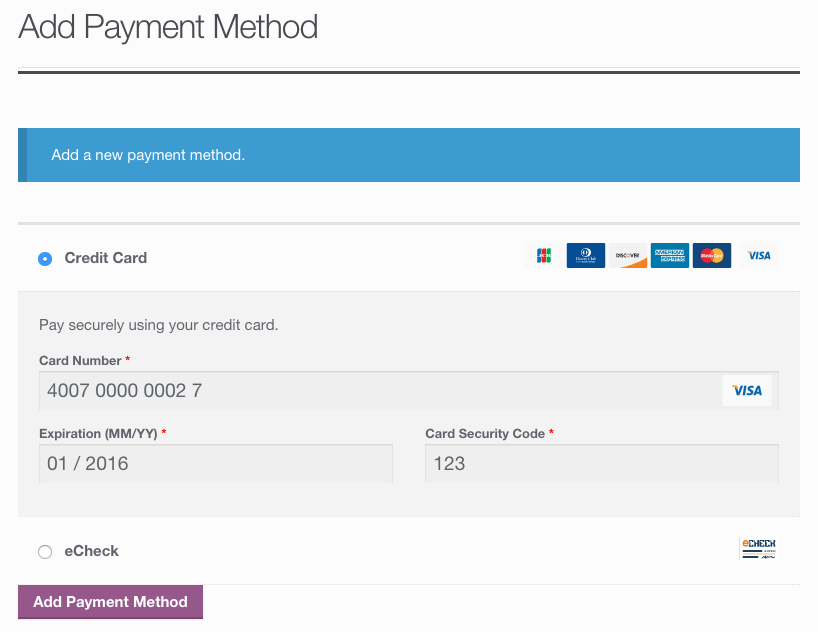
Customers can also change their active payment method, add payment methods, and remove payment methods from the My Account page. The “Add Payment Method” workflow is seamless and tokenizes card information for future use without requiring the customer to go through checkout!

WooCommerce Intuit Payments: Add payment
Customer Add Saved Payment

Full Support for Subscriptions and Pre-Orders

Bambora is an ideal gateway for WooCommerce Subscriptions, offering support for all of Subscriptions features – payment date changes, subscription date changes, and more. The gateway also fully-supports WooCommerce Pre-Orders, so you can take customer’s payment information upfront and then automatically charge their payment method once the pre-order is released.

Capture Charges directly from WooCommerce

Some users choose to set the payment gateway to only authorize charges rather than authorize & capture them. However, this requires the user to then log into the payment gateway admin to capture charges.

Version 2.0+ of this extension allow you to optionally capture previously authorized transactions directly from the WooCommerce Edit Order screen rather than logging into your Bambora control panel to do so. Simply edit the order, select the “Capture Charge” action, and charges will be captured through Bambora.

WooCommerce Bambora start capture

If you’ve enabled partial captures, you can even enter an amount to capture, and process multiple captures via WooCommerce.

WooCommerce Bambora process capture

https://ift.tt/2RHbmLT

https://ift.tt/36tnELS https://ift.tt/2rsutPb

WooCommerce Aweber Newsletter Subscription 2.0.6

WooCommerce Aweber Newsletter Subscription 2.0.6

WooCommerce Aweber Newsletter Subscription 2.0.6

Your shop’s best complement for your mailing strategy Making easier for your past clients to come back to your shop and repeat a purchase is the objective of many marketers and shop owners. It makes the difference in terms of sales and long-term growth as it costs way less to retain a customer than to […]

Your shop’s best complement for your mailing strategy

Making easier for your past clients to come back to your shop and repeat a purchase is the objective of many marketers and shop owners. It makes the difference in terms of sales and long-term growth as it costs way less to retain a customer than to get a new one.

Mailing lists are a powerful and cost-effective way to gather your clients and share with them content and sales to make them purchase again at your store. With AWeber Newsletter Subscription, you will make getting subscribed to your newsletter easier than ever. Moreover, with this extension’s rules and tags system, you will be able to classify your subscribers based on the products and behavior in your store.

Why use AWeber Newsletter Subscription?

  • Gather and tag your customers in mailing lists that you can target with promotions and other actions to increase your sales.
  • Use rules to automatically tag your customers so you can provide them with personalized sales and content.
  • Create one or several new sales channel with people already interested in what you do.
  • Especially useful for stores that require registration or that track closely the behavior of their customers, but versatile enough for all kinds of stores.
  • Smooth and easy integration into your checkout.
  • Easy to connect with your AWeber account.
  • Include a widget that allows you to place an AWeber Web Form in your store.

Classify your customers into mailing lists like a pro

With AWeber Newsletter Subscription you can add or remove tags automatically to the customers that get subscribed based on the category, subcategory or the product bought itself.

This is very useful if you have a differentiated catalog or an extense one. Create your rules in order to manage your users in clean mailing lists that are useful.

See our documentation for more detailed information about the possibilities of rules.

Checkout rules to subscribe the customers during checkout

Let your customer subscribe from anywhere in your shop with our widget

With our AWeber powered widget, you can add in any widget area of your store like menus, sidebars, footers, etc., an AWeber Web Form that will allow your customers get subscribed to your newsletter.

These web forms can be customized allowing you to harvest more receivers for your newsletters.

https://ift.tt/2PhAtU5

https://woocommerce.com/wp-content/uploads/2012/02/wc-aweber-checkout-rules.png?w=620 https://ift.tt/2RIufOw

Woocommerce Authorize.Net Reporting 1.10.0

Woocommerce Authorize.Net Reporting 1.10.0

Woocommerce Authorize.Net Reporting 1.10.0

Automate Transaction Reports for your Authorize.net Account Reporting for your Authorize.net transactions can be a real pain. You need to login to your account and run all sorts of complex reports (requiring up to a half hour in some cases!) just to get a simple list of transactions. No more! Simply install and configure this […]

Automate Transaction Reports for your Authorize.net Account

Reporting for your Authorize.net transactions can be a real pain. You need to login to your account and run all sorts of complex reports (requiring up to a half hour in some cases!) just to get a simple list of transactions. No more! Simply install and configure this extension and you can start receiving a daily email with your Authorize.net transactions from the previous day attached as a CSV.

Even better, you can login to your WooCommerce store and download a CSV of transaction details from a given date range on-demand, without ever having to login to your Authorize.net account. If you’re accepting payments via Authorize.net for your WooCommerce store and need to generate reports to monitor transactions, this extension is a must-have!

Automatic Daily Report Emails

We know that you need information about sales and revenue to make decisions on resource allocation or strategies for your business. We also know you don’t have time to waste on getting this information through an inconvenient system every day. With this extension, you can enter a single email or a list of emails to receive the daily transaction details report. The transaction details for the previous day are exported to a CSV file and attached to the email so you don’t even need to login to your WooCommerce store or Authorize.net account to stay up-to-date with your sales. Take back your precious hours for other projects or some well-deserved personal time!

test
Daily Transaction Details Sample Email

Easy On-Demand CSV Downloads

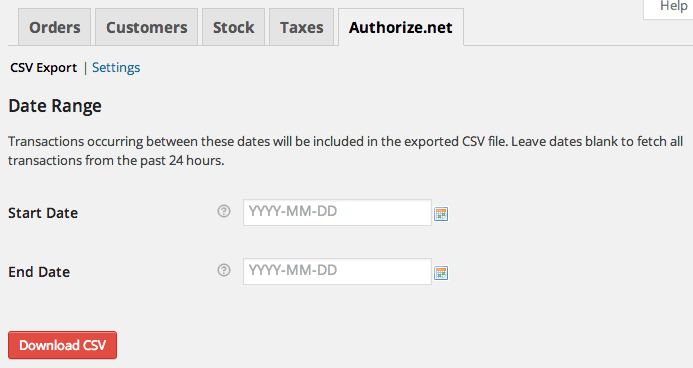
Need to get a quick list of transactions for a particular day or week? It’s easy with on-demand exports. Simply go to Reports > Authorize.net and select your date range and click Download. Your transaction details will be exported to a CSV and downloaded right to your desktop. Want to know what fields are included in the CSV file? Download a sample CSV to check out.

WooCommerce Authorize.net Reporting CSV Export
On-demand CSV Export

Simple Setup

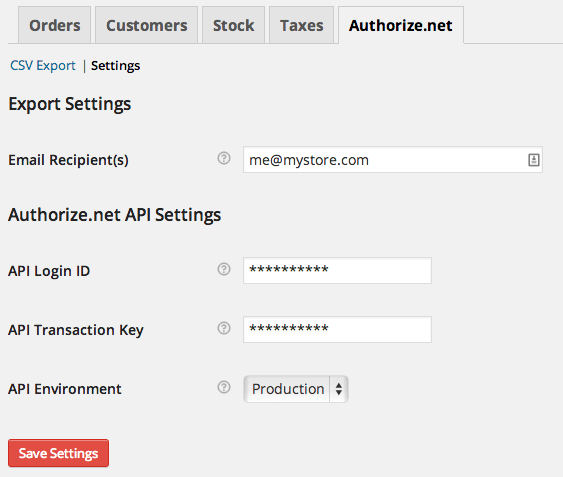
Just enter the email addresses that you want to receive the daily email and enter your Authorize.net API credentials. If you already have an active Authorize.net payment gateway for your WooCommerce store, this information will be pre-populated for you! That’s it – we promise it can be that quick and easy!

WooCommerce Authorize.net Reporting Settings

https://ift.tt/2LN4LvM

https://ift.tt/35eAbmr https://ift.tt/2qKODU9

WooCommerce Authorize.net DPM Payment Gateway 1.8.1

WooCommerce Authorize.net DPM Payment Gateway 1.8.1

WooCommerce Authorize.net DPM Payment Gateway 1.8.1

WooCommerce Authorize.net DPM is a WooCommerce Extensions being developed by Woothemes. WooCommerce Authorize.net DPM handles all the steps in the secure transaction while remaining virtually transparent, thus simplifying PCI compliance. Features : Accept All major credit cards easily. Authorize only or Authorize and Capture Funds Immediately Manage Your Transaction

WooCommerce Authorize.net DPM is a WooCommerce Extensions being developed by Woothemes. WooCommerce Authorize.net DPM handles all the steps in the secure transaction while remaining virtually transparent, thus simplifying PCI compliance.

Features :

  • Accept All major credit cards easily.
  • Authorize only or Authorize and Capture Funds Immediately
  • Manage Your Transaction

https://ift.tt/36r2Og9

https://ift.tt/30J29Ux https://ift.tt/2PCYaVD

WooCommerce Authorize.Net CIM Payment Gateway 3.1.1

WooCommerce Authorize.Net CIM Payment Gateway 3.1.1

WooCommerce Authorize.Net CIM Payment Gateway 3.1.1

Easily and securely accept credit cards and eChecks using Authorize.Net The Authorize.Net extension provides one of the most advanced integrations for WooCommerce while providing the security and reliability that comes with using Authorize.Net for payment processing. Let your customers save their credit cards and bank accounts to their WooCommerce account for fast and easy checkout. […]

Easily and securely accept credit cards and eChecks using Authorize.Net

The Authorize.Net extension provides one of the most advanced integrations for WooCommerce while providing the security and reliability that comes with using Authorize.Net for payment processing. Let your customers save their credit cards and bank accounts to their WooCommerce account for fast and easy checkout. Includes full support for WooCommerce SubscriptionsWooCommerce Pre-Orders, and Accept.js. Start using the most advanced WooCommerce payment gateway today!

Authorize.Net is one of the most popular payment processors around for a reason: they offer easy, safe, and affordable credit card and eCheck processing. This Authorize.Net payment gateway integration lets you take advantage of several features offered by Authorize.Net, such as customer profiles, card tokenization, and eCheck processing.

The Authorize.Net Payment Gateway extension allows you to keep the customer on your site for the checkout process, allowing you maximum control over checkout so that you can test and implement the most effective experience for your store. An SSL is required for PCI compliance due to the direct checkout to ensure that your customers’ credit card information is secure.

Why Authorize.Net is right for your store:

  • Accept international transactions from customers worldwide
  • Process refunds / voids automatically from within WooCommerce
  • Capture prior authorized transactions right from the WooCommerce edit order screen
  • Automatically capture transactions when order status changes to a paid status NEW
  • Includes Accept.js from Authorize.Net for improved security, meeting PCI SAQ A-EP compliance standards – no additional setup required!
  • Accepts eChecks with optional Authorize.Net eCheck account
  • Display customizer authorization confirmation messages for eCheck transactions
  • Customers can securely save their payment method to their account for easier checkout
  • Updated payment form at checkout with retina icons
  • Mobile-friendly checkout with numerical inputs for card type and security code
  • Customers can add saved payment methods to their accounts without going through checkout
  • Customers can add a nickname for a saved payment method to make checkout even smoother NEW
  • Customers never leave your site during checkout
  • Show detailed decline messages at checkout instead of generic errors
  • Force charges for orders with only virtual items instead of authorizing them NEW
  • Full Support for WooCommerce Subscriptions
  • Full Support for WooCommerce Pre-Orders
  • Accepts all Major Credit Cards / Debit Cards – Visa®, MasterCard®, American Express®, Discover®, Diner’s Club, JCB

Simple, seamless checkout

Using the Authorize.Net extension allows you to decide what your checkout process will look like, while keeping the customer on your site for the entire process. This gives you maximum control over this experience, providing a simple checkout process for the user and maximum customizability for the business owner.

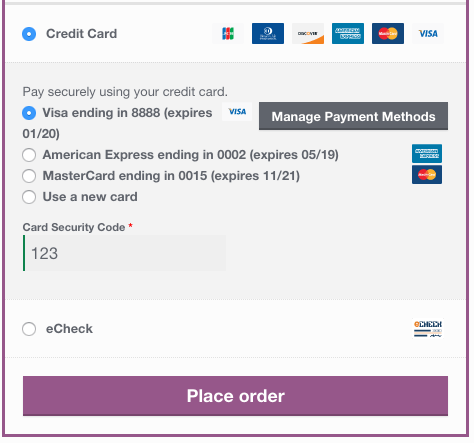
WooCommerce Authorize.Net saved card checkout

Mobile checkout is enhanced as well, offering automated card formatting and numerical (tel type) fields for easier input.

WooCommerce SkyVerge Payment Gateway mobile checkout form

You can now opt to show detailed decline messages to your customers, no more “an error occurred” error messages!

WooCommerce Authorize.Net detailed decline messages

Accept.js support

Authorize.Net includes Accept.js support for improved security in credit card payment processing! Customer credit card information is no longer sent directly through your server and instead is handled directly by Authorize.Net, meeting the lower level PCI SAQ A-EP compliance level. The customer doesn’t see a difference in the checkout process, but payment data is more secure behind the scenes. Best of all, the Authorize.Net plugin gathers the required information on your behalf, so there’s no additional setup required.

You can learn more about Accept.js here.

Support for automatic refunds & voids

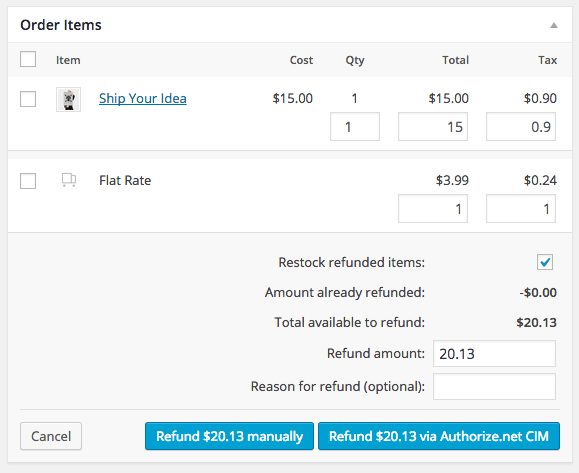
Shop employees can now process refunds for an order paid for with Authorize.Net directly from within WooCommerce — no more logging into your merchant account to process refunds! Speed up your store management by creating full or partial refunds from the “Edit Order” screen and sending the transaction automatically to Authorize.Net by clicking “Refund via Credit Card”.

WooCommerce Authorize.Net: Refund support

If the transaction has not been captured or settled, a transaction void will be performed automatically instead to cancel the order.

Securely save customer payment methods

Customers can easily & securely save multiple payment methods to their account for faster checkout, which are displayed in unified “My Payments” section of their account. Payment data is stored on Authorize.Net’s secure servers, so your responsibility for PCI compliance is significantly reduced. There’s no limit to the number of payment methods a customer can store on their account, and both credit cards and eChecks are supported.

WooCommerce Authorize.Net enhanced saved payment methods

Customers can also change their active payment method, add payment methods, and remove payment methods from the My Account page. The “Add Payment Method” workflow is seamless and tokenizes card information for future use without requiring the customer to go through checkout!

WooCommerce Authorize.Net: Add payment

Please note that you must have the CIM service enabled for your Authorize.Net account to take advantage of all features offered by this gateway.

Full support for Subscriptions and Pre-Orders

Authorize.Net is the ideal gateway for WooCommerce Subscriptions, offering support for all of Subscriptions features – payment date changes, subscription date changes, and more. Even better, customers can sign up for subscriptions with a credit card or eCheck. The gateway also fully-supports WooCommerce Pre-Orders, so you can take customer’s payment information upfront and then automatically charge their payment method once the pre-order is released.

Full support for Authorize.Net eChecks

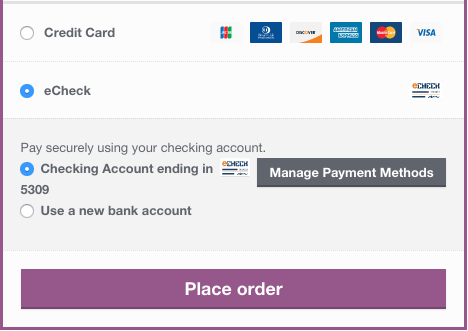
Customers with US bank accounts can checkout using their bank account information for a checking or savings account. To use this feature, you must have an active Authorize.Net eCheck account.

WooCommerce Authorize.Net echeck checkout

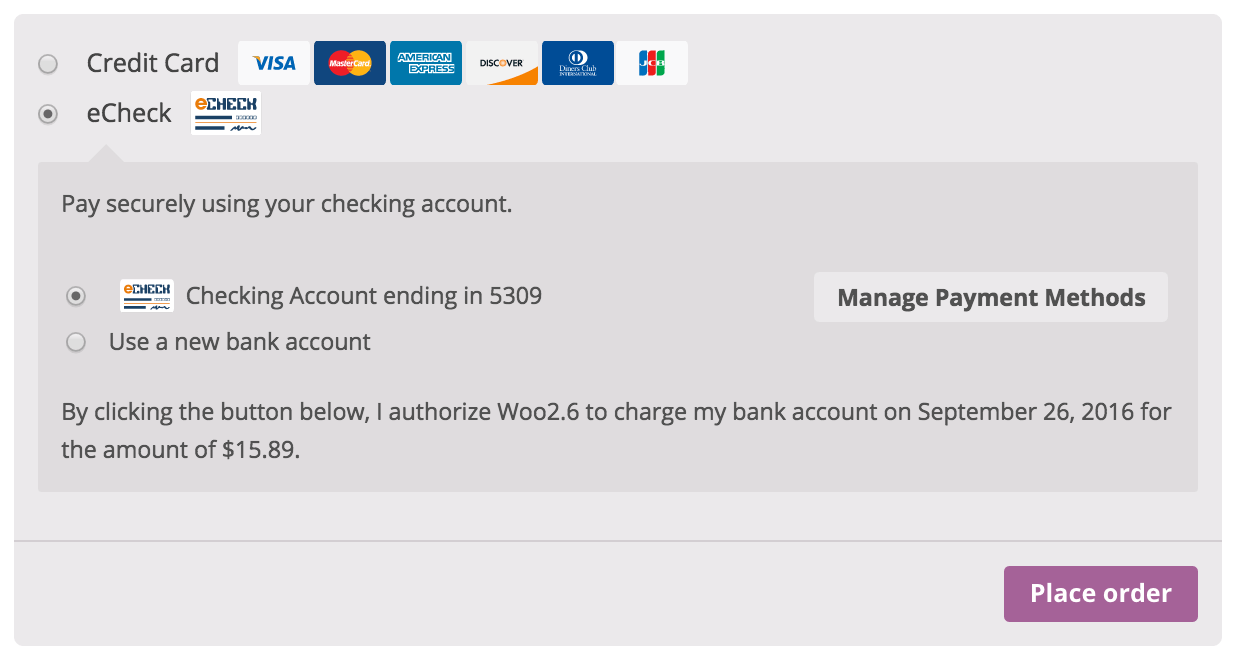
You can optionally display authorization messages for eCheck transactions if required by your merchant account. Supports WooCommerce Subscriptions to show a “recurring charge” message as well!

WooCommerce Authorize.Net authorization message for echecks

Capture Charges directly from WooCommerce

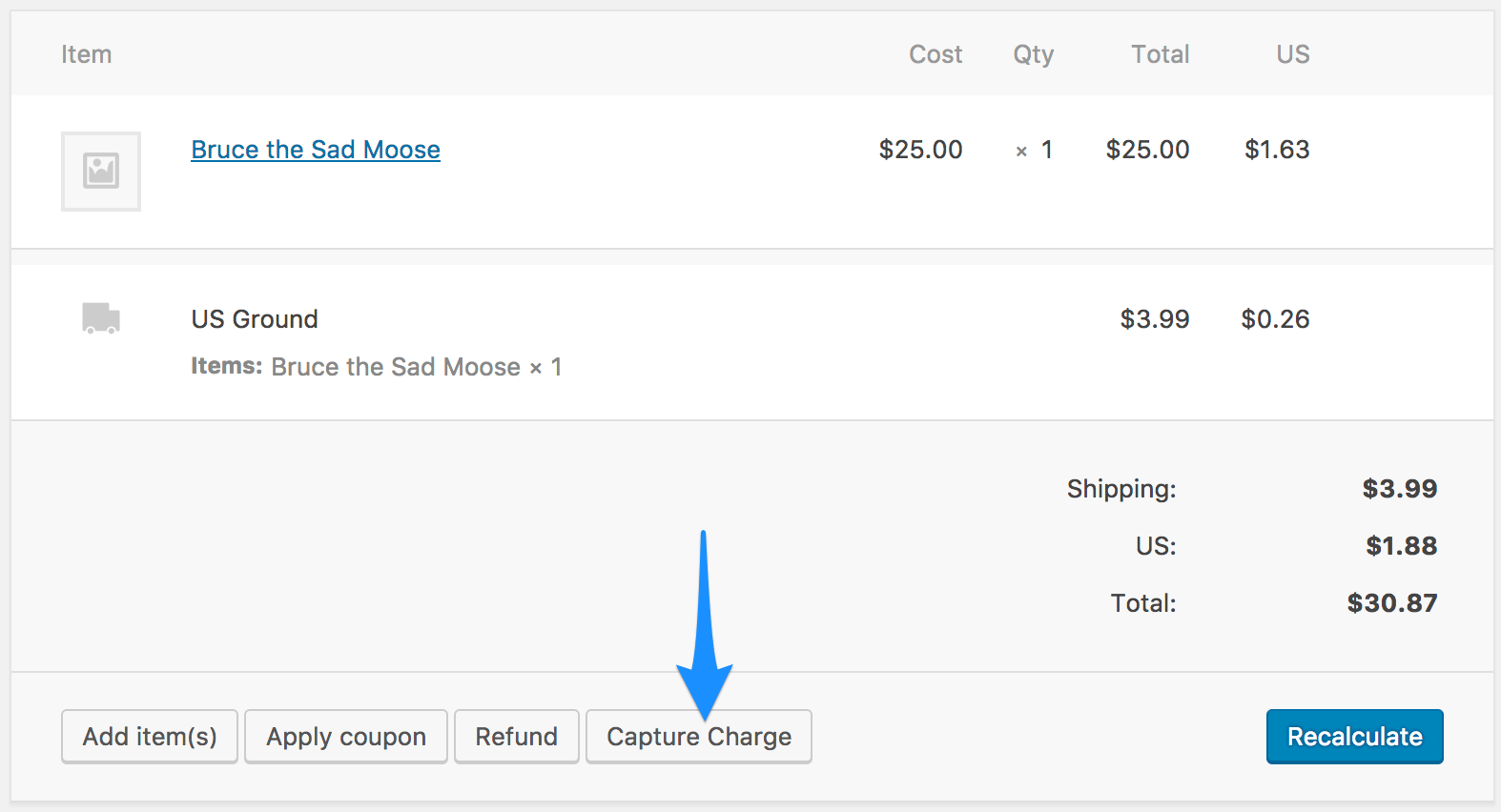
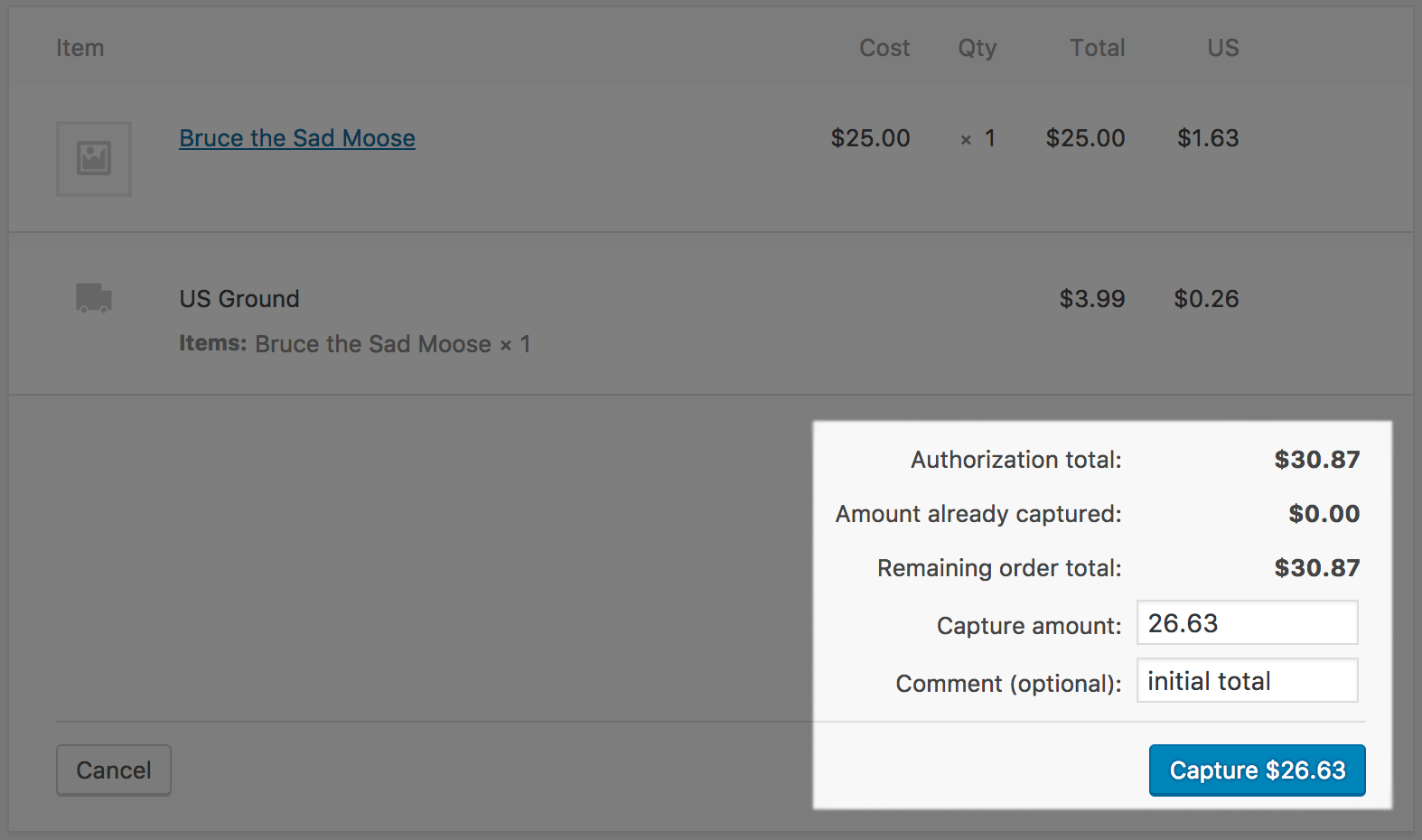
Some users choose to set the payment gateway to only authorize charges rather than authorize & capture them. However, this requires the user to then log into the payment gateway admin to capture charges. Versions 2.0+ of this extension allow you to optionally capture previously authorized transactions directly from the WooCommerce Edit Order screen rather than logging into your Authorize.Net control panel to do so. Simply edit the order, select the “Capture Charge” action, and charges will be captured through Authorize.Net.

WooCommerce SkyVerge gateway capture charges

When using a WooCommerce Authorize.net Payment Gateway, you can also avoid all of the hassle of logging in to your Authorize.net account and running complex reports just to get a simple list of transactions. Try the WooCommerce Authorize.net Reporting extension. After you install and configure the extension, you’ll start receiving a daily email with your Authorize.net transactions from the previous day attached as a CSV. You can also get transactions for a range of dates easily right from your WooCommerce store!

https://ift.tt/35gLJFt

https://ift.tt/2RHiPKK https://ift.tt/35ixPTi

WooCommerce Authorize.Net AIM Gateway 3.14.6

WooCommerce Authorize.Net AIM Gateway 3.14.6

WooCommerce Authorize.Net AIM Gateway 3.14.6

Easily and securely accept credit cards and eChecks using Authorize.Net The Authorize.Net extension provides one of the most advanced integrations for WooCommerce while providing the security and reliability that comes with using Authorize.Net for payment processing. Let your customers save their credit cards and bank accounts to their WooCommerce account for fast and easy checkout. […]

Easily and securely accept credit cards and eChecks using Authorize.Net

The Authorize.Net extension provides one of the most advanced integrations for WooCommerce while providing the security and reliability that comes with using Authorize.Net for payment processing. Let your customers save their credit cards and bank accounts to their WooCommerce account for fast and easy checkout. Includes full support for WooCommerce SubscriptionsWooCommerce Pre-Orders, and Accept.js. Start using the most advanced WooCommerce payment gateway today!

Authorize.Net is one of the most popular payment processors around for a reason: they offer easy, safe, and affordable credit card and eCheck processing. This Authorize.Net payment gateway integration lets you take advantage of several features offered by Authorize.Net, such as customer profiles, card tokenization, and eCheck processing.

The Authorize.Net Payment Gateway extension allows you to keep the customer on your site for the checkout process, allowing you maximum control over checkout so that you can test and implement the most effective experience for your store. An SSL is required for PCI compliance due to the direct checkout to ensure that your customers’ credit card information is secure.

Why Authorize.Net is right for your store:

  • Accept international transactions from customers worldwide
  • Process refunds / voids automatically from within WooCommerce
  • Capture prior authorized transactions right from the WooCommerce edit order screen
  • Automatically capture transactions when order status changes to a paid status NEW
  • Includes Accept.js from Authorize.Net for improved security, meeting PCI SAQ A-EP compliance standards – no additional setup required!
  • Accepts eChecks with optional Authorize.Net eCheck account
  • Display customizer authorization confirmation messages for eCheck transactions
  • Customers can securely save their payment method to their account for easier checkout
  • Updated payment form at checkout with retina icons
  • Mobile-friendly checkout with numerical inputs for card type and security code
  • Customers can add saved payment methods to their accounts without going through checkout
  • Customers can add a nickname for a saved payment method to make checkout even smoother NEW
  • Customers never leave your site during checkout
  • Show detailed decline messages at checkout instead of generic errors
  • Force charges for orders with only virtual items instead of authorizing them NEW
  • Full Support for WooCommerce Subscriptions
  • Full Support for WooCommerce Pre-Orders
  • Accepts all Major Credit Cards / Debit Cards – Visa®, MasterCard®, American Express®, Discover®, Diner’s Club, JCB

Simple, seamless checkout

Using the Authorize.Net extension allows you to decide what your checkout process will look like, while keeping the customer on your site for the entire process. This gives you maximum control over this experience, providing a simple checkout process for the user and maximum customizability for the business owner.

WooCommerce Authorize.Net saved card checkout

Mobile checkout is enhanced as well, offering automated card formatting and numerical (tel type) fields for easier input.

WooCommerce SkyVerge Payment Gateway mobile checkout form

You can now opt to show detailed decline messages to your customers, no more “an error occurred” error messages!

WooCommerce Authorize.Net detailed decline messages

Accept.js support

Authorize.Net includes Accept.js support for improved security in credit card payment processing! Customer credit card information is no longer sent directly through your server and instead is handled directly by Authorize.Net, meeting the lower level PCI SAQ A-EP compliance level. The customer doesn’t see a difference in the checkout process, but payment data is more secure behind the scenes. Best of all, the Authorize.Net plugin gathers the required information on your behalf, so there’s no additional setup required.

You can learn more about Accept.js here.

Support for automatic refunds & voids

Shop employees can now process refunds for an order paid for with Authorize.Net directly from within WooCommerce — no more logging into your merchant account to process refunds! Speed up your store management by creating full or partial refunds from the “Edit Order” screen and sending the transaction automatically to Authorize.Net by clicking “Refund via Credit Card”.

WooCommerce Authorize.Net: Refund support

If the transaction has not been captured or settled, a transaction void will be performed automatically instead to cancel the order.

Securely save customer payment methods

Customers can easily & securely save multiple payment methods to their account for faster checkout, which are displayed in unified “My Payments” section of their account. Payment data is stored on Authorize.Net’s secure servers, so your responsibility for PCI compliance is significantly reduced. There’s no limit to the number of payment methods a customer can store on their account, and both credit cards and eChecks are supported.

WooCommerce Authorize.Net enhanced saved payment methods

Customers can also change their active payment method, add payment methods, and remove payment methods from the My Account page. The “Add Payment Method” workflow is seamless and tokenizes card information for future use without requiring the customer to go through checkout!

WooCommerce Authorize.Net: Add payment

Please note that you must have the CIM service enabled for your Authorize.Net account to take advantage of all features offered by this gateway.

Full support for Subscriptions and Pre-Orders

Authorize.Net is the ideal gateway for WooCommerce Subscriptions, offering support for all of Subscriptions features – payment date changes, subscription date changes, and more. Even better, customers can sign up for subscriptions with a credit card or eCheck. The gateway also fully-supports WooCommerce Pre-Orders, so you can take customer’s payment information upfront and then automatically charge their payment method once the pre-order is released.

Full support for Authorize.Net eChecks

Customers with US bank accounts can checkout using their bank account information for a checking or savings account. To use this feature, you must have an active Authorize.Net eCheck account.

WooCommerce Authorize.Net echeck checkout

You can optionally display authorization messages for eCheck transactions if required by your merchant account. Supports WooCommerce Subscriptions to show a “recurring charge” message as well!

https://ift.tt/2qPaIRy

https://ift.tt/2RHiPKK https://ift.tt/2YE0AY6

WooCommerce API Manager 2.2.6

WooCommerce API Manager 2.2.6
WooCommerce API Manager 2.2.6

Make Recurring Income Selling Software or Services The WooCommerce API Manager turns WooCommerce Products into an API Resource that can be accessed with an API Key, aka License Key. API Resources (products) can be software, a service, an iPhone or Android App, a membership, a subscription, or anything that can be accessed over the Internet. The most […]

Make Recurring Income Selling Software or Services

The WooCommerce API Manager turns WooCommerce Products into an API Resource that can be accessed with an API Key, aka License Key. API Resources (products) can be software, a service, an iPhone or Android App, a membership, a subscription, or anything that can be accessed over the Internet. The most frequently used Product types are Simple, Variable, Simple Subscription, Variable Subscription, and Group. Subscription product types are created using the WooCommerce Subscriptions extension.

How does it work? The customer buys a Product (API Resource) which will have an API Key with a defined number of activations, or unlimited activations. The customer uses the API Key to access the API Resource, which is controlled by WooCommerce API Manager. The API Resource remains accessible until it expires, if it has an expiration time. For even more advanced API Resource time management, the WooCommerce API Manager works seamlessly with WooCommerce Subscriptions.

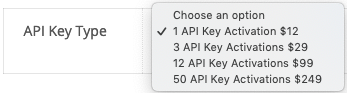
WooCommerce API Manager API Key Type

Sell API Keys as a License for Software and Automated Updates

The WooCommerce API Manager secures your software with an API Key, by acting as a WooCommerce Software License Manager. When used for software, the API Key is similar to using a License Key. The API Key provides access to an API Resource. By using an API Key, client software has a full range of options to activate, deactivate, check the status of an activation, get information about updates, check for updates, get updates, and more. All software downloads use secure, expiring, URLs to insure only your customers have secure access to the software that was purchased. Software downloads can come from the WooCommerce store local server, Amazon S3, or a remote server.

To make selling API Keys for WordPress plugins and themes easier, the WooCommerce API Manager PHP Library for Plugins and Themes was developed as a PHP Library that can be dropped into a plugin and theme in less than 5 minutes for API Key authentication and software updates with the WooCommerce API ManagerLearn more about how to get a copy of the WooCommerce API Manager PHP Library for Plugins and Themes.

Flexible API Key Types to Match Store Workflow

There are three types of API Key types that provides a flexible API Key model for any store.

  1. Master API Key: Great for customers who want to use a single API Key for everything. Can be used to activate any API Resource purchased with this single API Key. Providing a one-key solution to makes its use easier and more convenient for the customer, which improves satisfaction. Customer access to all API Resources can be turned off by the store owner using the Master API Key if required.
  2. Product Order API Key: Great for store owners who want customers to use separate API Keys for each purchase. Can be used to activated a single API Resource from a single order. Can be used for more fine-grained control by the store owner, or by the customer who may choose to allow employees, or a friend, to use only that API Key.
  3. Associated API Key: Just like the Product Order API Key, except you are in control of which products and orders it is associated with. Can be generated by another plugin, site, or imported, and stored in a custom table that is used by the WooCommerce API Manager when the API Key is associated with an API Resource. This allows store owners to use API Keys in a custom way.

WooCommerce API Manager Subscriptions

The WooCommerce API Manager has API Access Expiration, which is just another way of saying a time limit for an API Key that acts like a subscription. The customer buys a product, and can access that product (API Resource) until the API Access time limit expires, at which time the customer must renew the time limit by buying the product again. When the product is a WooCommerce Subscription, the store can automatically renew the subscription and email a receipt to the customer, or the customer can manually renew the subscription. A Variable WooCommerce Subscription allows a customer to upgrade/downgrade the subscription. All API Resources are managed using API Key activations. A product can have one or more activations available, and any of the API Key types mentioned above can be used to grant access to the API Resource. The choice to use the built in API Access Expiration, or WooCommerce Subscriptions, depends on the product, and store’s needs.

Flexible Product Types

The WooCommerce API Manager allows product creation based on your sales model, and the structure provided by WooCommerce. An API Resource (Product) can be sold as a simple/simple subscription product, or a variable/variable subscription product with variations. Each simple and variable variation can have a single number of activations, or unlimited activations, for purchase, or for variable product variations, each variation can have a different number of activations, including one variation that has unlimited activations.

WooCommerce API Manager Features

Easy Product Setup
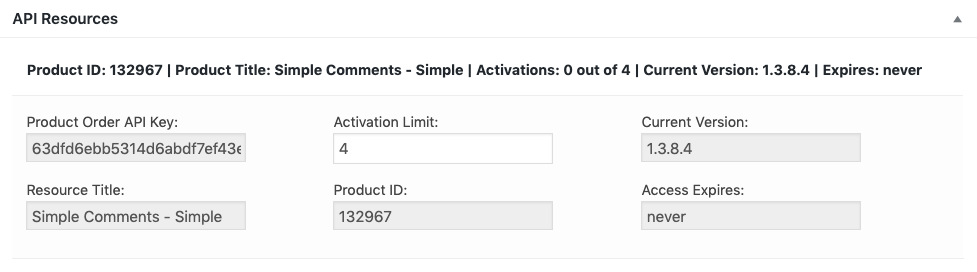
Easy product API form for software and non-software products.

Secure Download URLs
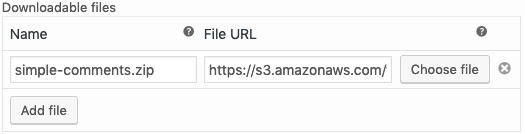
WooCommerce API Manager Files URL

URLs for the local server, Amazon S3, or remote, are wrapped for security and with an expiration time to prevent illicit use.

Plugin Update Screen Tab Control
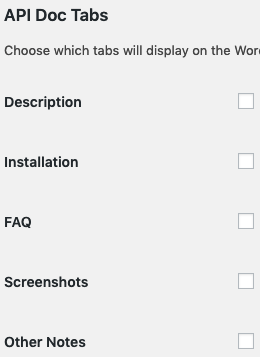
WooCommerce API Manager API Tab Choices

Plugin update tabs can be added or removed.

API Access Expiration

WooCommerce API Manager API Access Expires

Products that are not WooCommerce Subscription types can use the API Access Expires field to limit API Resource access just as a subscription would provide.


Full API Access Control

WooCommerce API Manager API Key Control

Store owners can disable a customer’s API Access if needed.


Built-in API Debugging
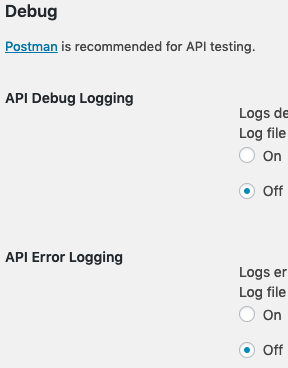
WooCommerce API Manager Debugging Choices

There are several options for beautifully formatted debugging data that is stored in custom WooCommerce logs.

Free Products

Store owners can offer free products, and give existing products that are not free to existing customers for free.

SmartCache

The API Manager uses SmartCache to cache database and API queries at critical points in the data process to dramatically increase the speed of critical services such as data and API responses. SmartCache only updates the cached data being requested when the data changes, or when expired cache is requested but needs to be refreshed. The result is a dramatic speed increase, and a dramatic decrease in server load. When SmartCache is combined with object caching the result is blazing fast speed. SmartCache allows the API Manager to effortlessly scale to any level of traffic load.

Order Screen API Resources
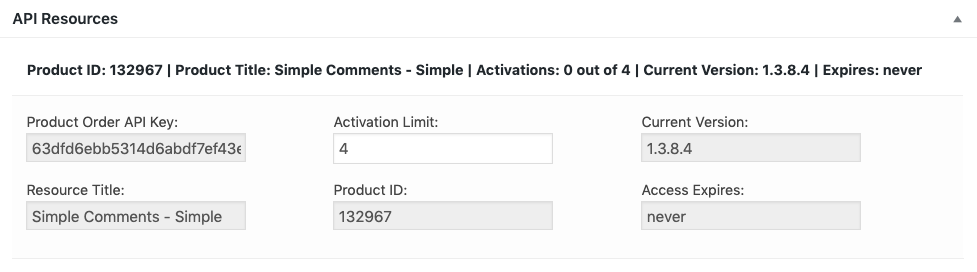
Order items that are API Resources are listed on the Order screen along with pertinent details.

Order Screen API Resource Activations
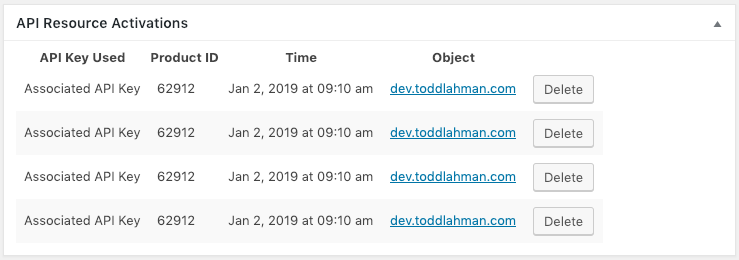
WooCommerce API Manager API Resource Activations

API Key activations are listed on the order screen, and can be removed if needed.

My Account Dashboard API Keys

WooCommerce API Manager Product Order API Key Hidden

On the My Account > API Keys page the Master API Key is always listed. The remaining details can optionally list the Product Order API Key, or it can be hidden as is shown in this screenshot. The customer can remove activations that were not properly removed by client software in the dashboard.

My Account Dashboard API Downloads
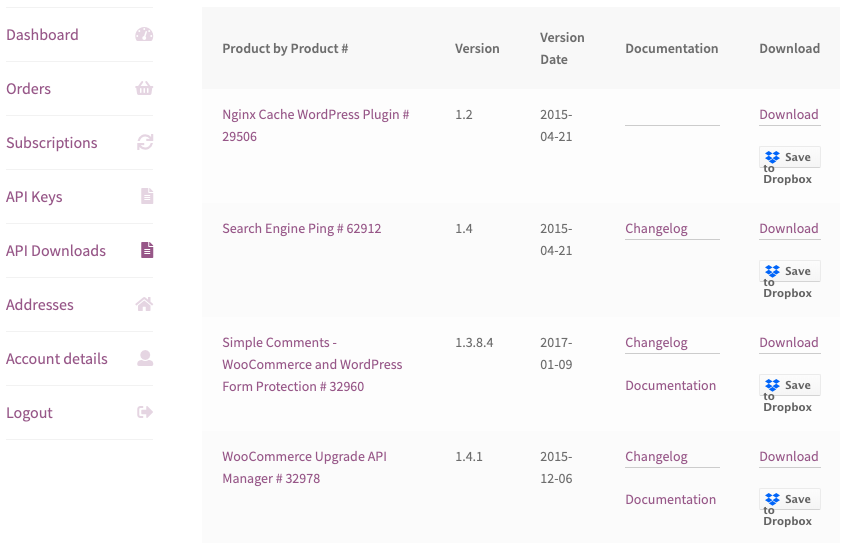
WooCommerce API Manager API Downloads

On the My Account > API Downloads page API Resources that are software products can be downloaded, and saved to Dropbox if that option is configured. All URLs are secure, and expire at a time interval configured under settings.

Easy WordPress Plugin and Theme Setup

The WooCommerce API Manager PHP Library for Plugins and Themes for the API Manager makes it possible to setup both WordPress plugins and themes in minutes. The WooCommerce API Manager PHP Library for Plugins and Themes allows WordPress plugins and themes to do automatic updates, and to communicate with all the API Manager APIs to complete tasks such as activation, deactivation, etc. This is an example.

WooCommerce API Manager Plugin Alert

When the plugin is activated the customer can easily find the activation screen.
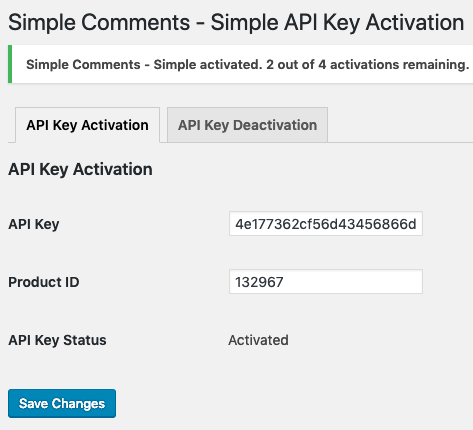
Once activated the API returns the activation totals. The Product ID form field in the screenshot above is optional.
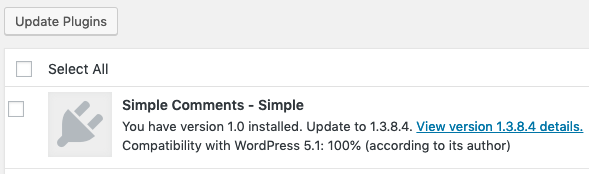
WooCommerce API Manager Plugin Update

When an update is available, the customer will see and update the plugin like any other WordPress plugin.
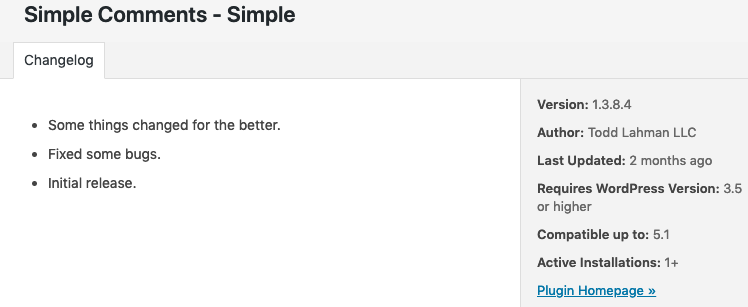
WooCommerce API Manager Plugin Details

Depending on the information gathered, and tabs chosen in the settings, the plugin view details screen displays information as would be displayed for any plugin from wordpress.org, so it will look familiar to the customer. Learn more about how to get a copy of the WooCommerce API Manager PHP Library for Plugins and Themes.

https://ift.tt/2RLVSWL

https://ift.tt/34fnaaE https://ift.tt/2qG2JWG