WooCommerce Customer History is a WooCommerce Extensions being developed by Woothemes. WooCommerce Customer History allows you to observes how your customers browse through your WooCommerce store. Increase your conversion rate by seeing how your customers browse your WooCommerce store The Customer History extension for WooCommerce observes how your customers browse through your WooCommerce store, as well […]
WooCommerce Customer History is a WooCommerce Extensions being developed by Woothemes. WooCommerce Customer History allows you to observes how your customers browse through your WooCommerce store.
Increase your conversion rate by seeing how your customers browse your WooCommerce store
The Customer History extension for WooCommerce observes how your customers browse through your WooCommerce store, as well as keeping a full purchase history log, and calculating the total customer lifetime value.
Key Features
Observe how your customers browse your store and which screens they visit before they purchase.
Track the total customer lifetime value for each customer.
View insights about your customer’s browsing habits on your website, to see which screens work best for targeted conversions.
The Currency Converter Widget lets you offer a dynamic currency switcher for displaying product prices and totals. The widget makes full use of money.js and the Open Source Exchange Rates API, allowing it to dynamically grab the latest exchange rates, and substitute displayed prices in real time. All prices formatted by WooCommerce are updated, even totals. Checkout is […]
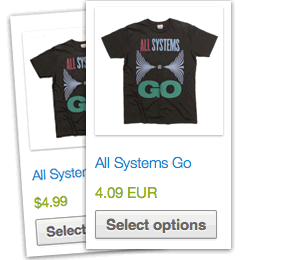
The Currency Converter Widget lets you offer a dynamic currency switcher for displaying product prices and totals.
The widget makes full use of money.js and the Open Source Exchange Rates API, allowing it to dynamically grab the latest exchange rates, and substitute displayed prices in real time. All prices formatted by WooCommerce are updated, even totals. Checkout is still done using your store’s base currency, but the converted price is also stored for your reference.
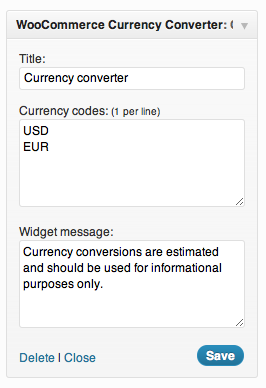
You can add and convert to as many currencies as you want via the widget settings:
Widget settings
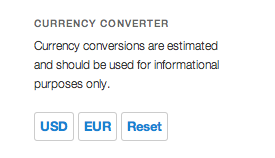
On the frontend:
Widget
Magic! As an added bonus, when users check out, the converted total is also stored so you know what price they saw.
Track the performance of your promotions The Coupon Campaigns extension for WooCommerce is designed to help you measure the impact your coupons make within your market. Whether you’re sending out a batch of coupons to an event your company is sponsoring, or are running a particular kind of promotion once a month on a variety […]
Track the performance of your promotions
The Coupon Campaigns extension for WooCommerce is designed to help you measure the impact your coupons make within your market. Whether you’re sending out a batch of coupons to an event your company is sponsoring, or are running a particular kind of promotion once a month on a variety of products, Coupon Campaigns makes tracking of these campaigns a breeze.
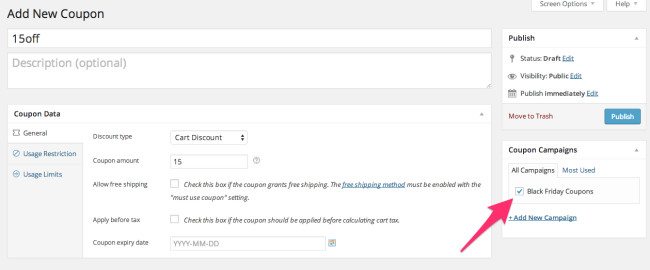
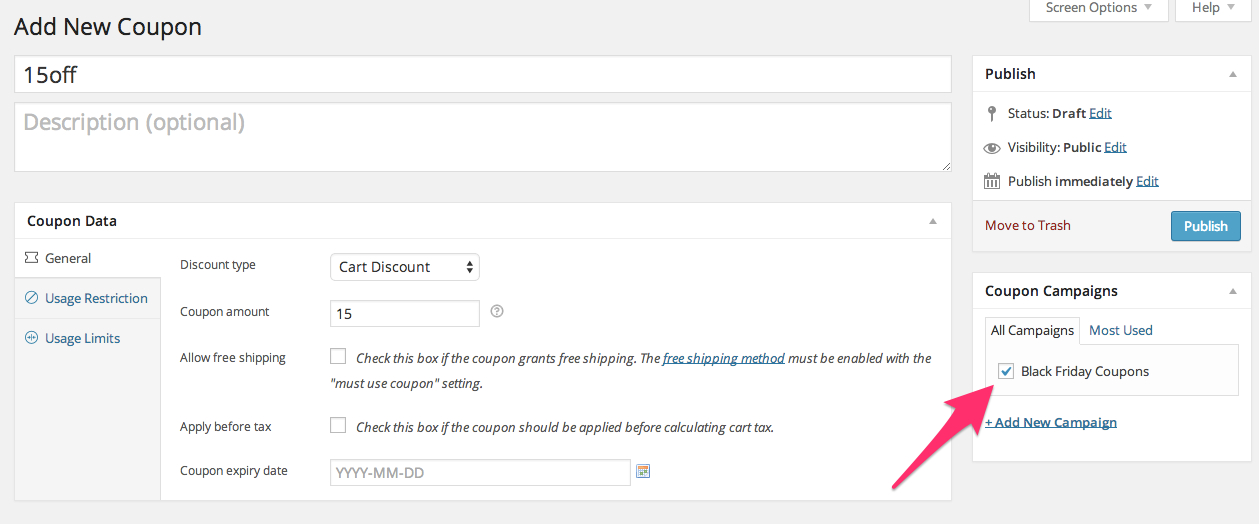
Easily create coupon campaigns, using a familiar WordPress interface.
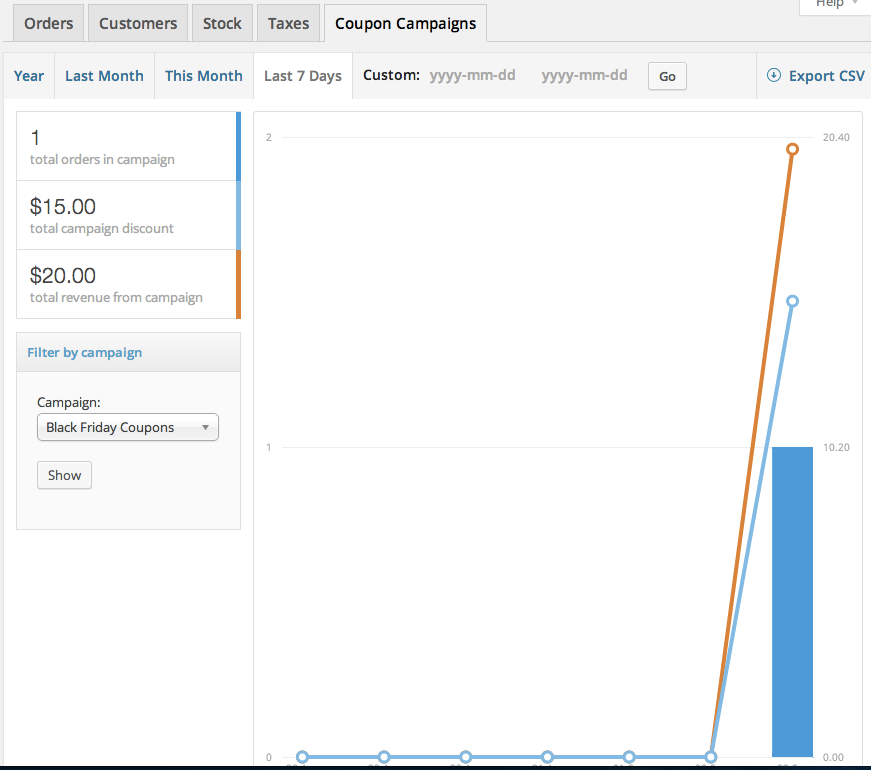
Coupon Campaigns integrates directly into your WooCommerce reporting dashboard. This enables performance tracking of campaigns across various date ranges, with several default options included (this week, this month, last month, this year).
Visual reports of coupon campaign performance, directly in your WooCommerce reporting dashboard.
Accelerate the performance of your coupons and promotions. Purchase Coupon Campaigns for WooCommerce, today.
Full-featured Profit and Cost of Goods Tracking for your WooCommerce Store WooCommerce gives you access to great reports on revenue and top-sellers or earners. Now we’ve added Profit Reporting to make these reports even more valuable! You can evaluate not only revenue, but costs and profit all from within your WooCommerce store. Quickly and easily get the information […]
Full-featured Profit and Cost of Goods Tracking for your WooCommerce Store
WooCommerce gives you access to great reports on revenue and top-sellers or earners. Now we’ve added Profit Reporting to make these reports even more valuable! You can evaluate not only revenue, but costs and profit all from within your WooCommerce store. Quickly and easily get the information you need to make marketing and sales decisions to optimize your store’s revenue.
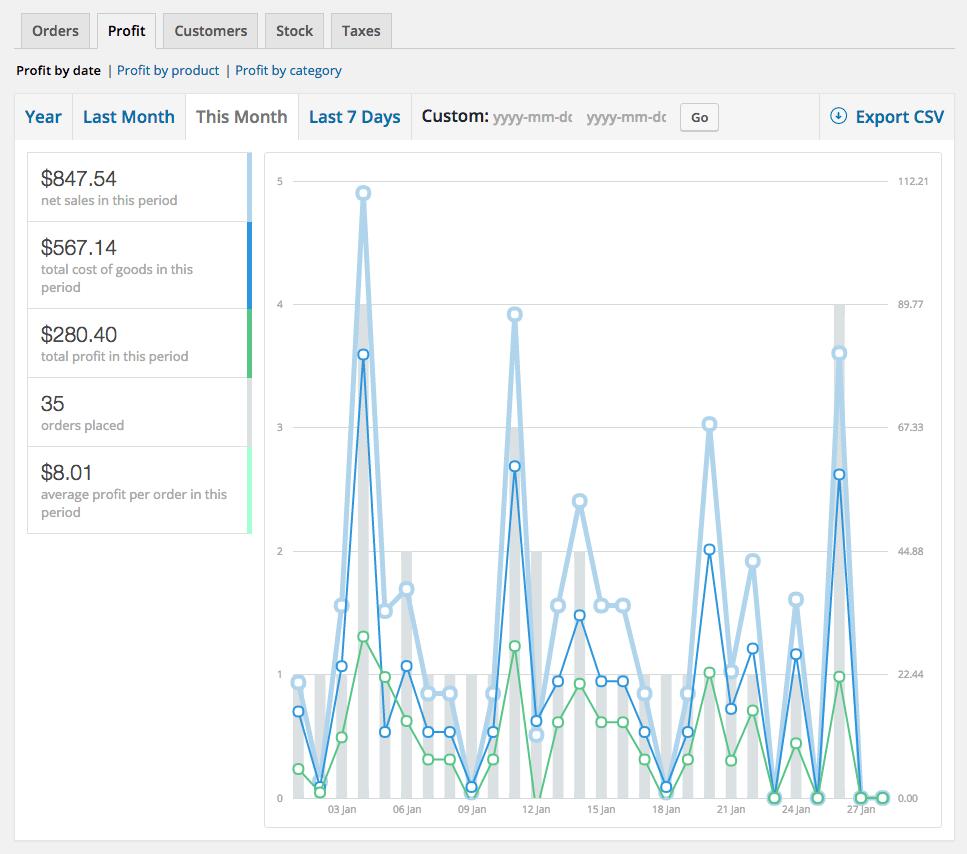
Profit by Date report
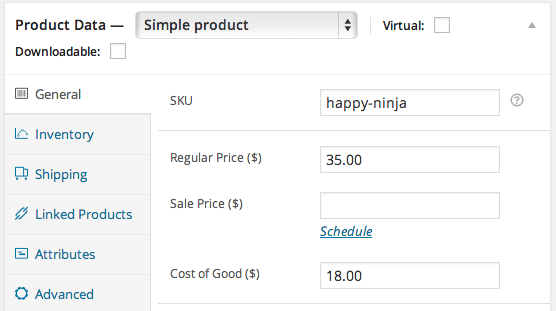
Easily track total profit and cost of goods by adding a “Cost of Good” field to simple and variable products. Costs are automatically calculated on checkout so that you can see your profit in addition to simple sales information, and the in-depth reports provide exactly the details you need to improve your bottom line.
Costs in Product Table Display
How “Cost of Goods” Improves Your Reporting
Gives you vital information about your business – adds information about store profit and most profitable products so you know about more than just revenue
Add a Cost of Good to each product (including variations!) to always know total costs of products sold in each order
Apply costs to previous orders (placed before installation) after you set product cost
View profit and cost by date range, by product, or by product category NEW
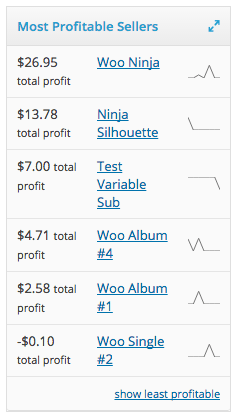
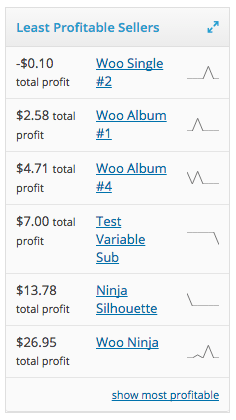
Gain insight into your most profitable and least profitable sellers so you know where to focus your marketing
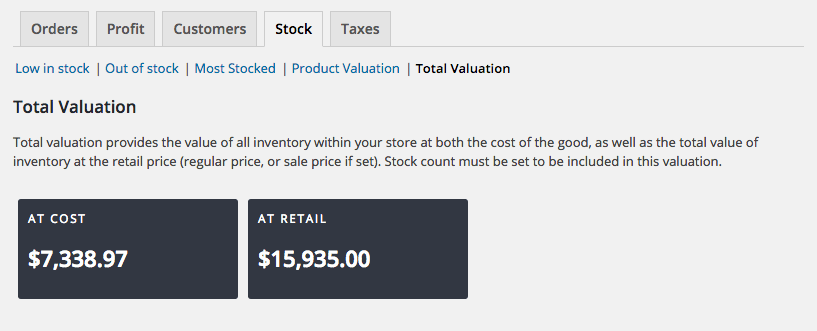
See a total inventory valuation based on retail prices or cost of goods.
Quickly view costs next to prices in your product manager table display
Add Costs to Products
Quickly add a Cost of Good to each product, including product variations, which are then used to calculate your total order costs so that you can always know what you really earned on every order – not just how much you sold. Total costs for each order line item are saved at checkout, so even if your costs increase in the future, your total costs are always historically accurate.
Simple Product Cost Configuration
Adding costs to variable products is easy as well. You can add a default cost for all variations or set costs for a variation manually.
Focus Your Marketing on Top Products
The Cost of Goods extension allows you to determine your true top products by viewing which products are most profitable and least profitable for your store, not just those that generate the most revenue.
Most Profitable Products
Least Profitable Products
Maybe you track pay-per-click or print advertising with the WooCommerce URL Coupons extension? Now you know which products to create these coupons for since you know which will earn the most for your store.
Detailed Reporting
Tracking your cost of goods is pointless without in-depth reporting to give you actionable information to improve your profitability. Reports include:
Profit by date – See your net sales, cost of goods, profit, and average profit per order for any date range.
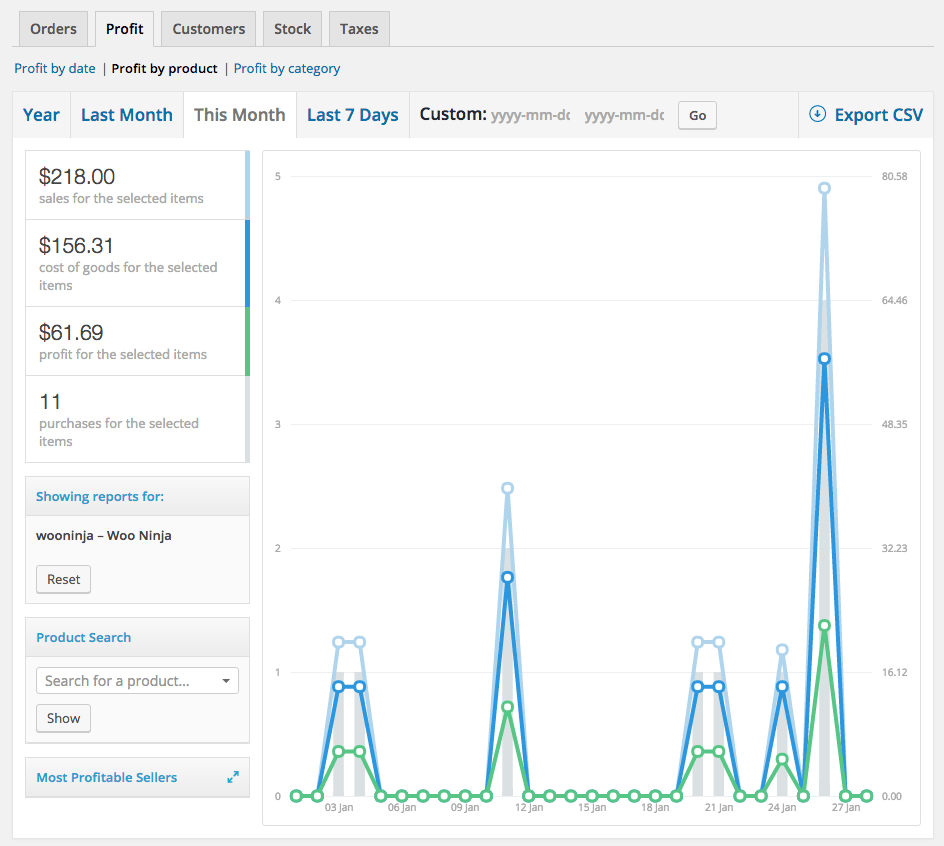
Profit by product – See your net sales for the item, total costs, total item profit, and total item purchases for the given date range.
Most/Least Profitable Sellers – See the most or least profitable products for a given date range.
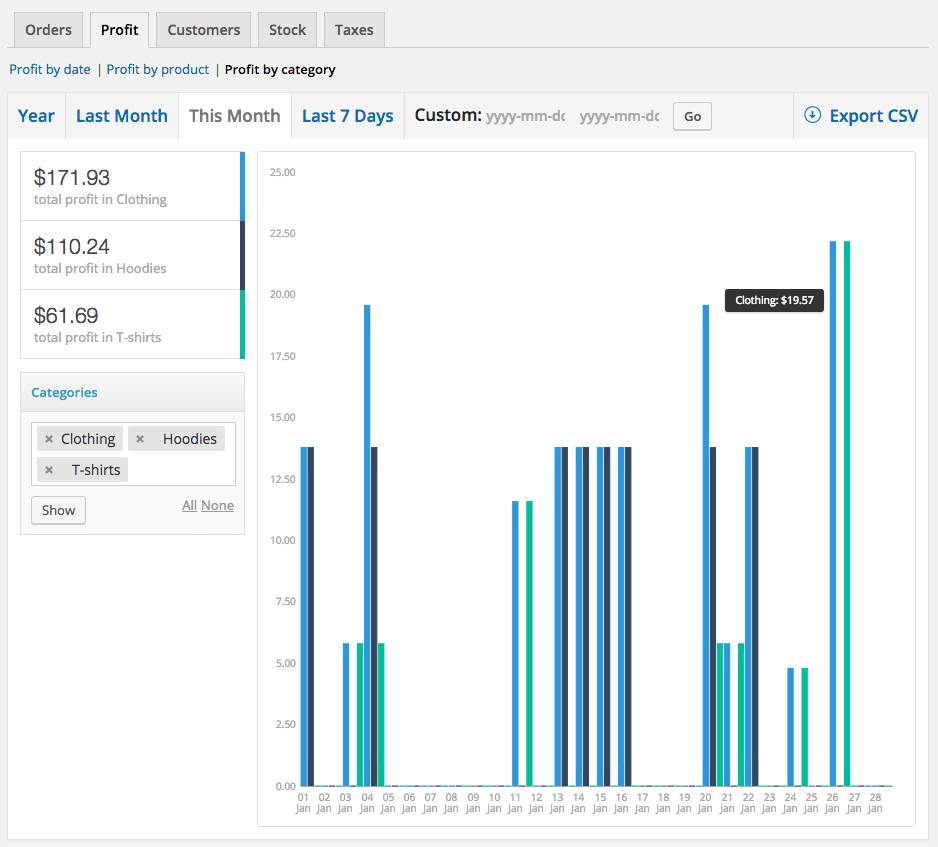
Profit by category – View total profit for any product category or multiple categories for a date range.
Inventory Valuation – See the total value of your inventory, calculated using the retail price or the cost of good.
Profit by Product reportProduct ValuationTotal inventory values
Powerful Configuration
You can apply costs to previous orders to gain immediate insight into profitability. Simply add costs for your products, and any orders placed before using this extension can be updated from Settings > Products > Inventory to see most and least profitable sellers without waiting for new sales to roll in.
WooCommerce Constant Contact Integration is a WooCommerce Extensions being developed by Woothemes. WooCommerce Constant Contact Integration allows you to integration your woocommerce store with Constant Contant easily. Features: Now supporting WooCommerce Points and Rewards – Reward your customers for signing up to your email list! Provides a way to let customers to opt-in to your Constant Contact email […]
WooCommerce Constant Contact Integration is a WooCommerce Extensions being developed by Woothemes. WooCommerce Constant Contact Integration allows you to integration your woocommerce store with Constant Contant easily.
Features:
Now supporting WooCommerce Points and Rewards – Reward your customers for signing up to your email list!
Provides a way to let customers to opt-in to your Constant Contact email lists from the checkout and order received page
Easily add a signup form to anywhere on your site with the included widget
Quickly see the total subscribers for your email list on the Dashboard page
Access top-notch reporting from Constant Contact to analyze your email responses and improve your marketing
WooCommerce Conditional Shipping and Payments 1.6.1
WooCommerce Conditional Shipping and Payments 1.6.1
Use conditional logic to exclude payment gateways and shipping methods Conditional Shipping and Payments allows you to conditionally restrict the payment gateways, shipping methods and shipping countries/states available on your site. Define sophisticated rules in minutes and manage them all in one place. Use conditional logic to: Disable shipping methods based on weight, item count, cart total. Control the availability of free shipping, flat rates […]
Use conditional logic to exclude payment gateways and shipping methods
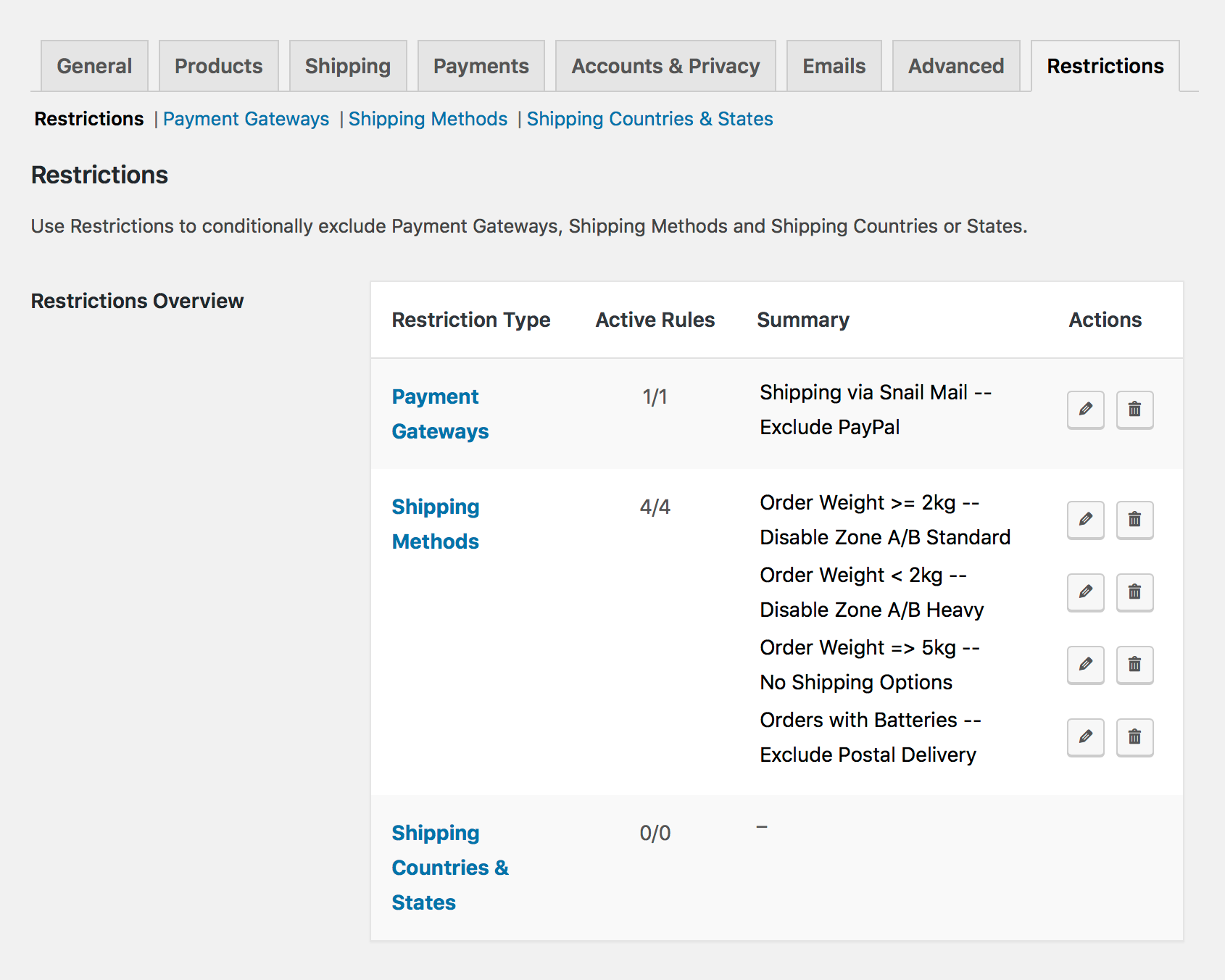
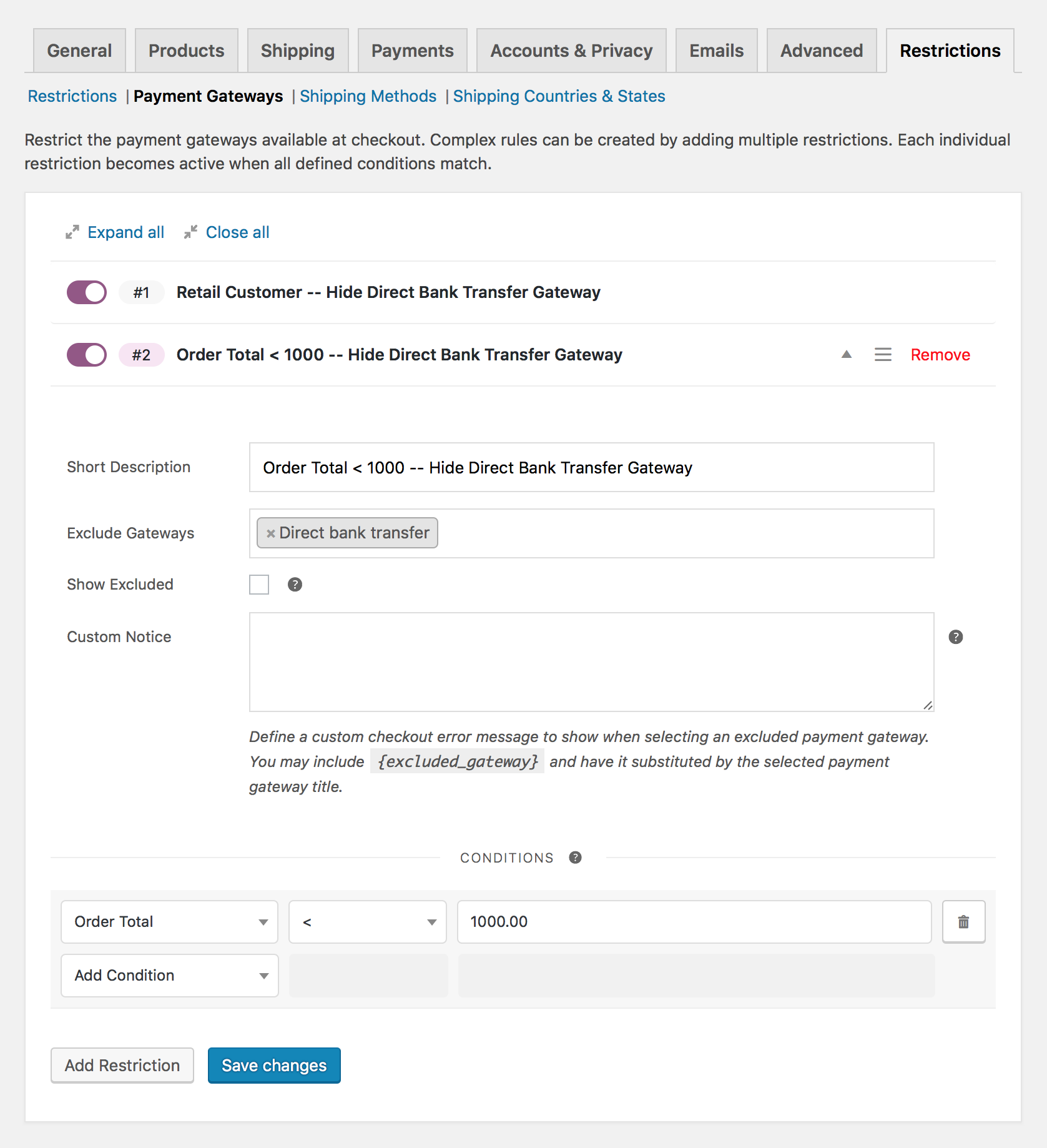
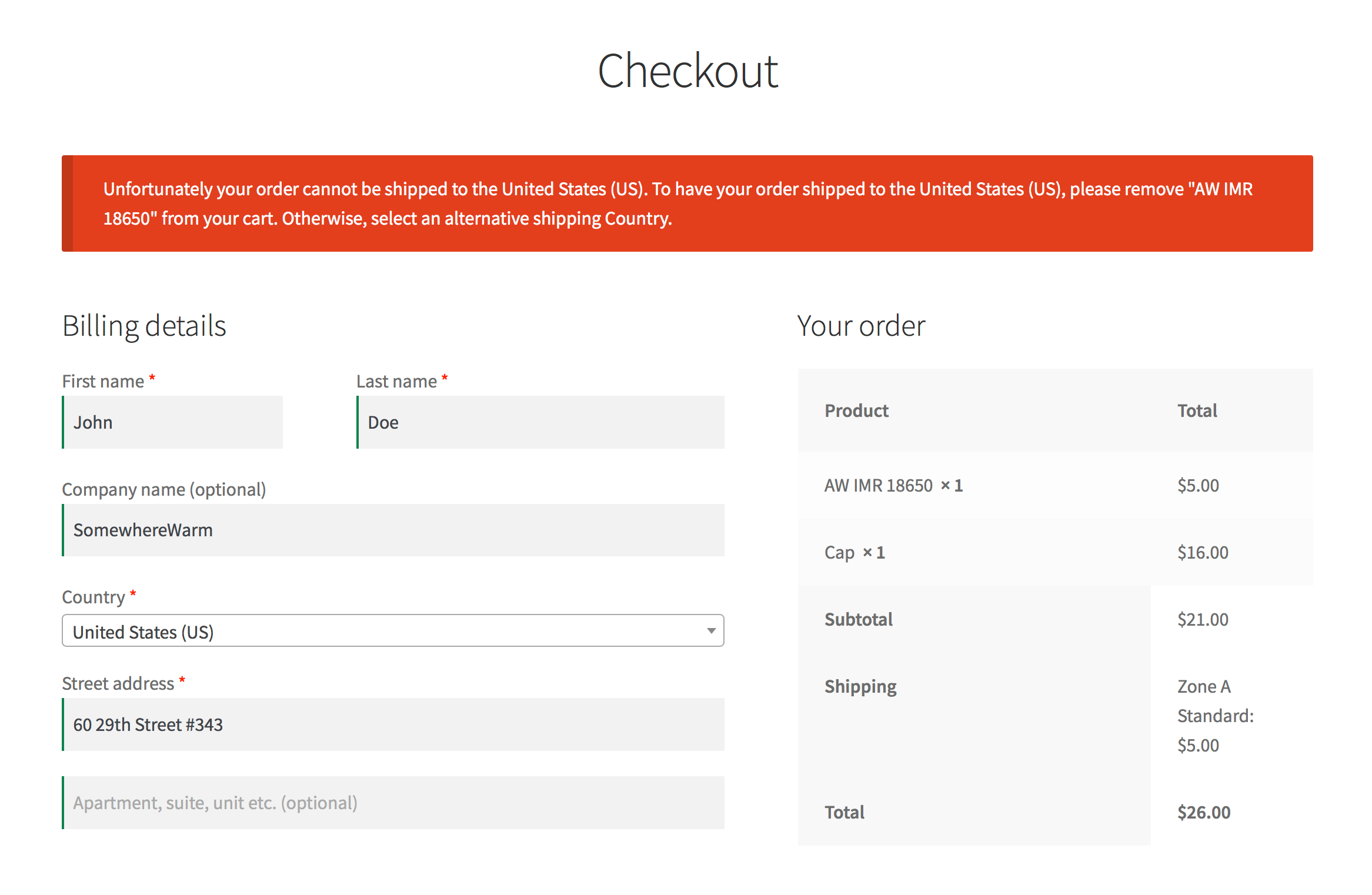
Conditional Shipping and Payments allows you to conditionally restrict the payment gateways, shipping methods and shipping countries/states available on your site.
Define sophisticated rules in minutes and manage them all in one place. Use conditional logic to:
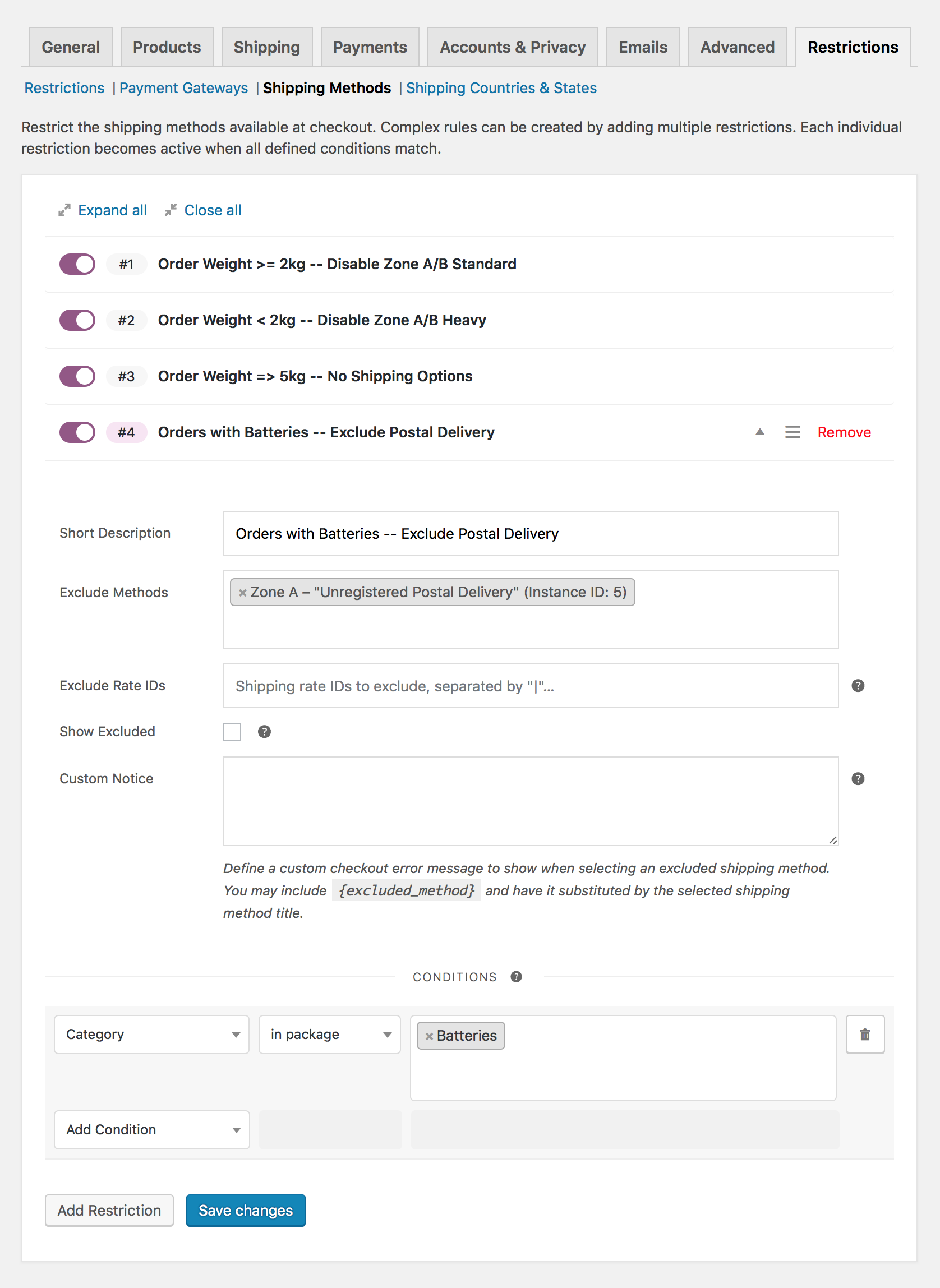
Disable shipping methods based on weight, item count, cart total.
Control the availability of free shipping, flat rates and other shipping options per product, category or shipping class.
Limit shipping method and payment gateway access to specific customers and customer roles, such as membership holders or wholesale customers.
Enable specific payment gateways when purchasing subscriptions.
Create country, state, or zip code shipping restrictions for specific products.
Features
Conditional Shipping Methods
Create rules to conditionally show or hide shipping methods:
For individual customers, customer roles, or members of your site.
Shipping Country and State Restrictions
Create rules to prevent customer orders from being shipped to specific shipping countries or states in order to comply with customs import regulations, or shipping terms. Build per product shipping rules, or custom conditional rules based on:
Product categories or shipping classes in the cart.
Want to learn more? Check out the documentation for a complete list of all conditions available in the extension.
Unclutter Your Workflow
Struggling with scattered snippets and plugins with limited functionality? It’s never too late to streamline the way you manage your shipping and payment rules!
To help you integrate restrictions into your workflow, Conditional Shipping and Payments allows you to create both global or per product restrictions. No matter which approach you choose, the extension lets you easily manage your shipping and payment method restrictions.
Rigorously Built and Tested
Running a high-traffic store?
The extension leverages all caching optimizations built into WooCommerce and loads only the components needed to evaluate the rules you’ve built. This ensures that Conditional Shipping and Payments will never slow you down.
We’ve written over 2000 automated tests to ensure that all features will work as expected, update after update, so you can stay focused on what matters the most: Your business — not your plugins!
Customize & Extend It
Conditional Shipping and Payments already comes with more than 8 integrations with popular extensions, such as Subscriptions and Memberships — and the list keeps growing!
Need to build a custom condition? Use actions and filters to add new conditions, customize the extension, or even build new types of cart/checkout restrictions from scratch.
Easily Offer Free or Paid Add-ons and Services at Checkout The core WooCommerce checkout process covers all of the basic fields shops needs to place an order, but what if your shop needs to offer services or additional products only at checkout? That’s where WooCommerce Checkout Add-ons comes into play. This extension allows you to add several additional […]
Easily Offer Free or Paid Add-ons and Services at Checkout
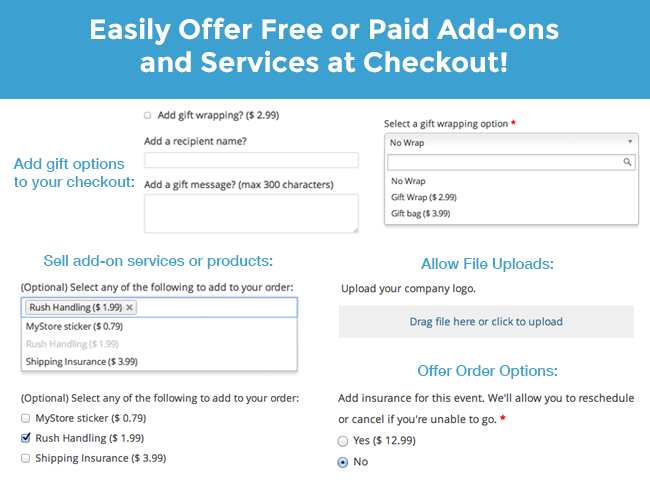
The core WooCommerce checkout process covers all of the basic fields shops needs to place an order, but what if your shop needs to offer services or additional products only at checkout? That’s where WooCommerce Checkout Add-ons comes into play. This extension allows you to add several additional options to your checkout page and determine which are free or paid. You can also sort and filter orders based on your shiny new options.
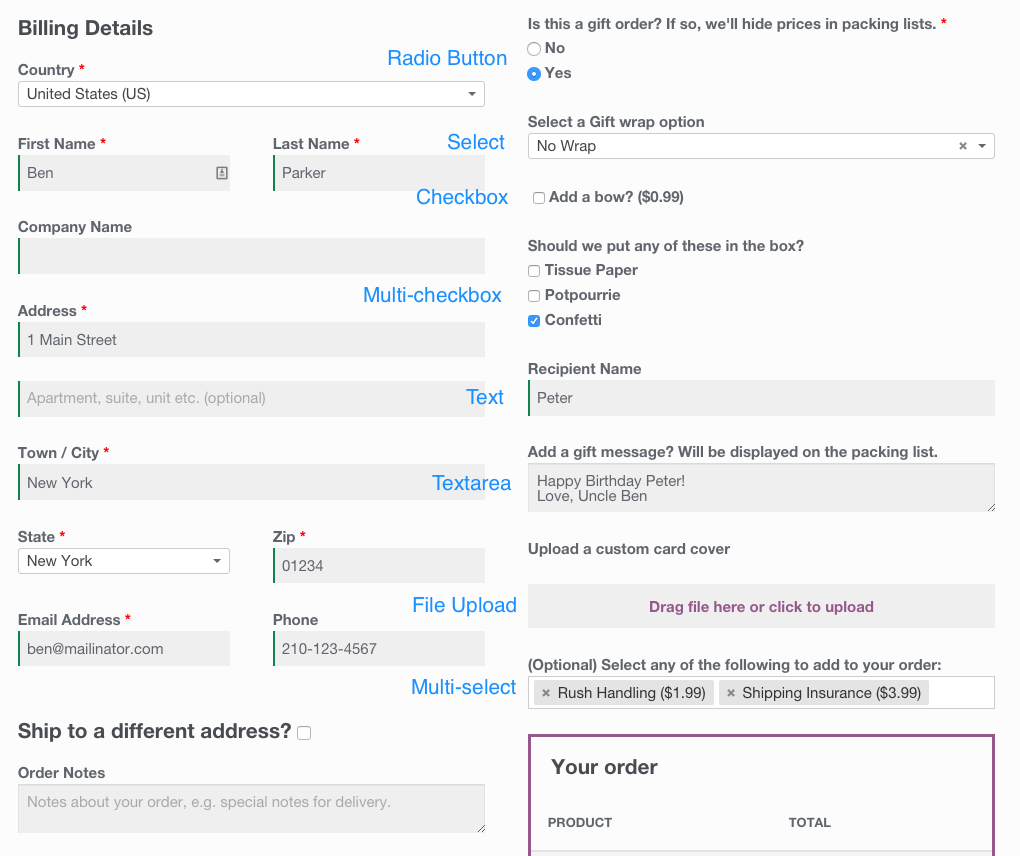
WooCommerce Checkout Add-ons can give you a way to charge for add-ons services such as rush fulfillment or gift wrapping, or can help you offer add-ons at checkout without inventory, such as stickers or insurance. Checkout Add-ons allows you to easily add several field types to your checkout page, including text fields, text areas, select (dropdowns), multi-selects, radio buttons, a checkbox, multi-checkbox, and file uploads.
Sample Checkout Fields
Checkout Add-ons is great at adding any kind of field for free, but they can also be used to add paid services or fees, and can even do so on a per-option basis.
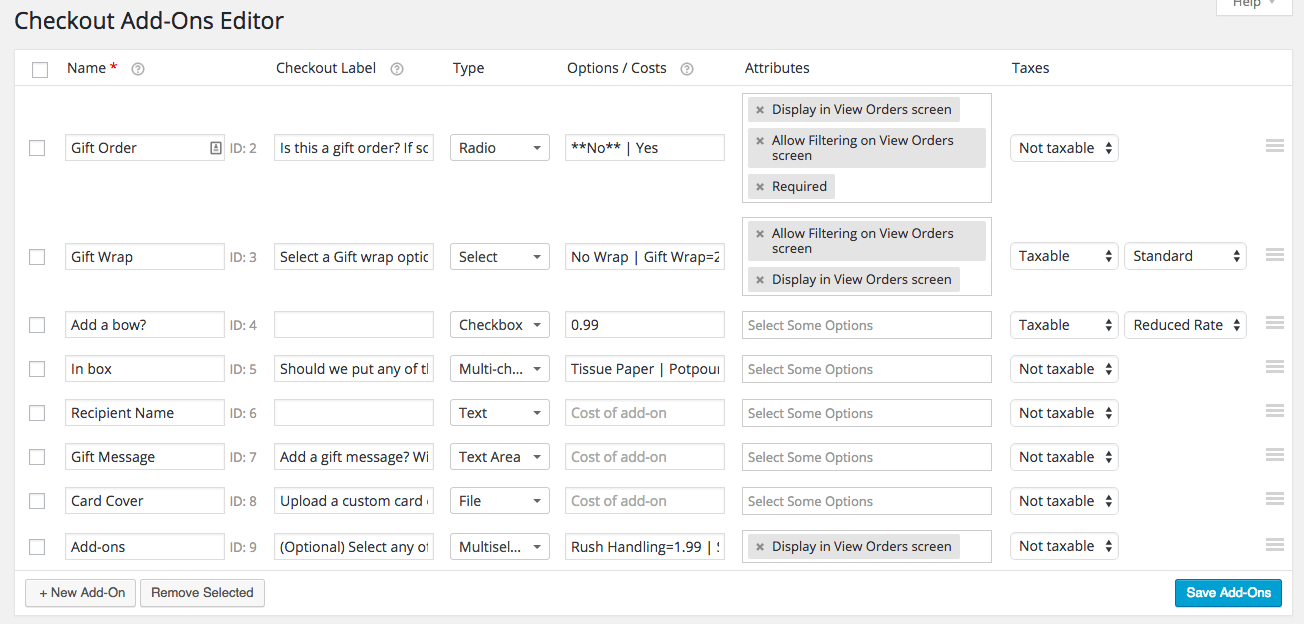
Adding checkout fields is easy from the new Checkout Add-ons Menu. Simply add your field name, optionally replace it with a descriptive label for the checkout page, determine field type, and whether the options should add a cost or be taxable. You can also determine whether or not to display this information on the “Orders” page and make it sortable or filterable.
Adding Checkout Fields
What Can Checkout Add-ons Do?
Add option fields for add-on services and products (without inventory management)
Optionally add costs for fields or selected options
Use amount or percentage-based fees NEW
Apply costs on a per-option basis
Dynamically update the order details and total on the checkout page as options are selected or changed
Saves selected options & uploads even if customers browse away from checkout!
Supports WooCommerce Subscriptions – A checkout add-on will add a one time charge to the initial purchase
Secure Payment Processing via Hosted Pay Page The Chase Paymentech Payment Gateway extension is an advanced payment integration for WooCommerce that provides powerful options for accepting payments via Chase. Let your customers securely save their credit card information to their WooCommerce account for fast and easy checkout. Includes full support for WooCommerce Subscriptions and Pre-Orders. Chase […]
Secure Payment Processing via Hosted Pay Page
The Chase Paymentech Payment Gateway extension is an advanced payment integration for WooCommerce that provides powerful options for accepting payments via Chase. Let your customers securely save their credit card information to their WooCommerce account for fast and easy checkout. Includes full support for WooCommerce Subscriptions and Pre-Orders.
Chase Paymentech requires merchants to complete individual certification with Chase, so a certification mode is included in this WooCommerce Chase Paymentech integration to help you complete this process.
Once certification is completed, you’ll benefit from a secure payment solution that fully utilizes Chase’s Hosted Pay Page technology, and can also keep customers on-site during checkout, improving trust and conversions for your store.
Why Chase Paymentech?
Accept Major Credit Cards / Debit Cards – Visa®, MasterCard®, American Express®, Discover®, and JCB
Process refunds / voids automatically from within WooCommerce NEW
Customers can securely save their payment method to their account for easier checkout
Customers can add saved payment methods without going through checkout NEW
Customer checkout experience is highly customizable for different themes; customers never leave your site during checkout
Capture authorized funds directly within the WooCommerce admin
Force charges for orders with only virtual items instead of authorizing them NEW
Accept payments from international customers (processed in USD)
Show detailed decline messages at checkout instead of generic orders NEW
Uses the Hosted Pay Page to maximize security, as payments are posted directly to Chase’s secure servers while customers appear to remain on-site
Seamless & Secure Checkout
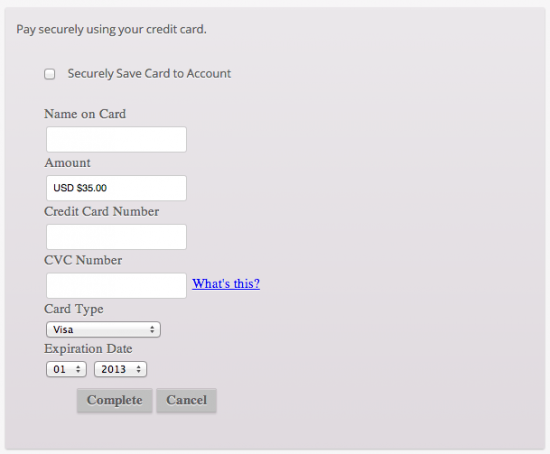
Using the Chase Paymentech extension allows you to decide what your checkout process will look like, while keeping the customer on your site for the entire process. Customize the pay page to optimize conversions for your business. Using a hosted payment page provides a seamless checkout process for the user and flexbility for the business owner.
Checkout Experience
You can now opt to show detailed decline messages to your customers, no more “an error occurred” error messages!
Detailed Decline Message
Support for Automatic Refunds & Voids
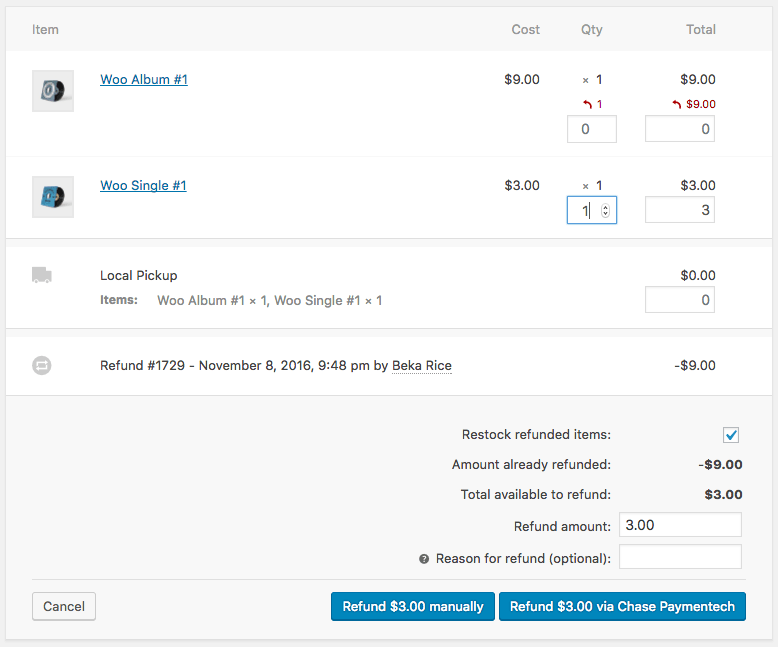
Shop employees can now process refunds for an order paid for with Chase Paymentech directly from within WooCommerce — no more logging into your merchant account to process refunds! Speed up your store management by creating full or partial refunds from the “Edit Order” screen and sending the transaction automatically to Chase Paymentech by clicking “Refund via Chase Paymentech”.
If the transaction has not been captured or settled, a transaction void will be performed automatically instead to cancel the order.
Capture Charges directly from WooCommerce
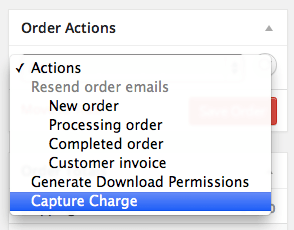
Some users choose to set the payment gateway to only authorize charges rather than authorize & capture them. However, this requires the user to then log into the payment gateway admin to capture charges. This extension allow you to optionally capture previously authorized transactions directly from the WooCommerce Edit Order screen rather than logging into your gateway control panel to do so. Simply edit the order, select the “Capture Charge” action, and charges will be captured through Chase.
Chase Capture Charge
Securely Save Customer Credit Cards
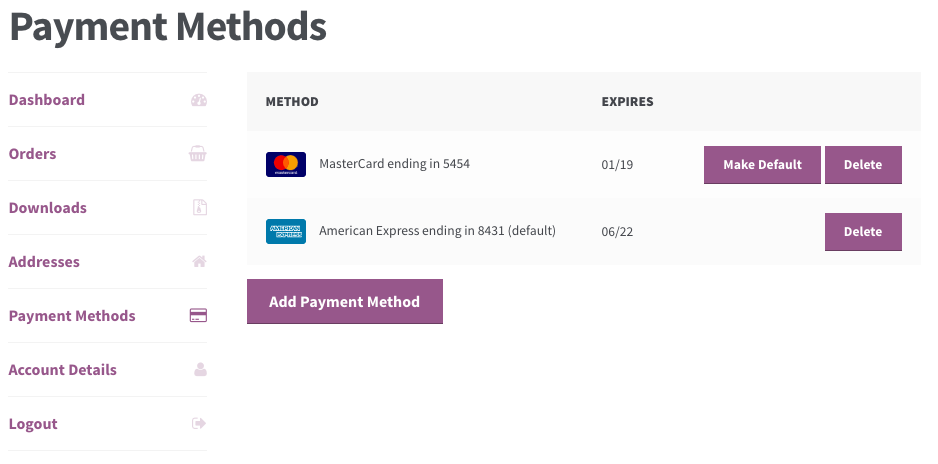
Customers can easily & securely save multiple credit cards to their account for faster checkout. Payment data is stored on Chase’s secure servers, so your PCI compliance requirements are significantly reduced. There’s no limit to the amount of credit cards a customer can store on their account. Customers can also select a default card and remove saved credit cards from the “My Account” page.
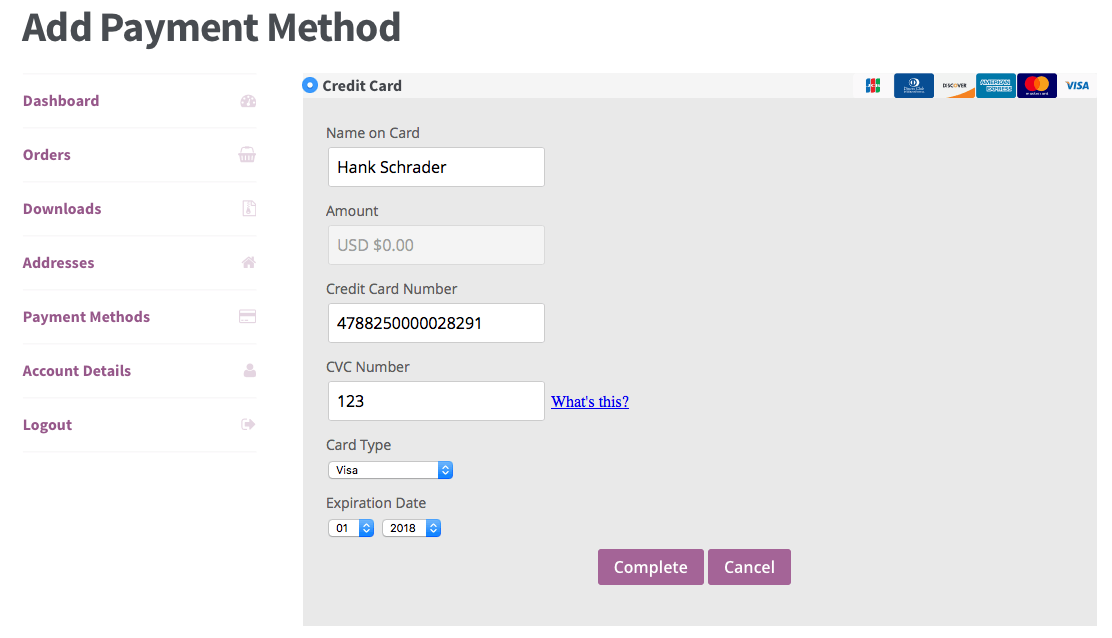
Customers can also change their active payment method, add payment methods, and remove payment methods from the My Account page. The “Add Payment Method” workflow is seamless and tokenizes card information for future use without requiring the customer to go through checkout!
Security Done Right
This gateway integration makes full use of all recommendations from Chase to maximize security. Credit card information is processed by Chase’s servers even though the customer remains on your site so that the integration is PCI compliant.
You don’t have to redirect customers to another site for checkout and you therefore reduce the chance that they’ll abandon the purchase, but can still maintain the highest levels of security and theme flexibility. Rest easy knowing that your transactions are under virtual lock and key.
Full Support for Subscriptions and Pre-Orders
Chase Paymentech is an ideal gateway for WooCommerce Subscriptions, offering support for all of Subscriptions features – payment date changes, subscription date changes, and more. The gateway also fully-supports WooCommerce Pre-Orders, so you can take customer’s payment information upfront and then automatically charge their payment method once the pre-order is released.
How to Get Started
Buy this extension
Download and install into your WooCommerce store
Log in to your Chase Virtual Terminal account (sign up here if you don’t have an account yet) and grab your test Merchant and Terminal IDs
Enter your store information for the Hosted Pay Page in your Chase account
Complete the certification test cases to get your production credentials.
Save your credentials in settings under WooCommerce > Settings > Payment Gateways
That’s it! Sit back and enjoy secure payment processing using Chase!
Need any more reason to buy? When you purchase a SkyVerge-developed extension, you’re getting the highest quality extensions for your WooCommerce store. Gain peace of mind by knowing that when you purchase our products, your store’s performance is as important to us as it is to you.
When someone buys a “main” product, they get all “chained” products automatically. Chained Products is your WooCommerce plugin to create pre-configured, discounted, automatic product bundles, forced sells, giveaways and combos. Thousands of people use it everyday – and consistently give it 5 star reviews We have all picked up discounted bundles of products when we […]
When someone buys a “main” product, they get all “chained” products automatically. Chained Products is your WooCommerce plugin to create pre-configured, discounted, automatic product bundles, forced sells, giveaways and combos.
Thousands of people use it everyday – and consistently give it 5 star reviews
We have all picked up discounted bundles of products when we go shopping. Even when we didn’t really need them; we have bought bigger quantities or multi-product bundles.
Offering a bundle of your products at a lucrative discount is one of the easiest method to grow sales – research has proven this across a variety of businesses – physical products, digital downloads or memberships.
Most Loved Features
Chained Products does one thing, and it does it really-really well. Here is what you can do with it.
Buy X, Get A, B, C, D…: Chain multiple products or additional quantities easily. When the main product is added to cart, all the linked products will be added to cart automatically. So yes, you can create “Buy One, Get X” or “Beginner Bundle” or “Everything for a Weekend trip” kind of products easily.
Individual Inventory Management: Inventories are managed at individual products that are chained. So no need to manage stock at “main” product level.
No Configuration For Customer: These are pre-configured product bundles. Customers can’t pick variation options or change bundle configuration. Makes it much easier for them.
Auto update “chained” products in past orders: When you update linked products in the main product, Chained Products can automatically add / remove products from historical orders. Works great for memberships and digital downloads.
High performance: Chained Products does not slow down your site or checkout process. Some of the largest WooCommerce stores use it, and you too can rely on its quality.
Easy to use: It’s super intuitive. Store admins and junior staff can easily create bundles using Chained Products – without needing developer assistance.
Genuine, Compatible, Regular Updates: You’re getting 100% genuine and original plugin when you buy today. Chained Products has been tested with popular other plugins and we keep improving it regularly. No risks here!
Why does Chained Products give stellar results?
There is certainly the “more bang for the buck” aspect. But chained product bundles also provide “works great with” and “get add-ons for free with main product” cross sell opportunities. They trigger fundamental human behavior to select an item with higher perceived value.
Plus: Chained Products works because it lets you create pre-configured product bundles and gifts. Customers don’t get confused picking options and focus their attention on the value a bundle generates for them. This improves conversion rates and greatly increases overall sales.
How does Chained Products work?
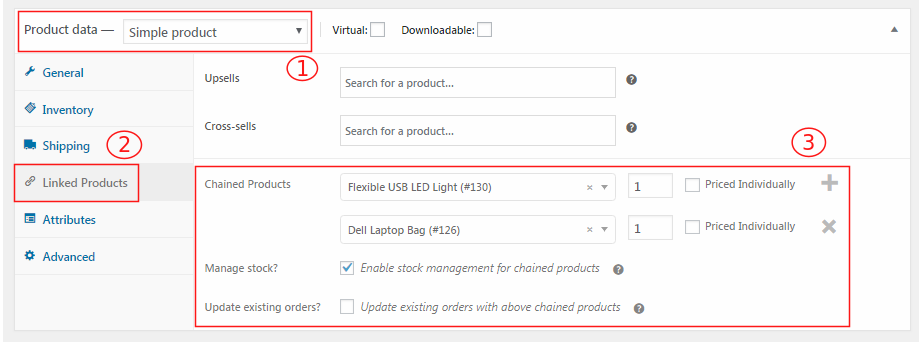
Edit a product (or create new) and go to the “Linked Products” tab.
Link as many products as you want to create a bundle. You can pick up variations and even select quantities.
This way you can create bundles as well as bulk discount offers – “Buy One Get One” / “Buy 1 Get X” / “Buy X For $$”
Now you can either set a price for your main product or you can configure chained products to be priced individually.
When people add the main product to cart, cart will show main product and all linked products with the prices configured. Zero if priced individually option is disabled else the chained product price.
When order is paid, Chained Products also takes care of managing inventory and granting access to digital downloads.
Transform WooCommerce into an online catalog by removing eCommerce functionality Wait, what? Remove eCommerce functionality? It may sound strange but when you think about it, if you take out the cart, checkout process and ‘buy now’ buttons, WooCommerce is actually the perfect platform upon which to showcase a catalog of products which aren’t currently for […]
Transform WooCommerce into an online catalog by removing eCommerce functionality
Wait, what? Remove eCommerce functionality? It may sound strange but when you think about it, if you take out the cart, checkout process and ‘buy now’ buttons, WooCommerce is actually the perfect platform upon which to showcase a catalog of products which aren’t currently for sale online. The added beauty of this solution is that when you do want to start selling, you can do so with the flick of a switch.
But this extension does much more than that. Rather than just taking the entire store offline, you also have the option restrict it to users who are logged in.
You can also configure messages to replace the price / add to cart button components or just remove them completely.
In a nutshell:
Provides the ability to hide prices, or show prices only to authenticated users.
Provides the ability to disable e-commerce functionality by disabling the cart.
Allows configuration of alternate price content, when prices are disabled or shown only to logged in users.
Allows configuration of alternate add-to-cart content, when e-commerce functionality is disabled or only available to authenticated users.
Hide pricing to comply with Minimum Advertised Price (MAP) rules.












 WPExclusive