WooCommerce Moneris Payment Gateway 2.12.1

WooCommerce Moneris Payment Gateway 2.12.1

WooCommerce Moneris Payment Gateway 2.12.1

Accept online payments using Moneris Why accept payments with just anyone when you can process them with one of Canada’s leading payment processors? Moneris processes more than 3 billion credit and debit card transactions a year, for over 350,000 merchant locations across North America. This extension brings quality service and processing for Canada to your WooCommerce store. […]

Accept online payments using Moneris

Why accept payments with just anyone when you can process them with one of Canada’s leading payment processors? Moneris processes more than 3 billion credit and debit card transactions a year, for over 350,000 merchant locations across North America. This extension brings quality service and processing for Canada to your WooCommerce store.

The Moneris extension allows you to keep the customer on your site for the checkout process, allowing you greater control over the checkout experience so that you can test and implement the most effective experience for your store. An SSL certificate is required for PCI compliance due to the direct checkout to ensure that your customers’ credit card information is secure.

Why Moneris?

  • Accept payments in Canadian dollars
  • Process refunds / voids automatically from within WooCommerce
  • Capture charges right from within the WooCommerce dashboard
  • Support “Hosted Tokenization” for a hosted and more secure checkout form
  • Updated payment form at checkout with retina icons NEW
  • Adds a mobile-friendly checkout with numerical inputs for card type and security code NEW
  • Show detailed decline messages at checkout instead of generic orders NEW
  • Allow customers to securely save cards to their accounts for future purchases
  • Customers can add saved payment methods to their accounts without going through checkout NEW
  • Supports eFraud tools / address and card verification
  • Fully supports WooCommerce Subscriptions
  • Fully supports WooCommerce Pre-Orders
  • Accept payments via Interac (no subscriptions / pre-orders support)
  • Force charges for orders with only virtual items instead of authorizing them NEW
  • Accepts Major Credit Cards / Debit Cards – Visa®, MasterCard®, American Express®, Discover®, Diner’s Club, JCB

Fraud prevention tools

The WooCommerce Moneris payment gateway extension features completely updated security checks and AVS / CVV handling for increased security. Shop owners can now completely customize address and card security code checks directly from their WooCommerce settings page for both AVS and CVV errors.

Direct on-page checkout

Using the Moneris extension allows you to decide what your checkout process will look like, while keeping the customer on your site for the entire process. This gives you maximum control over this experience, providing a seamless checkout process for the user and maximum customizability for the business owner.

You can also optionally use a hosted checkout field (Hosted Tokenization) if enabled in your Moneris account to gather credit card details. This reduces security risks, as it prevents credit card details from being passed through your servers. An SSL certificate is still required for maximum security.

WooCommerce Moneris Credit Card Checkout
Credit Card Checkout

Mobile checkout is enhanced as well, offering automated card formatting and numerical (tel type) fields for easier input.

WooCommerce SkyVerge Payment Gateway mobile checkout form
Mobile Credit Card Form

You can now opt to show detailed decline messages to your customers, no more “an error occurred” error messages!

WooCommerce Moneris detailed decline messages
Detailed Decline Message

Securely save payment details

Customers can easily & securely save multiple payment methods to their account for faster checkout, which are displayed in unified “My Payments” section of their account. Payment data is stored on Moneris’s secure servers to reduce your security burden while reducing friction at checkout for improved conversions. You must have tokenization enabled for your Moneris account by your Moneris rep.

WooCommerce Moneris saved payment methods
Customer saved payment methods

Customers can also change their active payment method, add payment methods, and remove payment methods from the My Account page. The “Add Payment Method” workflow is seamless and tokenizes card information for future use without requiring the customer to go through checkout!

WooCommerce Moneris: Add payment
Customer Add Saved Payment

Support for automatic refunds

Shop employees can process refunds for an order paid for with Moneris directly from within WooCommerce — no more logging into your merchant account to process refunds! Speed up your store management by creating full or partial refunds from the “Edit Order” screen and sending the transaction automatically to Moneris by clicking “Refund via Credit Card”.

WooCommerce Moneris: Refund support
Process Refunds

If the transaction has not been captured or settled, a transaction void will be performed automatically instead to cancel the order.

Full Subscriptions and Pre-Orders support

The Moneris credit card gateway now fully supports Subscriptions and Pre-Orders so that you can leverage recurring payments or pre-orders for your WooCommerce store. You must enable tokenization to use either of these extensions with the WooCommerce Moneris credit card gateway.

Please note that it is not possible to use Subscriptions or Pre-Orders with the Interac gateway.

Moneris Interac

Moneris supports Interac® as a second gateway when the plugin is activated, and can be configured with the same or different credentials from the credit card gateway. Interac cannot be used with Subscriptions or Pre-Orders.

WooCommerce Moneris Interac Checkout
Interac Checkout

Capture Charges directly from WooCommerce

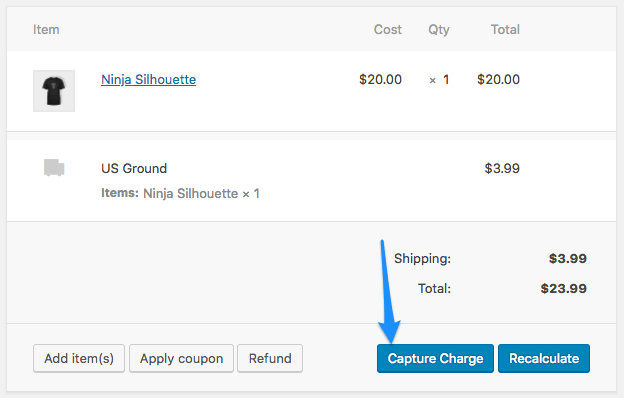
Some users choose to set the payment gateway to only authorize charges rather than authorize & capture them. However, this requires the user to then log into the payment gateway admin to capture charges. This extension allows you to optionally capture previously authorized transactions directly from the WooCommerce Edit Order screen rather than logging into your Moneris control panel to do so. Simply edit the order, select the “Capture Charge” action, and charges will be captured through Moneris.

WooCommerce Authorize.net AIM Payment Gateway Integration Capture Charge

https://ift.tt/2LVOLav

https://ift.tt/2qUDL66 https://ift.tt/36IlVmf

WooCommerce Mollie Payment Gateway 2.15.0

WooCommerce Mollie Payment Gateway 2.15.0

WooCommerce Mollie Payment Gateway 2.15.0

Accept Multiple Payment Methods with WooCommerce Mollie Process secure iDEAL, credit card, Mister Cash, bank transfers, PayPal, Belfius Direct Net, paysafecard, and SOFORT payments using WooCommerce Mollie. The new Mollie has been rewritten to take advantage of all payment processing services offered by Mollie, and still includes the ever-popular iDEAL payment method for use with banks in […]

Accept Multiple Payment Methods with WooCommerce Mollie

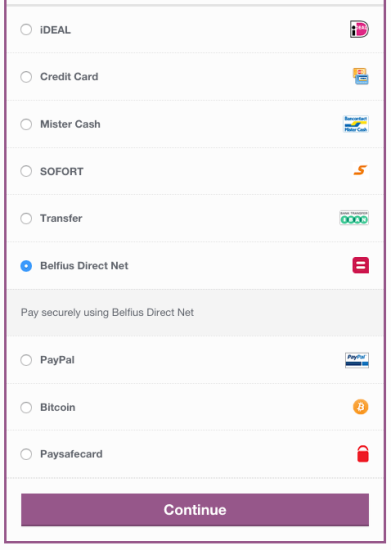
Process secure iDEAL, credit card, Mister Cash, bank transfers, PayPal, Belfius Direct Net, paysafecard, and SOFORT payments using WooCommerce Mollie. The new Mollie has been rewritten to take advantage of all payment processing services offered by Mollie, and still includes the ever-popular iDEAL payment method for use with banks in the Netherlands.

Because Mollie handles the payment processing for you, no SSL certificate is required on your site, and you don’t have to worry about PCI compliance. Customers select their favorite payment method at checkout, and are redirected to Mollie or their bank’s site to finish the payment process. You benefit from easy, secure payment processing, and improve customer satisfaction by offering multiple payment methods.

WooCommerce Mollie Payment Methods
Checkout Form

Why Choose WooCommerce Mollie?

  • Improve sales by offering customers their preferred payment method
  • iDEAL Works with ten large banks in NL
  • Process credit cards via Mollie
  • Use Mister Cash, the popular Belgian payment method
  • Let customers checkout using PayPal
  • Receive bank transfers within the SEPA zone via Mollie NEW
  • Accept paysafecard prepaid cards for online payments (popular for parents to purchase for children)
  • Accept payments via SOFORT for 11 countries
  • Accept payments via Belfius Direct Net NEW
  • Benefit from Mollie’s great fraud detection services
  • No security burden on your site for payment processing

Using iDEAL via WooCommerce Mollie

When an order is placed using iDEAL, the customer chooses the correct bank and is taken to iDeal to make a secure payment via Mollie. The actual payment then takes place in the familiar surroundings of the website of the bank so that buyer and seller are assured of a secure, transparent transaction with no hidden costs.

iDEAL works directly with ten large banks in the Netherlands: ING, ABN AMRO, Rabobank, SNS Bank, Regions Bank, Friesland Bank, Triodos, ASN Bank, Van Lanschot, and Knab to provide inexpensive, secure payment processing.

Using paysafecard with WooCommerce Mollie – NEW

Prepaid paysafecard cards are available at more than 110,000 points of sale in 37 countries, and paysafecard is one of the most popular prepaid cards for online payments (especially for parents purchasing for their children).

When the customer selects the paysafecard option on your website, a pop-up window appears and customers can enter the paysafecard code. After this code is entered in the pop-up window, the transfer amount will be deducted from the card. If necessary, an amount can be paid via multiple paysafecards.

https://ift.tt/2EmjSId

https://ift.tt/34t4ggx https://ift.tt/2RX5JcG

WooCommerce Mad Mimi Email Marketing 1.2.1

WooCommerce Mad Mimi Email Marketing 1.2.1

WooCommerce Mad Mimi Email Marketing 1.2.1

WooCommerce Mad Mimi Email Marketing is a WooCommerce Extensions being developed by Woothemes. WooCommerce Mad Mimi Email Marketing allows you to automatically add your customers to your Mad Mimi mailing lists when they purchase your products. Mad Mimi is email service that lets you create, send, share, and track emails. Over 100,000 businesses use Mad Mimi […]

WooCommerce Mad Mimi Email Marketing is a WooCommerce Extensions being developed by Woothemes. WooCommerce Mad Mimi Email Marketing allows you to automatically add your customers to your Mad Mimi mailing lists when they purchase your products.

WooCommerce Mad Mimi Email MarketingMad Mimi is email service that lets you create, send, share, and track emails. Over 100,000 businesses use Mad Mimi Email Marketing.

What is it you were looking for?

Examining, refining and streamlining our product offering is of paramount importance to us at WooCommerce. Retiring older products helps to ensure you receive the best possible offering across our various product ranges. Have a look at our latest themes and extensions or reach out via support.

https://ift.tt/38AbMK5

https://ift.tt/38Hg1Uf https://ift.tt/2PMFUJx

Woocommerce Local Pickup Plus 2.7.0

Woocommerce Local Pickup Plus 2.7.0

Woocommerce Local Pickup Plus 2.7.0

Offer Pickup for Any Product, Anywhere The built-in “Local Pickup” shipping method for WooCommerce allows your customers to come to you to pick up their purchased products. While this works great for stores with a single brick-and-mortar location, it poses large issues for stores with multiple locations or distribution centers. Local Pickup Plus provides a far […]

Offer Pickup for Any Product, Anywhere

The built-in “Local Pickup” shipping method for WooCommerce allows your customers to come to you to pick up their purchased products. While this works great for stores with a single brick-and-mortar location, it poses large issues for stores with multiple locations or distribution centers.

Local Pickup Plus provides a far more robust pickup system for retailers with multiple locations, distribution centers, or pickup sites. Provide pickup locations across the country (or in other countries!), limit pickup to certain items, restrict which products are available at a location, accept scheduled pickup dates, and more!

WooCommerce Local Pickup Plus pickup locations
Pickup Locations

Using Local Pickup Plus, your customers know exactly where to go to pick up their products, and you know where to expect them. Customers will see a list of available pickup locations for each product that can be picked up (or you can opt to only allow one pickup location per order), and can choose locations that that let them receive orders where they want them.

WooCommerce Local Pickup Plus cart

(See more cart options in the documentation.)

What does Local Pickup Plus add to WooCommerce?

  • Set up multiple pickup locations for the customer to choose a pickup location at checkout
  • Selected pickup location is displayed in customer’s Account – View Order page, order emails, and in Order Admin
  • Allow, require, or restrict pickup for individual products and product categories NEW
  • Determine if each product can be picked up at a different place, or if only one pickup location is available per order
  • If you allow per-item pickup locations, you can even limit which products are available at a location! NEW
  • Set costs or discounts for choosing pickup for a package
  • Export and import pickup locations via CSV NEW
  • Notify a list of email addresses when an order contains a pickup at a given location NEW
  • Define business days and hours to allow or require selecting a pickup date NEW
  • Compatible with several plugins, such as WooCommerce Customer / Order CSV ExportWooCommerce Customer / Order XML Export, and WooCommerce Print Invoices & Packing Lists NEW
  • Support for Google Maps Geocoding to sort locations by distance from customer NEW
  • Supports multiple shipping methods per order
  • Use the pickup location as the taxable address

Limit Pickup Location Products – NEW

Each pickup location can have its own settings for holidays, business hours, and more. However, there maybe greater differences between your locations, too, such as the stock each carries. If certain locations only carry certain products, you can limit which products are available for pickup at a given location.

WooCommerce Local Pickup Plus location products
Available Products

If a product is in the cart that’s not available at a location, that location is simply hidden from the list when the customer chooses where to pick up the item.

Note that you must allow pickup on a per-item basis to use this setting.

Fine-Tune Product Pickup Availability

Shipping large or hazardous items can be a huge pain for merchants, so you may want to require pickup for these items. With new selectors for product and category pickup availability, you can designate a product as requiring pickup, or a product that cannot be picked up (must be shipped).

WooCommerce Local Pickup Plus product pickup availability

Allow Scheduled Pickup Dates – NEW

Sometimes you’ll need to know when a customer is coming to get an order, or to inform them of when your location accepts pickups. Pickup Appointments allow you to set up business hours globally or on a per-location basis, along with holidays, lead time (prep time needed for a pickup), and deadline (maximum days allowed to schedule a pickup).

WooCommerce Local Pickup Plus Pickup Appointment Settings

https://ift.tt/35jFBMR

https://ift.tt/35oSuoY https://ift.tt/2YO5MZu

WooCommerce Lightspeed POS Integration 1.7.0

WooCommerce Lightspeed POS Integration 1.7.0

WooCommerce Lightspeed POS Integration 1.7.0

Connect WooCommerce to Lightspeed Retail and keep inventory in sync across both systems The Lightspeed Retail Point of Sale integration for WooCommerce enables your WooCommerce store and Lightspeed Point of Sale account to communicate and keep inventory in sync. When a new sale comes in via your Point of Sale system, stock quantities are updated […]

Connect WooCommerce to Lightspeed Retail and keep inventory in sync across both systems

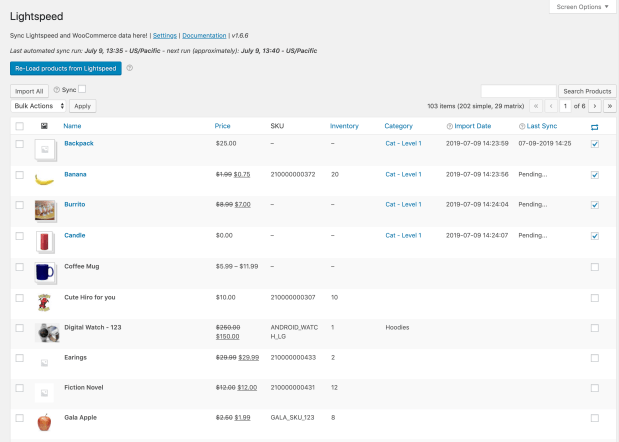
The Lightspeed Retail Point of Sale integration for WooCommerce enables your WooCommerce store and Lightspeed Point of Sale account to communicate and keep inventory in sync.

When a new sale comes in via your Point of Sale system, stock quantities are updated within WooCommerce. When a new order arrives via WooCommerce, your Lightspeed Retail account reflects the same inventory numbers.

Lightspeed WooCommerce POS Integration
Import your Lightspeed Retail inventory into WooCommerce.


https://ift.tt/38FnyTs

https://ift.tt/2qTlV3n https://ift.tt/2PR4KrC

WooCommerce Klarna Payment Gateway 2.5.13

WooCommerce Klarna Payment Gateway 2.5.13

WooCommerce Klarna Payment Gateway 2.5.13

Klarna is one of Europe’s largest banks and payment providers — currently connecting 60 million consumers to 100,000 merchants across 14 countries. Klarna delivers – Klarna is globally compliant. – Klarna absorbs all credit and fraud risk. – Klarna is widely supported across Europe. You benefit – You will see an increase in conversions and […]

Klarna is one of Europe’s largest banks and payment providers — currently connecting 60 million consumers to 100,000 merchants across 14 countries.

Klarna delivers

– Klarna is globally compliant.

– Klarna absorbs all credit and fraud risk.

– Klarna is widely supported across Europe.

You benefit

– You will see an increase in conversions and order value. – You will reach a new audience.

– You will always get paid.

Klarna Checkout lets you provide your customers with truly smoooth purchase experiences.

Our checkout is a seamless and mobile optimized solution that comes with all our payment methods through one a single integration. Klarna will improve your checkout experience by providing direct payments, pay after delivery options and instalment plans, that let consumers pay whenever and however they prefer. It identifies the customer and enables one-click repeat purchases across Klarna’s merchant network, resulting in increased average order value and conversion rates. You’ll have one agreement, one point of contact, one settlement file, one payout.

  • Mobile-optimised online checkout.
  • Management of all transactions including card and APMs.
  • One-click repeat purchases.


All payment methods included in Klarna Checkout.

Buy now,​ Pay later

Pay later in full is a deferred payment that gives shoppers an extra 14 or 30 days to try before they buy.

Spread the cost with ​Pay later in installments (available for UK & US)

Pay later lets you split your payment into four (US) or three (UK) smaller, interest-free amounts.

Pay over time with​ Slice it

Slice it offers long-term, monthly payments to make larger purchases possible for your customers.

Pay now​, with direct payments

Pay now accepts all direct payments for a fast, convenient checkout.

Do you want to know more? Take a look at the ​smoooth hand book ​to make sure you’re getting 100% from your Klarna products.

How to Get Started

  1. Sign up for Klarna Checkout: ​To offer your customers the benefit of paying with Klarna, you must first sign up for a Klarna account and gain access to the Klarna Merchant Portal. You’ll be up and running in no time with our new onboarding. If your business is registered in the United States please submit your contact details ​here.
  2. Install the plugin​ on your site. During this process you will be asked to download Klarna Order Management so you can handle orders in Klarna directly from WooCommerce.

Klarna Shipping Service in your Checkout

Klarna Shipping Service is a dynamic way of presenting shipping options. It helps merchants increase conversion and customer satisfaction at the point of purchase by making the selection of logistics products user friendly and efficient. With Klarna shipping service you don’t have to maintain your own shipping selector, freeing up a lot of time otherwise spent on technical maintenance.


Merchant portal access always included.

You will get access to a backend in which you can manage everything Klarna.

  •  Activate On-site Messaging, read more ​here​.
  •  See if you are eligible for financing Merchant lending, read more ​here​.
  •  Get valuable customer insights and see how you are performing.

On-site Messaging

Many people decide how they want to pay before they click the buy button. On-site marketing lets your customers know what their financing and payment options are before they enter the checkout. It is simple to integrate and provides tailored messaging ranging from generic banners to financing availability and personalised credit promotions on product or cart pages. The service also provides eligibility checks in supported markets. Activate on-site marketing through Merchant Portal.

Merchant Lending

https://ift.tt/2Pnl44j

https://ift.tt/2YPnPP2 https://ift.tt/2RPoqyS

WooCommerce KISSMetrics 1.14.0

WooCommerce KISSMetrics 1.14.0

WooCommerce KISSMetrics 1.14.0

Get Actionable Metrics for Your WooCommerce Store with Kissmetrics Add Kissmetrics tracking to your WooCommerce store with one click and start getting actionable metrics today. Easily build a customized dashboard that shows you the metrics you care about, visualize your checkout funnel with sales funnel reports, and watch visitors interact with your store in real-time. […]

Get Actionable Metrics for Your WooCommerce Store with Kissmetrics

Add Kissmetrics tracking to your WooCommerce store with one click and start getting actionable metrics today. Easily build a customized dashboard that shows you the metrics you care about, visualize your checkout funnel with sales funnel reports, and watch visitors interact with your store in real-time.

No need to manually add javascript and read through the Kissmetrics integration guides for hours – this plugin does all setup for event tracking for your store and sends the correct data to your Kissmetrics account.

Designed for Kissmetrics

Kissmetrics is the premier analytics tool that shows you actionable metrics for your business. Use this extension to integrate Kissmetrics with your WooCommerce store and save 20+ hours (and guaranteed headache) in setup time! If you don’t already have a Kissmetrics account, sign up for Kissmetrics — free for 14 days.

Kissmetrics dashboard – drag and drop metrics to display only the ones you need.

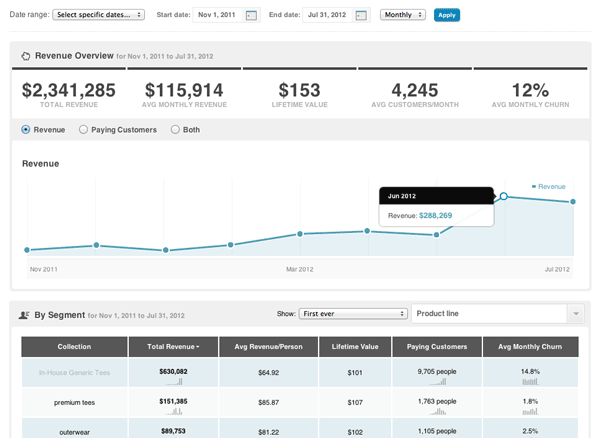
Get Insight into Revenue

Track your revenue over time and easily segment by product, category, and more. See the average number of customers over time combined with average revenue per customer to give you better insight into how your store is performing.

WooCommerce KissMetrics Revenue
Get better insight into your revenue by segmenting it over time and category.

Visualize Your Sales Funnel

See the percentage of people in each step of your checkout funnel so you can improve your checkout process. You can even segment the sales funnel by category or product!

Improve your sales funnels to increase your store’s revenue.

Real-Time Analytics

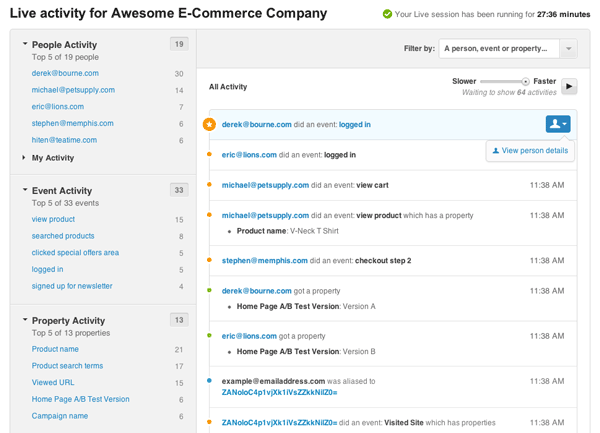
Running a one-day sale or advertising campaign and want to see how your customers are using your site? Use the built-in Live view within Kissmetrics to see activity on your site in real time.

WooCommerce KissMetrics Live Screenshot
Watch customers interact with your store in real-time.

Powerful Customization

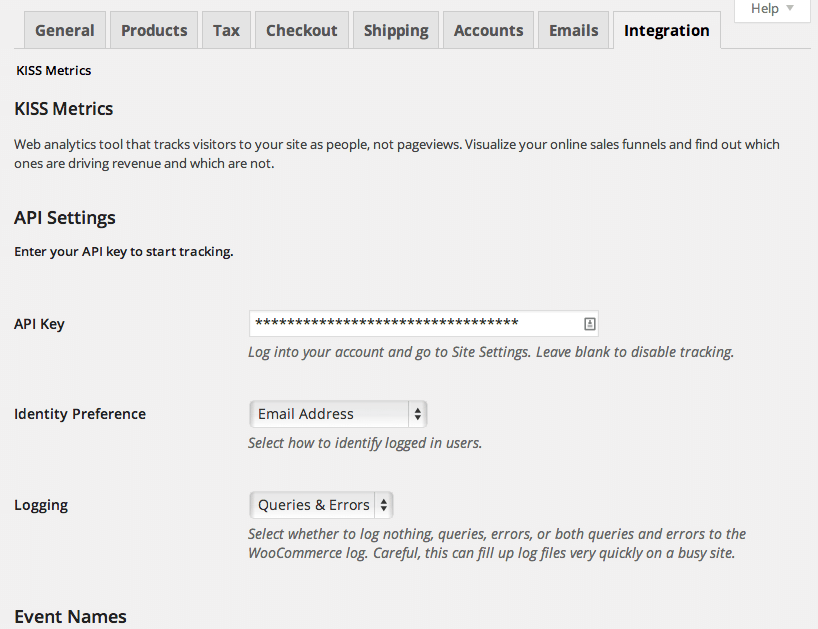
All event and property names are customizable through the admin interface and can be individually disabled. Customers are automatically aliased to their WordPress username or email address when logging in. Custom events can be tracked by adding a snippet to your theme.

WooCommerce KISSmetrics integration admin settings
Already using Kissmetrics? Easily customize the event and property names sent to match your existing data.

Supports WooCommerce Subscriptions

Selling subscriptions on your store? Great! Get insight into your subscribers by automatically tracking when subscriptions are activated, suspended, cancelled, renewed, and even when free trials expire. Kissmetrics can then display churn rate, average subscription length, and your cancellation rate without any extra configuration required.

When WooCommerce Subscriptions is active, this plugin automatically adds the appropriate Subscription events to your tracking data.

https://ift.tt/34mLhEr

https://ift.tt/2RTd7pj https://ift.tt/2RVyZQS

WooCommerce jPlayer Product Sampler 1.4.1

WooCommerce jPlayer Product Sampler 1.4.1

WooCommerce jPlayer Product Sampler 1.4.1

WooCommerce jPlayer Product Sampler is a WooCommerce Extensions being developed by Woothemes. WooCommerce jPlayer Product Sampler enables your customers to preview digital music and video files before they buy them. What is it you were looking for? Examining, refining and streamlining our product offering is of paramount importance to us at WooCommerce. Retiring older products helps to […]

WooCommerce jPlayer Product Sampler is a WooCommerce Extensions being developed by Woothemes. WooCommerce jPlayer Product Sampler enables your customers to preview digital music and video files before they buy them.

What is it you were looking for?

Examining, refining and streamlining our product offering is of paramount importance to us at WooCommerce. Retiring older products helps to ensure you receive the best possible offering across our various product ranges. Have a look at our latest themes and extensions or reach out via support.

https://ift.tt/2PlTip4

https://ift.tt/30J29Ux https://ift.tt/35oyqmE

WooCommerce Ipay88 Gateway 1.3.2

WooCommerce Ipay88 Gateway 1.3.2

WooCommerce Ipay88 Gateway 1.3.2

Take payments on your WooCommerce store via iPay88 iPay88 is a leading eCommerce payment provider in South East Asia. Using iPay88 gateway you can accept payments via Credit cards, Debit cards, Bank account transfers, and alternative payments. Merchants can also accept payments in different currencies like Malaysian Ringgit(MYR), US Dollar (USD), Yuan Renminbi (CNY), Euro […]

Take payments on your WooCommerce store via iPay88

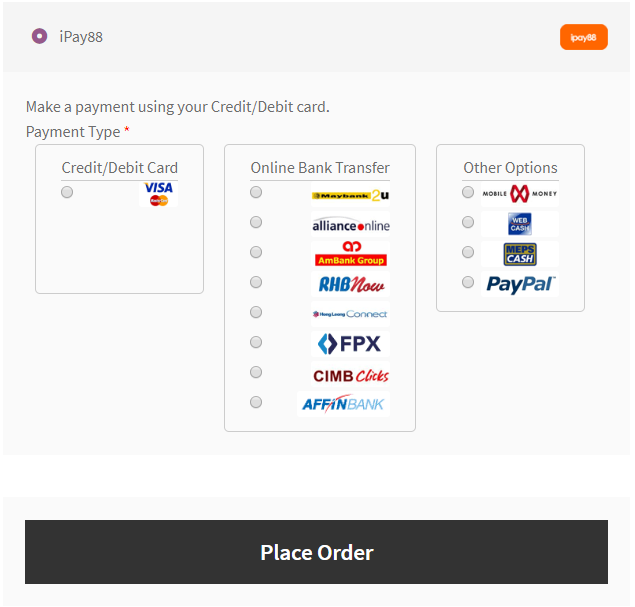
iPay88 is a leading eCommerce payment provider in South East Asia. Using iPay88 gateway you can accept payments via Credit cards, Debit cards, Bank account transfers, and alternative payments. Merchants can also accept payments in different currencies like Malaysian Ringgit(MYR), US Dollar (USD), Yuan Renminbi (CNY), Euro (EUR), Pound Sterling (GBP) and more.

Features:

  • Accept all Major Credit Cards – Visa®, MasterCard®
  • Accept Direct Debit payments
  • Accept payments with alternative payment methods like Alliance Online (ALB), Maybank2u (M2U), RHB Online (RHB), Hong Leong Online (HLB), Bank Islam Online – via FPX, Ambank Online (AMB,  Mobile Money, Paypal, Meps Cash and more.
  • Full-redirect payment process
  • iFrame payment process

SSL certificate is not required but strongly recommended.

https://ift.tt/2YREQYN

https://ift.tt/36CVP3O https://ift.tt/35q2QEZ

WooCommerce Intuit Payments/QBMS Gateway 2.6.0

WooCommerce Intuit Payments/QBMS Gateway 2.6.0

WooCommerce Intuit Payments/QBMS Gateway 2.6.0

Easily and Securely Accept Credit Cards via Intuit The Intuit Payment Gateway extension provides an advanced payment integration for WooCommerce while providing the security and reliability that comes with using Intuit for payment processing. This extension supports merchants using an Intuit Payments account for eCommerce processing. Intuit Payments provides increased security in payment processing, as […]

Easily and Securely Accept Credit Cards via Intuit

The Intuit Payment Gateway extension provides an advanced payment integration for WooCommerce while providing the security and reliability that comes with using Intuit for payment processing. This extension supports merchants using an Intuit Payments account for eCommerce processing.

Intuit Payments provides increased security in payment processing, as customer credit card information is tokenized before being sent through your server, meeting the lower level PCI SAQ A-EP compliance level. The customer doesn’t see a difference in the checkout process, but payment data is more secure behind the scenes.

Let your customers save their credit cards and bank accounts to their WooCommerce account for fast and easy checkout. Includes full support for WooCommerce Subscriptions!

WooCommerce Intuit Payments Credit Card form
Credit Card form

The Intuit Payment Gateway extension allows you to keep the customer on your site for the checkout process, allowing you maximum control over checkout so that you can test and implement the most effective experience for your store. An SSL certificate is required for PCI compliance due to the direct checkout to ensure that your customers’ credit card information is secure.

Why Use Intuit Payments

  • Process refunds / voids automatically from within WooCommerce
  • Capture prior authorized transactions right from the WooCommerce edit order screen
  • Force charges for orders with only virtual items instead of authorizing them NEW
  • Automatically capture transactions when order status changes to a paid status NEW
  • Full Support for WooCommerce Subscriptions
  • Full support for WooCommerce Pre-Orders
  • Customers can securely save their payment method to their account for easier checkout
  • Supports Intuit Payments client-side tokenization for improved security, meeting PCI SAQ A-EP compliance standards NEW
  • Accepts eChecks with Intuit Payments account NEW
  • Updated payment form at checkout with retina icons
  • Adds a mobile-friendly checkout with numerical inputs for card type and security code
  • Customers can add saved payment methods to their accounts without going through checkout
  • Customers can add a nickname for a saved payment method to make checkout even smoother NEW
  • Show detailed decline messages at checkout instead of generic errors
  • Customers never leave your site during checkout
  • Accept Major Credit Cards / Debit Cards – Visa®, MasterCard®, American Express®, Discover®, Diner’s, JCB

Simple, Integrated Checkout

Using the Intuit Payment Gateway extension allows you to decide what your checkout process will look like, while keeping the customer on your site for the entire process. This gives you maximum control over this experience, providing a slick checkout process for the user and maximum customizability for the business owner.

WooCommerce SkyVerge gateways saved methods with nicknames
Using Saved Cards

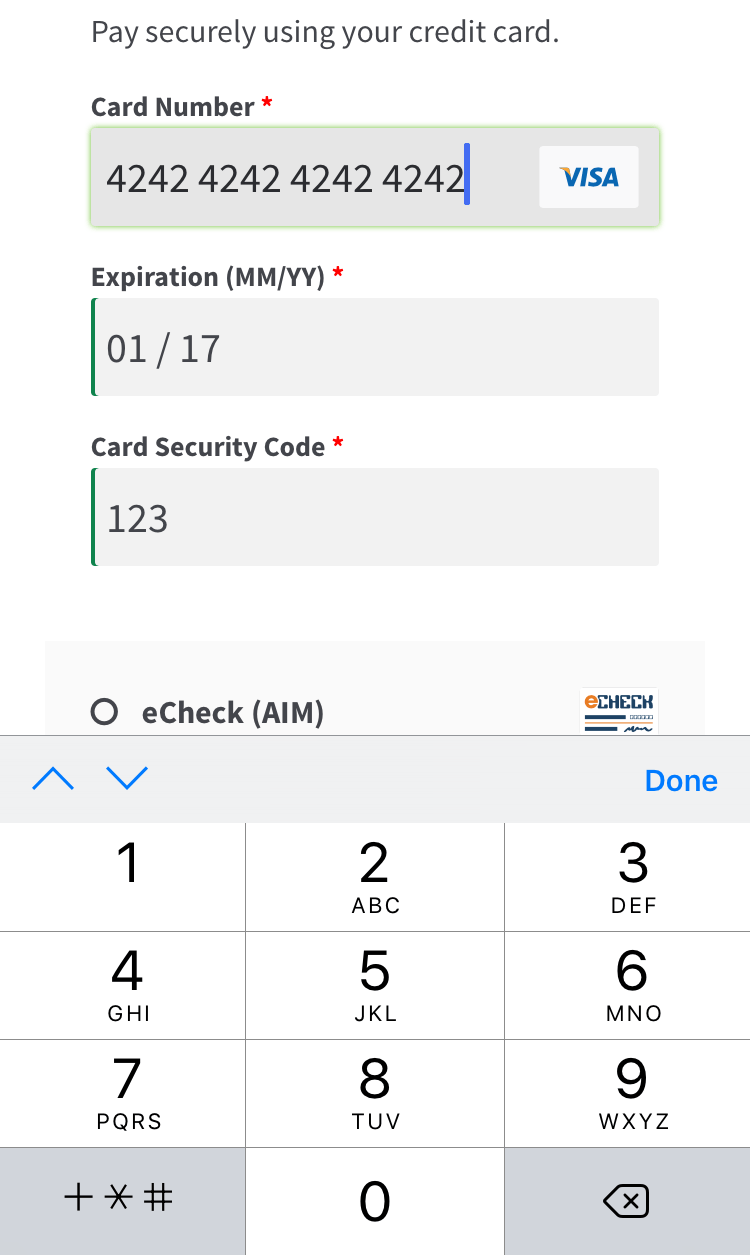
Mobile checkout is enhanced as well, offering automated card formatting and numerical (tel type) fields for easier input.

WooCommerce SkyVerge Payment Gateway mobile checkout form
Mobile Credit Card Form

You can now opt to show detailed decline messages to your customers, no more “an error occurred” error messages!

WooCommerce Intuit Payments detailed decline messages
Detailed Decline Message

Support for Automatic Refunds & Voids – NEW

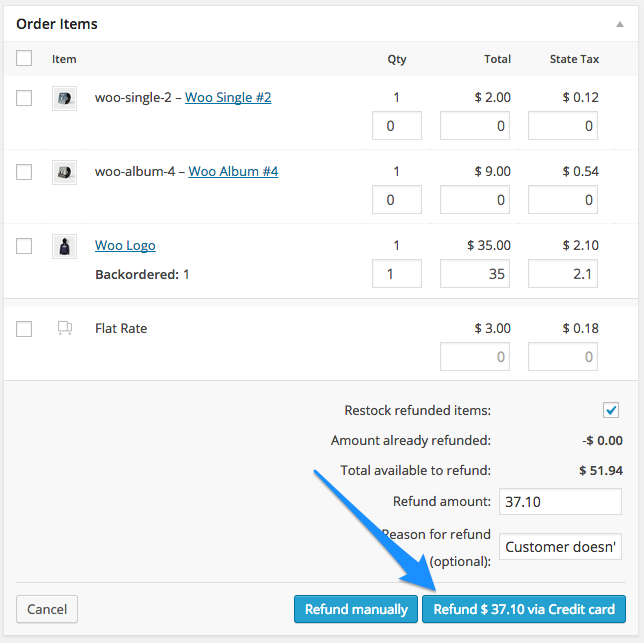
Shop employees can now process refunds for an order paid for with Intuit Payments directly from within WooCommerce — no more logging into your merchant account to process refunds! Speed up your store management by creating full or partial refunds from the “Edit Order” screen and sending the transaction automatically to Intuit by clicking “Refund via Credit Card”.

WooCommerce Begin Automatic Credit Card Refund

If the transaction has not been captured or settled, a transaction void will be performed automatically instead to cancel the order.

Securely Save Customer Payment Methods

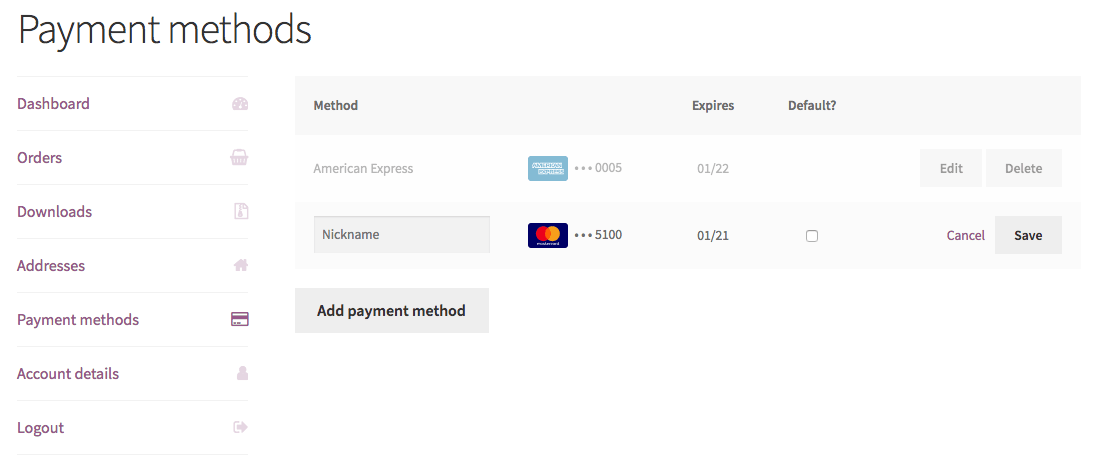
Customers can easily & securely save multiple payment methods to their account for faster checkout, which are displayed in unified “My Payments” section of their account. Payment data is stored on Intuit’s secure servers, so your responsibility for PCI compliance is significantly reduced. There’s no limit to the number of payment methods a customer can store on their account, and both credit cards and eChecks are supported.

WooCommerce Intuit Payments enhanced saved payment methods
Saved payment methods

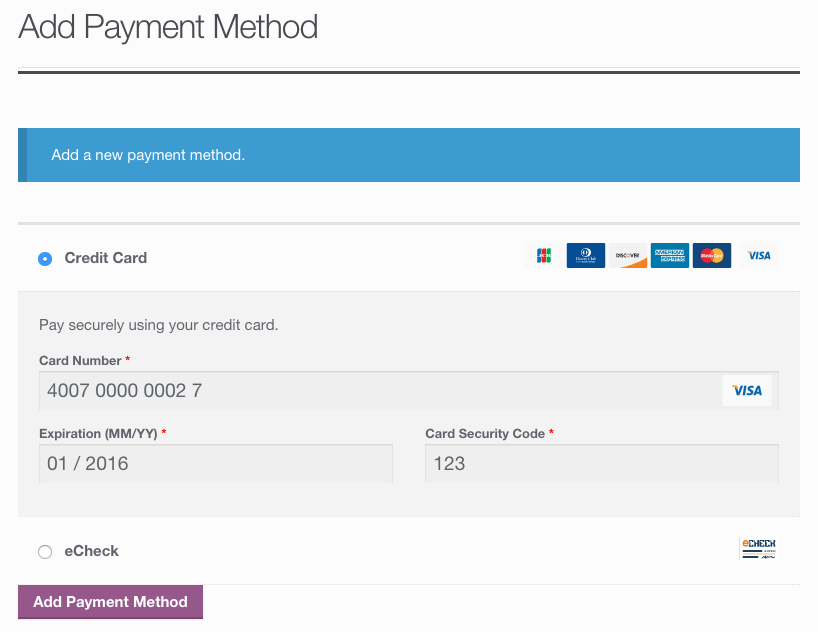
Customers can also change their active payment method, add payment methods, and remove payment methods from the My Account page. The “Add Payment Method” workflow is seamless and tokenizes card information for future use without requiring the customer to go through checkout!

WooCommerce Intuit Payments: Add payment
Customer Add Saved Payment

Full Support for Subscriptions and Pre-Orders

Intuit Payments is an ideal gateway for WooCommerce Subscriptions, offering support for all of Subscriptions features – payment date changes, subscription date changes, and more. The gateway also fully-supports WooCommerce Pre-Orders, so you can take customer’s payment information upfront and then automatically charge their payment method once the pre-order is released.

Intuit Payments eChecks – NEW

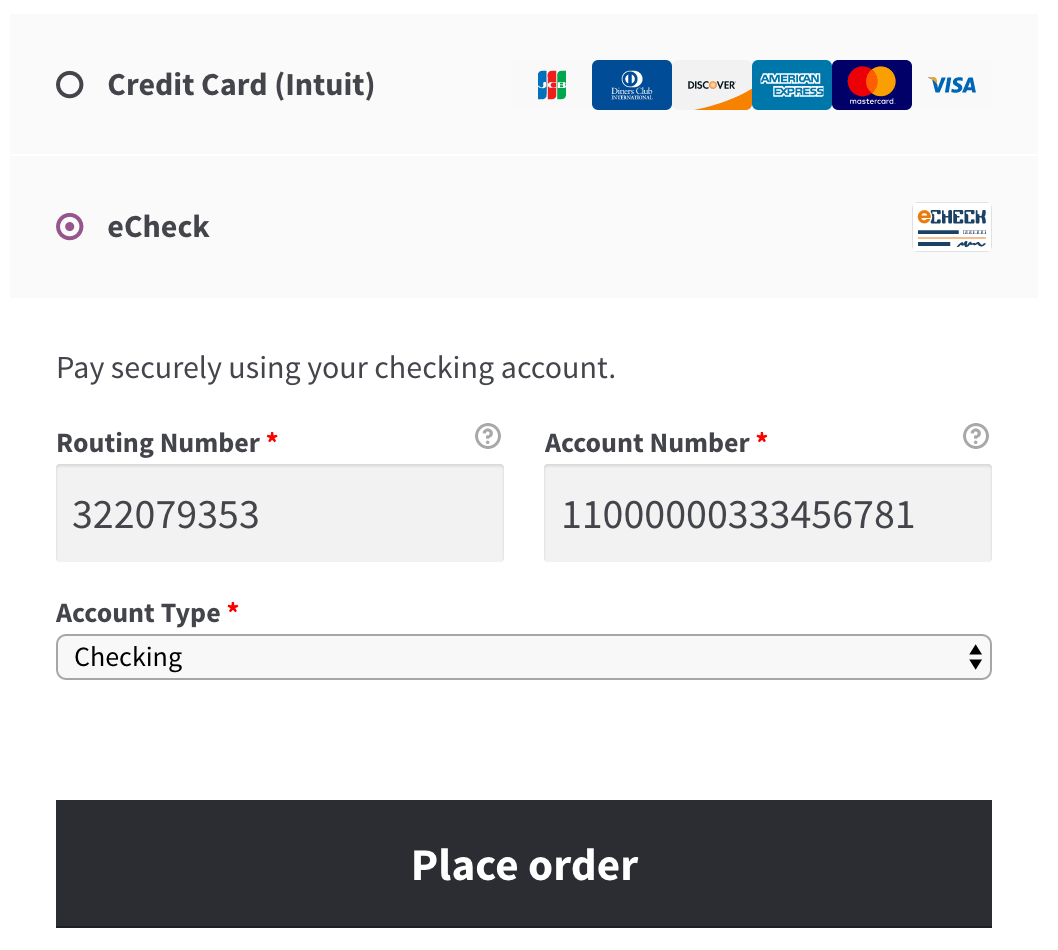
Customers with US bank accounts can checkout using their bank account information for a checking or savings account. To use this feature, you must have eChecks enabled for your Intuit Payments account.

WooCommerce Intuit Payments eCheck form
eCheck form

Capture Charges directly from WooCommercehttps://woocommerce.com/products/intuit-qbms/

Some users choose to set the payment gateway to only authorize charges rather than authorize & capture them. However, this requires the user to then log into the payment gateway admin to capture charges. This extension allow you to optionally capture previously authorized transactions directly from the WooCommerce Edit Order screen rather than logging into your gateway control panel to do so. Simply edit the order, select the “Capture Charge” action, and charges will be captured through Intuit.

WooCommerce SkyVerge gateway capture charges

https://ift.tt/34knhC4

https://ift.tt/35nVx0D https://ift.tt/2sv767u