WooCommerce Order Barcodes Developed by WooCommerce Generate a unique barcode for each order. WooCommerce Order Barcodes generates unique barcodes for every order placed on your site. These barcodes can be used on e-tickets, e-reservations, packing slips or anything else that would benefit from having a scannable barcode attached to it. Barcodes can be created as one […]
WooCommerce Order Barcodes
Developed by WooCommerce
Generate a unique barcode for each order.
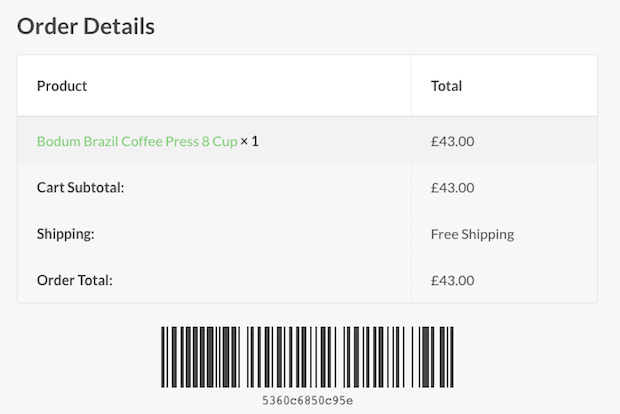
WooCommerce Order Barcodes generates unique barcodes for every order placed on your site. These barcodes can be used on e-tickets, e-reservations, packing slips or anything else that would benefit from having a scannable barcode attached to it.
Barcodes can be created as one of five different types (from standard barcodes to QR codes) and can be scanned and processed directly on your site. Customers will receive their barcodes by email so they can be easily printed out where necessary.
Store owners will also be able to view and print out barcodes.
Using the built-in barcode scanner, you can quickly complete orders or check customers in – this allows you to use the barcode as a robust (yet simple) e-ticket solution for any type of event, booking or reservation.
One Page Checkout Features One Page Checkout makes it possible to turn any page into a checkout page. It also makes it easier for your customers to buy from these custom checkout pages by displaying both product selection and checkout forms on a single page. Customers can add or remove products from their cart and […]
One Page Checkout Features
One Page Checkout makes it possible to turn any page into a checkout page. It also makes it easier for your customers to buy from these custom checkout pages by displaying both product selection and checkout forms on a single page.
Customers can add or remove products from their cart and complete payment without leaving the page and waiting for a new page to load.
Checkout fields can also be displayed on a single product’s page, or you can add the field to custom landing pages for unique promotions. It’s easy to create a single page checkout, and once you do, it’s even easier for your customers to purchase the products on that page.
Product Selection + Checkout
One Page Checkout displays product selection and checkout forms on a single page. Customers can add products to an order (or remove them) and complete payment without leaving the page.
Custom Landing Pages
Create unique landing pages for special events, promotions or select customers. Add the shortcode to any page (or post) and add your content above the shortcode to display unique sales copy before the purchase process.
Product Type Support
One Page Checkout integrates with more than a dozen extensions so you can sell subscriptions, bookings, bundles and many other unique product types.
Simple Code-Free Setup
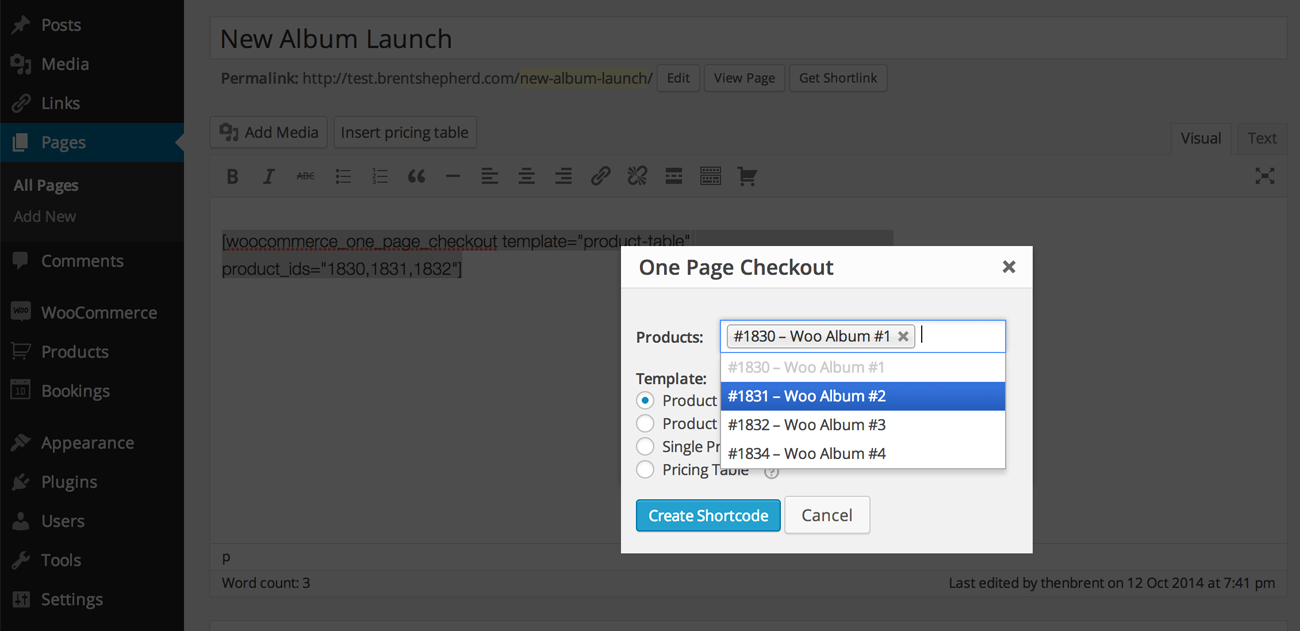
Checkout pages can be created using the graphical interface added to the classic WordPress editor. Each Product page can also become a checkout page by clicking a single checkbox.
Curated Products
You choose the products to display on each checkout page. Create a page for just the one featured product, a few related products for a promotion, or your store’s entire catalog if your store has just a few products.
Built-in & Custom Templates
One Page Checkout includes several built-in templates, including a simple pricing table and list of products. Choose the template most suited to your page or if the built-in templates don’t fit your needs, create a custom template.
Sell More with Simpler Checkout
Whether you’re selling services, like personal training, or physical goods, like a monthly candy subscription box, if you’re selling with WooCommerce, One Page Checkout can help you sell more.
Allowing your customers to purchase on a single page gives them a faster checkout experience, with less interruption. That means more sales, and more happy customers for your business.
How to Get Started
Buy this extension
Download, install, and activate the plugin in your WooCommerce store
WooCommerce Ingenico (Ogone platform) Accept multiple payment channels with Ingenico (Ogone Platform) payment services. WooCommerce Ingenico (Ogone Platform) is a gateway plugin that allows you to accept many international and local payment methods so that your customers can choose their preferred payment method, helping you to improve conversions and customer satisfaction. This is especially useful […]
WooCommerce Ingenico (Ogone platform)
Accept multiple payment channels with Ingenico (Ogone Platform) payment services. WooCommerce Ingenico (Ogone Platform) is a gateway plugin that allows you to accept many international and local payment methods so that your customers can choose their preferred payment method, helping you to improve conversions and customer satisfaction. This is especially useful for international sellers who’d like to offer customers’ preferred payment method.
Ingenico is supported in several countries, including the US, Belgium, France, Netherlands, Austria, Germany, Luxembourg, Switzerland, and the United Kingdom. This integration will redirect payments through Ingenico’s secure servers so that you don’t have to worry about security while processing payments in your store, and therefore an SSL is not required.
Why Choose Ingenico (Ogone Platform)?
Accept over 40 local and international payment methods via Ingenico
Avoid security requirements by routing payments through Ingenico’s servers
Easily add more payment methods as needed
Customize your pay page
Accepts Major Credit Cards / Debit Cards, including: Visa®, MasterCard®, American Express®, Maestro®, Diner’s Club
Excellent Merchant Services
Ingenico provides a versatile suite of reporting tools to make it easy to monitor and manage all your multi-channel payments in one account. They also use modular approach, so you start with only what you need today and can add payment methods, channels, and enhanced functionality as your business develops.
How to Get Started (in 5 minutes or less)
Buy this extension
Download and install into your WooCommerce store
Login to your Ingenico (Ogone Platform) account (sign up a free test account if you don’t already have an account) and grab your SHA-in/out credentials.
Save this information on the settings page
That’s it! Sit back and enjoy secure payment processing!
Need any more reason to buy? When you purchase a SkyVerge-developed extension, you’re getting the highest quality extensions for your WooCommerce store. Gain peace of mind by knowing that when you purchase our products, your store’s performance is as important to us as it is to you.
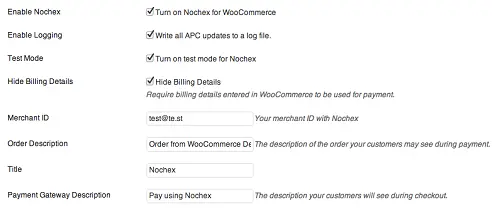
WooCommerce Nochex UK Gateway is a WooCommerce Extensions being developed by Woothemes. WooCommerce Nochex UK Gateway allows your WooCommerce store take a payment via Nochex. Nochex is the leading independent British online payment company for UK-based smaller online businesses and start-ups with easy to use, Internet payment solutions.
WooCommerce Nochex UK Gateway is a WooCommerce Extensions being developed by Woothemes. WooCommerce Nochex UK Gateway allows your WooCommerce store take a payment via Nochex.
Nochex is the leading independent British online payment company for UK-based smaller online businesses and start-ups with easy to use, Internet payment solutions.
Turn Your First-Time Customers into Recurrent Clients The best newsletter list to care about is the one that has all your past clients in it. Sharing content and special sales to reactivate all your past customers surely pays off as it takes up to 7 times less money to make a customer repeat a purchase […]
Turn Your First-Time Customers into Recurrent Clients
The best newsletter list to care about is the one that has all your past clients in it. Sharing content and special sales to reactivate all your past customers surely pays off as it takes up to 7 times less money to make a customer repeat a purchase than to obtain a new one.
With WooCommerce Newsletter Subscription you may integrate into your checkout a checkbox that allows your customers to subscribe to the mailing list of your choice with one click. Moreover, you can configure a widget that will place a signup form in your sidebar or any other widget area.
You can also take a look at your stats in no time with our simple yet effective dashboard widget. MailChimp, MailPoet (Version 2) and Campaign Monitor are all supported mailing clients.
Why use Newsletter Subscription?
Gather your next recurrent customers in one mailing list that you can target with promotions and other actions to increase your sales.
Integrates smoothly into your checkout.
Create a new sales channel with people already interested in you in no time.
Dashboard widget with the main statistics you need to keep track of your performance.
MailChimp, MailPoet (Version 2) and Campaign Monitor are supported.
Easy to Get Subscribed, Easy to Manage
Newsletter Subscription allows the customer to subscribe to the mailing list of your choice with one click in case of the checkout checkbox and by only manually including the email in case of the subscribing widget.
Check your numbers with a minimalistic dashboard that keeps you updated about the current trends and total subscribers of your mailing list.
MailChimp Ecommerce360
The newsletter subscription extension supports MailChimp’s Ecommerce360 service which allows you to gather further analytics on your email campaigns with regards to purchases.
Automatically calculate shipping rates for New Zealand orders PLEASE NOTE: This plugin is the product of OPMC and is not associated with New Zealand Post. New Zealand Post is not able to assist with any support or inquiries on this product. Any customer service requests must be directed only to OPMC. The New Zealand Post Group offers […]
Automatically calculate shipping rates for New Zealand orders
PLEASE NOTE: This plugin is the product of OPMC and is not associated with New Zealand Post. New Zealand Post is not able to assist with any support or inquiries on this product. Any customer service requests must be directed only to OPMC.
The New Zealand Post Group offers services to help New Zealand run, connecting people, businesses and communities. This plugin lets you offer New Zealand Post rates to your customers which are pulled directly from their API.
When a customer enters their shipping information, the cost of the order’s shipping is calculated using the weight and dimensions of the product(s). This returns the correct shipping rate for the customer.Save time manually calculating shipping costs and avoid unexpected shipping costs.
The extension requires that your store uses NZ Dollars currency and New Zealand as the base country. It primarily works with mm and kg, but other units can be converted automatically.
Calculate domestics and international shipping rates for NZ packages.
NZ Post can calculate rates worldwide, or domestic:
DOMESTIC
INTERNATIONAL
ParcelPost
ParcelPost Fast
ParcelPost Tracked
Courier
International Express Courier
International Economy Courier
International Air
International Economy
Add handling fees or offer shipping discounts
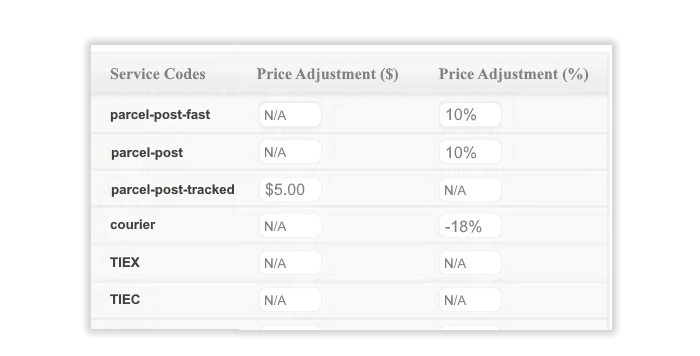
Easily adjust the pricing of your shipping rates from the plugin’s settings. Increase the costs for each service by a dollar or percentage amount.
Specify custom box sizes
Specify the size, maximum weight and dimensions of the boxes you use to ship products. Items will automatically be added to these boxes depending on their dimensions or weight.
Show Your Shop Catalog by Category and Subcategory The WooCommerce Nested Category Layout extension allows you to show products organized by category and sub-category on the shop and catalog pages. By breaking products up by subcategory, this plugin provides an intuitive and attractive catalog layout that your customers will appreciate. Here are before and after shots of […]
Show Your Shop Catalog by Category and Subcategory
The WooCommerce Nested Category Layout extension allows you to show products organized by category and sub-category on the shop and catalog pages. By breaking products up by subcategory, this plugin provides an intuitive and attractive catalog layout that your customers will appreciate. Here are before and after shots of the shop page using Nested Category Layout:
Before
After
WooCommerce typically allows you to show subcategories on shop and category pages (or subcategories and products, but this can look messy). While this is a handy option, it requires that customers click on categories, then subcategories to simply browse products and looks like this:
Default WooCommerce Category View
However, the more barriers you put in the way of finding a product or purchasing, the more likely customers are to leave your site, so we’ve sought to fix that with this plugin. Nested Category Layout cleans this process up and makes it simpler for the user. Instead of requiring customers to click through categories, then subcategories to get to products, it simply creates list on the shop and/or category pages organized by category / subcategory, then allows customers to click a category / subcategory title if they want to see more products.
You can select which categories to nest and which to display normally and determine whether to show this layout on shop pages and category pages, or just on category pages. Want to see this in action? You can check out the Demo Shop that has the plugin running to get a feel for how the shop and catalog pages are changed.
What does Nested Category Layout do?
Increase customer satisfaction and sales with an intuitive layout that separates products by subcategory
Select which category pages to alter, and which to render as normal
Easily configure the number of products per subcategory to display on the shop and catalog pages
Known compatibility with WooCommerce Themes and the Genesis Framework
Flexible, overrideable architecture allows customization and support for additional themes and frameworks
Flexible Display
Don’t have a category for a product? No problem – Nested Category Layout will show these products at the top of the page, then show your categories and subcategories. If a product is in both the parent category and a subcategory, it will be displayed with the appropriate subcategory. If a product is only in a parent category, then it will be displayed in the parent category before subcategories are shown (like this):
How to Get Started
Purchase and download the extension
Upload and install into your WooCommerce store
Go to WooCommerce > Settings > Products and configure your options
Organize products into categories and subcategories
That’s it! Sit back and enjoy a flexible, intuitive catalog display!
Let Customers Pay What They Want With Name Your Price The Name Your Price plugin lets you be flexible in what price you are willing to accept for selected products. You can use this plugin to accept donations or to take a new approach to selling products. You can suggest a price to your customers […]
Let Customers Pay What They Want With Name Your Price
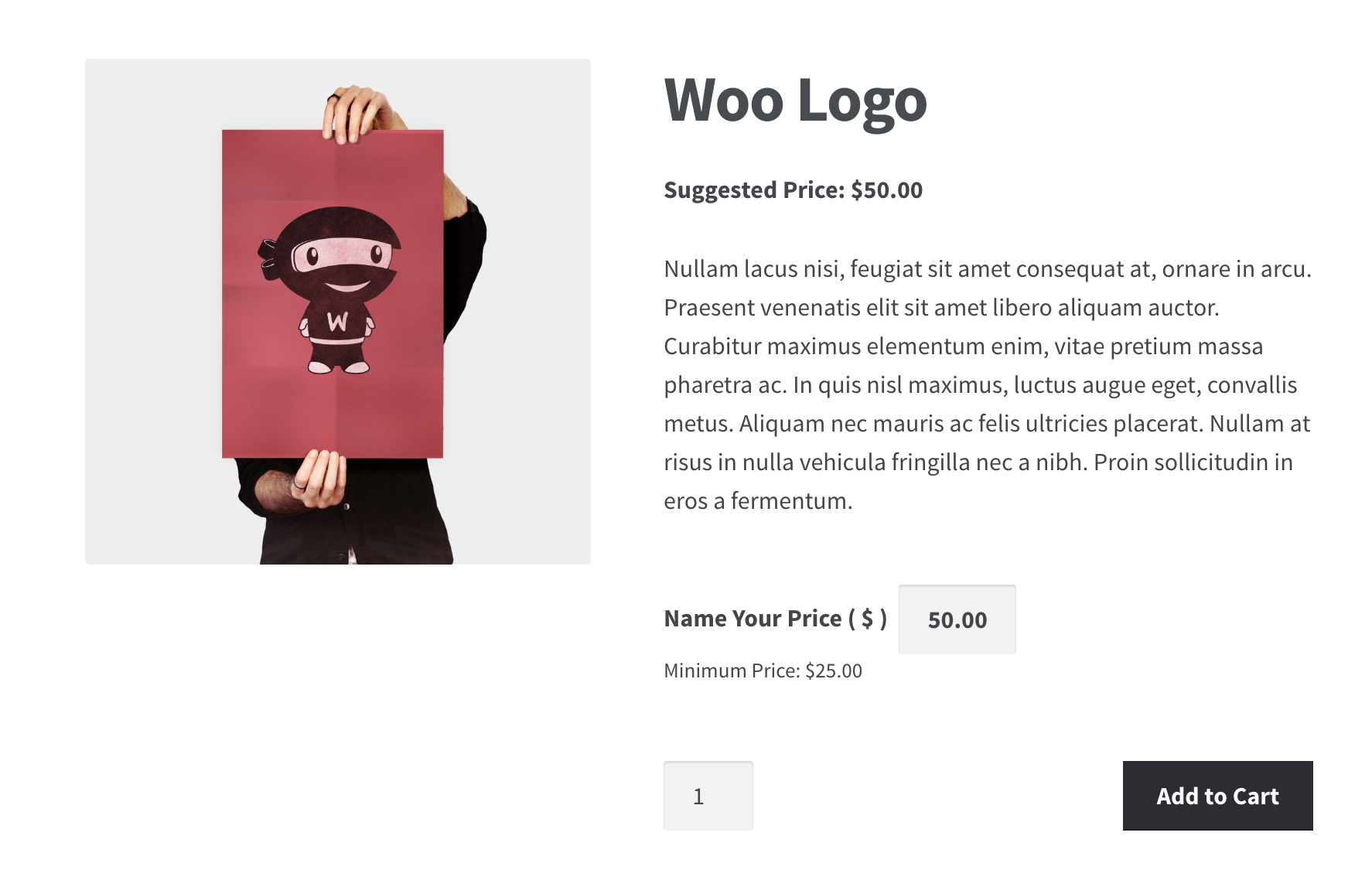
The Name Your Price plugin lets you be flexible in what price you are willing to accept for selected products. You can use this plugin to accept donations or to take a new approach to selling products. You can suggest a price to your customers and optionally enforce a minimum acceptable price, or leave it entirely in the hands of the customer.
Pay what you want with name your price.
Just Some of the Possibilities
Collect donations.
Alternative selling strategy.
Make a profit on products you’d otherwise give away.
Collect data on what price customers are willing to pay.
Name Your Price for Variable Products
Name Your Price now supports its customer-defined pricing for variable products! Pick and choose which variations will be Name Your Price enabled to allow customers to set a price on all of a product’s variations or just one. For example, a donation could be configured with $10, $20, and $50 variations plus a Name Your Own Price variation that allows the customer to chose his or her own level of giving.
Support for Product Bundles
The Product Bundles plugin (separate purchase) allows you to sell combos, simple kits and product assemblies or simply offer a discount when items are purchased together. With Name Your Price support:
Sell the entire bundle for whatever price the customer is willing to pay
Sell the bundle with “per item” pricing and the total bundle price will be calculated once the Name Your Price item’s price is set. Note: “Per Item” pricing currently only works with simple products, but support for variable products is coming soon.
Let Subscribers Choose When to Pay
Selling subscriptions with WooCommerce Subscriptions (separate purchase)? Want to let your customers decide when they want to pay? Past versions of Name Your Price included support for subscriptions with a variable billing period and still work for existing subscriptions. In the current version, you now create a variable subscription with different billing periods as variations.
Create printable gift certificates by using the PDF Product Vouchers plugin
The PDF Product Vouchers plugin (separate purchase) connects your online business with your brick and mortar business and allows you customize and sell downloadable PDF vouchers for offline goods or service. Coupled with Name Your Price, customers can create vouchers for a value of their choosing, allowing them to create printable gift certificates that can be redeemed in person.
Easy Configuration
Creating a “Name Your Price”-enabled product is hardly any different from creating a regular product. Once you’ve created a product, simply tick the checkbox marked “Name Your Price” and you will be able to enter the optional suggested and minimum prices for your product (or a particular variation). The price input box will automatically be added.
All the texts that your customer will see on the product page ( such as Add to Cart, Name Your Price, Suggested Price, etc.) can all be changed from the plugin’s options with no coding.
This extension allows you to use NAB Transact as a credit card processor. You can process Visa and Mastercard by default, and optionally accept American Express, UnionPay (UPOP), Diners Club and JCB after activation from NAB. The gateway also supports Subscriptions, refunds, risk management, 3D Secure and pre-authorization. As of version 2.0, this gateway supports both Direct Post and XML API integration methods offered by NAB Transact. […]
This extension allows you to use NAB Transact as a credit card processor. You can process Visa and Mastercard by default, and optionally accept American Express, UnionPay (UPOP), Diners Club and JCB after activation from NAB. The gateway also supports Subscriptions,refunds, risk management, 3D Secure and pre-authorization.
As of version 2.0, this gateway supports both Direct Post and XML API integration methods offered by NAB Transact.
Direct Post
Using the Direct Post method, after checkout your customers will be directed to an additional page on your website (with all of your branding/header etc) which accepts their credit card details. These details are sent directly to NAB servers, bypassing your server and the need to worry about PCI-DSS compliance. If the user chooses to pay with UnionPay (UPOP), they will be redirected to an additional external page to complete payment.
XML API
Using the XML API method, customers enter their credit card details directly on the checkout page. This is a more streamlined checkout, however you will be responsible for being PCI-DSS compliant. This method cannot support UnionPay (UPOP) or 3D Secure.
Additional functionality
Subscriptions: The NAB Transact gateway fully supports Subscriptions functionality.
Refunds: The NAB Transact gateway supports full and partial refunds.
Risk management: The NAB Transact gateway supports Risk Management functionality offered by NAB Transact.
Pre-authorization: The NAB Transact gateway supports pre-authorization checkouts (where the funds are not captured immediately). With this option enabled, simply change the order status to Processing or Completed to capture the payment automatically.
Display MSRP prices to your customers The WooCommerce MSRP plugin allows you to record Manufacturer Suggested Retail Prices / Recommended Retail Prices against your products, and have them displayed on the sales pages. This allows your customers to see why it’s a good idea to buy from you. On your product edit screens you’ll now […]
Display MSRP prices to your customers
The WooCommerce MSRP plugin allows you to record Manufacturer Suggested Retail Prices / Recommended Retail Prices against your products, and have them displayed on the sales pages. This allows your customers to see why it’s a good idea to buy from you.
On your product edit screens you’ll now see an extra field in with the normal pricing information, labelled MSRP. You can enter the MSRP here and it will be shown on the front end to your customers. If you’re bulk importing products, then the MSRP can be imported by using meta: _msrp. By default the MSRP will be shown struck-out – much like a sale price. You can style these however you want, the whole content is within a div with a class of woocommerce_msrp, and the price itself is within a span with a class of woocommerce_msrp_price.















 The WooCommerce MSRP plugin allows you to record Manufacturer Suggested Retail Prices / Recommended Retail Prices against your products, and have them displayed on the sales pages. This allows your customers to see why it’s a good idea to buy from you.
 WPExclusive