WooCommerce Product Image Watermark is a WooCommerce Extensions being developed by Woothemes. WooCommerce Product Image Watermark allows you to add watermarks to your WooCommerce product images. Watermark can be copyright symbol, company logo, or branding text. You can easily choose from 9 positions to place the watermark: middle, middle left, middle right, top left, top center, top right, bottom […]
WooCommerce Product Image Watermark is a WooCommerce Extensions being developed by Woothemes. WooCommerce Product Image Watermark allows you to add watermarks to your WooCommerce product images. Watermark can be copyright symbol, company logo, or branding text.
You can easily choose from 9 positions to place the watermark: middle, middle left, middle right, top left, top center, top right, bottom left, bottom center or bottom right.
WooCommerce Product Gallery Slider is a WooCommerce Extensions being developed by Woothemes. WooCommerce Product Gallery Slider allows you transform your product galleries into a fully responsive slideshow.
WooCommerce Product Gallery Slider is a WooCommerce Extensions being developed by Woothemes. WooCommerce Product Gallery Slider allows you transform your product galleries into a fully responsive slideshow.
An advanced product search extension for WooCommerce Do you have loads of products on your WooCommerce website and are struggling to get users to the products they are wanting to buy? Wouldn’t it be great if you could get them there with one search? The WooCommerce Product Finder extension allows your users to search your […]
An advanced product search extension for WooCommerce
Do you have loads of products on your WooCommerce website and are struggling to get users to the products they are wanting to buy? Wouldn’t it be great if you could get them there with one search?
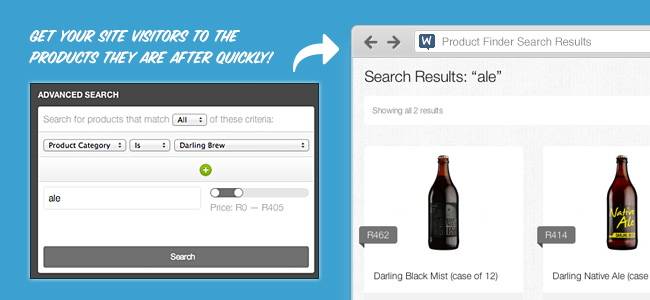
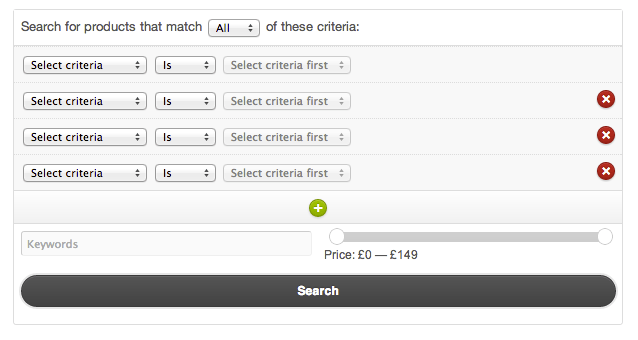
The WooCommerce Product Finder extension allows your users to search your site more thoroughly by giving you the ability to add an in-depth advanced search form to your site.
The Product Finder in action
Product Finder includes:
Options that allow users to select which product attributes or categories they would like to display in their search results
Standard text search
Price slider
The combination of all of these features creates a powerful search tool that will assist your users in finding exactly what they need no matter how large your store is.
Easily add to your site
The Product Finder can be included in your site using a shortcode, template tag or as a widget that can be added to any widgetized area of your site.
Give customers the opportunity to enquire about a product before purchasing The product enquiry form module extends WooCommerce by adding an extra tab to each of your product details pages. The tab displays a reCAPTCHA protected form which visitors can use to enquire about any specific product. The store manager receives the emails and can […]
Give customers the opportunity to enquire about a product before purchasing
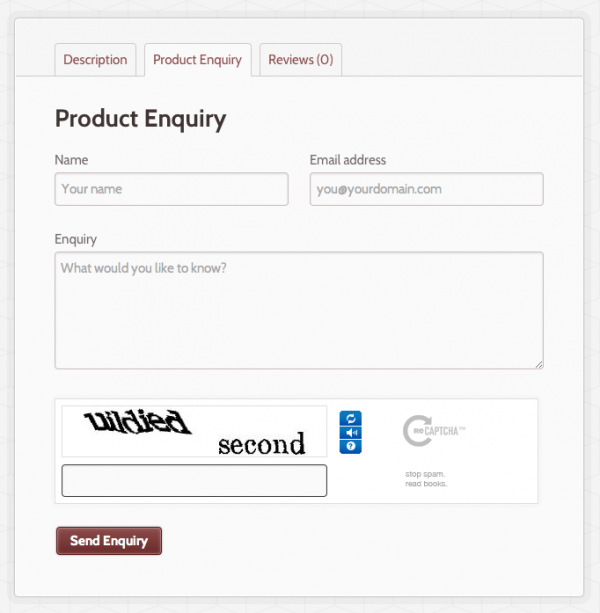
The product enquiry form module extends WooCommerce by adding an extra tab to each of your product details pages. The tab displays a reCAPTCHA protected form which visitors can use to enquire about any specific product.
The store manager receives the emails and can then respond to the user directly.
The product enquiry form is a great extension for stores selling complex, unique or expensive products which a customer may wish to know more information about before checkout.
Provide Product Documents, such as Assembly Instructions or Videos, to Customers Before Purchase Everyone wants to sell more, and one proven way to make it happen is to reduce barriers to purchase. For many customers, the more information they have for a product up-front, the fewer excuses they have to avoid buying. Giving customers access […]
Provide Product Documents, such as Assembly Instructions or Videos, to Customers Before Purchase
Everyone wants to sell more, and one proven way to make it happen is to reduce barriers to purchase. For many customers, the more information they have for a product up-front, the fewer excuses they have to avoid buying. Giving customers access to product documentation can help reduce barriers to purchase, or just give you a slick way to display product information to customers. Product Documents can display documentation below the product short description, in the sidebar using our widget, or anywhere you can use shortcodes!
How can I use Product Documents?
Want to sell an ebook? Many times, offering sample chapters can be a helpful way to engage readers and encourage them to buy (why else would Amazon gives away chapters for the Kindle edition of books for free?). You can now list sample chapters, sample images, and more in a sophisticated front-end display with virtually no effort.
You can give customers technical specifications or assembly instructions for your products one click by adding documents to your products. Maybe you spent tons of money printing user manuals that many customers end up losing or throwing away? Now you can go completely paperless! How about including a card when shipping products that directs users to your site, where you can feature user manuals and warranties for products without worrying about rising printing costs again? Centralize all of your documents to save on printing costs, reduce barriers to purchase, and help make them easy to find for customers.
Do you link to manufacturers specs or post how-to videos on YouTube? You can link product documents to a URL to get customers the information they need!
Include a Video or other URL sources
What can Product Documents Do?
Upload any file type to share documents with customers in an accordion-style menu
Display product documentation from other page URLs, such as YouTube
Customize the name of tabs and file names in your menu
Display menus below the product short description, or anywhere you can use shortcodes on your site
Display the documentation menu for the corresponding product in a sidebar using our widget
Use one shortcode to display a list of all attached documents on your site (listed by product)
Super-Easy User Interface
Adding new menus, tabs, and files is simple from the product page. Under Product Data, you can add as many files or URLs and as many menu tabs/section as you need to so customers have all of the information they need to make a purchase. Imagine having installation instructions, links to helpful videos, technical specifications, and warranty information all in one, easy-to-use menu!
Backend: Adding Tabs and Documents
Use shortcodes to embed Product Documents menus anywhere!
You can use the advanced shortcode to embed the Product Documents menu for the defined product on a page of your choosing. How do these shortcodes help you? First, if you have multiple products sharing the same product documents, you can simply copy/paste this shortcode onto every product page that will use those documents. Or, if you want to display the product documents in a blog post, or on a separate page of your website, you can use this shortcode to reference the product documents for the product you need.
The basic shortcode will embed the documentation menu anywhere you put the shortcode on the corresponding product page. We recommend using the WooCommerce Tab Manager to put documentation in a custom product tab:
What your shortcode will look like on the frontend
Use Widgets to Diplay Documentation on Product Pages
The Product Documents widget will allow you to put the product documentation on the corresponding product page for all products, with the menu name of your choice. This widget will respond to show the documents for the product being viewed, and can be used instead of showing documents in the short description.
Displaying your Product Documents in the sidebar
The Product Documents extension lets you publish all documents customers need, such as installation instructions or technical specification all in one place, and can help you save on printing costs by adding these documents to your product pages. Providing more information before purchase also helps to reduce barriers to purchase: you can reference outside URLs or post links to helpful videos or reviews, and help make documents easy to find for customers so they have all of the information needed to purchase.
Save time creating and updating complex products, and managing your product catalog Product CSV Import Suite lets you import thousands of products and supports complex products and custom data from Bookings, Product Vendors, Brands, Google Product Feed and more. Manage and sync your catalog, including bookable products and more The bread and butter of WooCommerce […]
Save time creating and updating complex products, and managing your product catalog
Product CSV Import Suite lets you import thousands of products and supports complex products and custom data from Bookings, Product Vendors, Brands, Google Product Feed and more.
Manage and sync your catalog, including bookable products and more
The bread and butter of WooCommerce is allowing you to sell anything, and that includes appointments, reservations or services with WooCommerce Bookings. It can be time consuming updating products (for example, adjusting prices), especially if you have a lot of products or many changes.
Save yourself the hassle of making changes one-by-one with Product CSV Import Suite.
Create, upload or update thousands of products at once, including complex products. Mass update standard items like price and description, along with custom data like appointment availability, resources and more.
Product CSV Import Suite goes beyond the basic import / export tool available in WooCommerce to support more extensions, including WooCommerce Bookings, WooCommerce Photography and Google Product Feed.
Have special details for your products? Import them in a snap
Beyond special kinds of products, you might have special information you want to import and update, for example:
Assigning a product to the vendor that sells it, using Product Vendors
Adding the name of the brand that makes that product, using WooCommerce Brands
Offering add-ons services like gift wrapping (ex: setup with Product Add-Ons)
Special pricing like 2-for-1 (ex: set up with Dynamic Pricing)
Product CSV Import Suite captures custom field information, without requiring custom code, so you can include extra information in your imports and exports. Beyond this – you can import information into any custom taxonomies, so you can add or update all the data about your products.
Export all your product data from your store, or just some of it
You can use Product CSV Import to export data back to a CSV file.
On top of products in published or private mode, you can also export products set to draft.
If your store has a lot of products, you may run into challenges exporting all of them at once. With Product CSV Import Suite, set a limit on how many you’d like to export, or skip exporting the first X rows of products, to make your exports more manageable.
If you merge products and variations in your store, you can export these changes back to your CSV file, too.
A complete product grouping toolkit for creating customizable product kits and assembled products Product bundling is one of the most effective marketing strategies around. Bundle a few products together, offer them at a discount, and watch your sales soar! At the same time, bundling techniques are essential for creating many types of assembled products and product kits, such as […]
A complete product grouping toolkit for creating customizable product kits and assembled products
Product bundling is one of the most effective marketing strategies around. Bundle a few products together, offer them at a discount, and watch your sales soar!
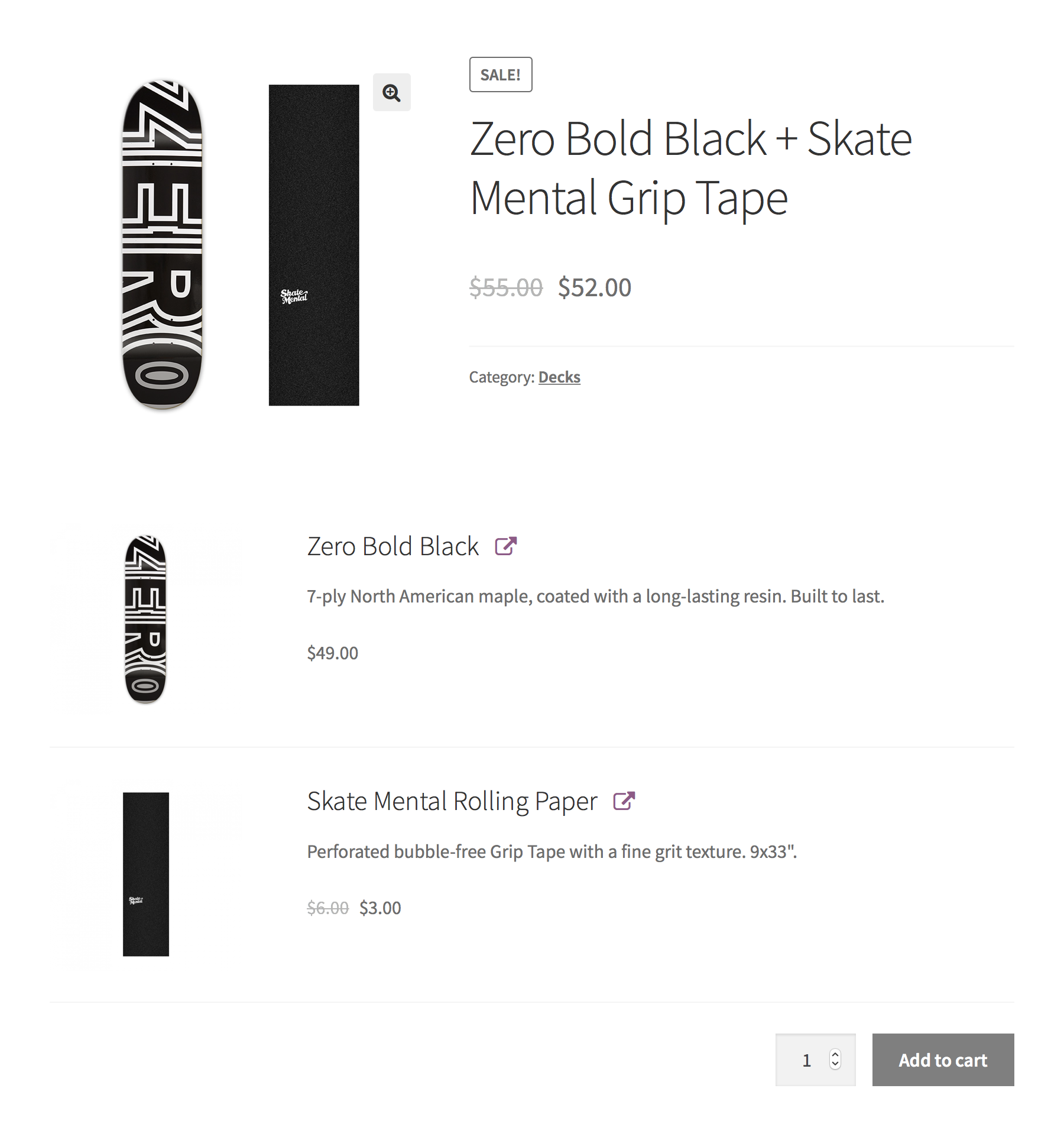
At the same time, bundling techniques are essential for creating many types of assembled products and product kits, such as computers, skateboards and gift boxes.
Product Bundles is the most flexible, robust product grouping toolkit for WooCommerce, powering thousands of successful stores. Its product grouping, pricing and shipping features have been designed to make sure it works great across a broad range of use cases. There’s little Product Bundles can’t handle!
Create Product Packages
Adding a bundle to your catalog is probably the most straightforward way to offer a few related products together. To make the offer more appealing, you can discount the entire package, or individual items.
Create Assembled Products
Build assembled products using multiple inventory-managed parts and control the visibility of each bundled item in the single-product, cart/checkout, and order/e-mail templates. Create fully assembled, partially assembled, or unassembled bundles.
Create Pick-and-Mix Boxes
Ever tried to build pick-and-mix boxes using the Grouped Product type? The Product Bundle type is the featured-packed alternative you’ve been looking for. With Product Bundles, you can:
Encourage customers to purchase multiple, related products with one click: Add Frequently Bought Together recommendations to any product.
Offer Bundles as Up-Sells
Every bundle you create is a standalone product that you can show or hide in your catalog. This allows you to utilize existing WooCommerce features — such as shortcodes and Up-Sells — to help customers discover them in a way that’s best suited to each use case.
Looking for a way to automatically recommend all bundles that contain the currently viewed product? It’s possible, thanks to Product Bundles’ integration with WooCommerce Product Recommendations.
Features at a Glance
Add simple, variable and subscription products to bundles, including virtual and downloadable flavors of all types.
Create digital and downloadable bundles.
Control the pricing and shipping configuration of each bundle down to the last detail.
Build customizable bundles with configurable quantities and optional items.
Managing a large store? Use bundled product stock reports to find bundles with insufficiently stocked contents.
Tweak the appearance of bundles and bundled items in single-product, cart/checkout and order/e-mail templates.
Customize it. Check out our growing collection of free snippets and mini-extensions for quick customizations and enhancements.
Extend it. Looking for REST API support? Need a generous amount of filter/action hooks at your disposal? How about a comprehensive technical documentation?
Ready to take WooCommerce to the next level? Jilt and Metorik fully support Product Bundles!
Is Product Bundles right for you?
Product Bundles is suitable for creating product packages with static content: All bundled products are pre-defined, and customers may only configure quantities and attributes, or pick from a list of optional items. If you want to build product kits that consist of several components with multiple product options, then Composite Products might be a better choice.
For a shopping experience as unique as your customers From adding a personal engraving, to upgrading to premium fabric, customizing products can keep your customers coming back. With Product Add-Ons, you can offer special options to your customers in a snap. Product Add-Ons allow your customers to personalize products while they’re shopping on your online store. No […]
For a shopping experience as unique as your customers
From adding a personal engraving, to upgrading to premium fabric, customizing products can keep your customers coming back. With Product Add-Ons, you can offer special options to your customers in a snap.
Product Add-Ons allow your customers to personalize products while they’re shopping on your online store. No more follow-up email requests—customers get what they want, before they’re done checking out.
Add options via text boxes, dropdowns, text areas, checkboxes, custom price inputs, even sample images. Add-ons can be added globally or per-product from the edit product page.
Give your customers the options they want
Product Add-Ons is one of the most popular extensions available for WooCommerce. It gives you and your customers even more options, including (but definitely not limited to):
Image-based selections
A picture’s worth a thousand words, so why describe a customer’s personalization options when you can show them? With image-based selections, customers can see what they’re getting before they buy.
Flat fees
Charge customers a flat fee regardless of how many products they ordered. Perfect for a one-time set-up charge or a rush fee.
Percentage fees
Charge a fee for the add-on based on a percent of the total price—this is especially useful for service-based add-ons that can be tougher to boil down to a flat fee.
Text input
Let your customers enter custom text to create a custom t-shirt, add a monogram or personalize a card.
Dropdown
Customer can chose between a few pre-defined options with a drop-down field for your add-on.
Checkboxes
Make customization as easy and satisfying as checking a checkbox. Great for add-on services, like gift wrapping or express shipping.
Print Invoices, Packing Lists, and Pick Lists for WooCommerce Orders The WooCommerce Print Invoice & Packing list extension is the ultimate tool to handle invoices, packing lists, and pick lists in your WooCommerce store. This plugin allows you to easily print documents for orders straight from the Orders page (individually and in bulk), while editing orders, and […]
Print Invoices, Packing Lists, and Pick Lists for WooCommerce Orders
The WooCommerce Print Invoice & Packing list extension is the ultimate tool to handle invoices, packing lists, and pick lists in your WooCommerce store. This plugin allows you to easily print documents for orders straight from the Orders page (individually and in bulk), while editing orders, and allows customer to view invoices from the “My Account” page.
Including invoices with shipped orders allows you to provide important order and policy information to customers when they receive their purchases. Print Invoices & Packing Lists takes all of the effort out of providing order information to customers so that you can bulk print the documents you need with only two clicks.
However, this won’t only help your customers. Packing Lists for individual orders and combined pick lists will help you speed up your fulfillment process, as order items are sorted by product category for efficient picking and packaging, letting you gather orders and double-check them for accuracy.
Flexible Invoice Format
This plugin has been completely re-built from version 3.0+ to make customizing your order documents as simple and flexible as possible for both users and developers. Invoice settings let you determine what information you want to show to customers, and you can even use a live preview to adjust colors, font sizes, and other appearance settings.
Live Preview for Customizing Document Appearance
Invoices can be printed (individually or in bulk!), emailed when an order is paid for, or viewed from the customer account area.
Customer account
Useful Packing and Pick Lists
When you’re picking orders in your store or warehouse, you know exactly where each kind of product is. We’ve organized packing and pick lists in the same way your organize your inventory — by product category / type. Packing lists will show you items needed to fulfill a single order, and you can even exclude virtual (non-shipped) items or include customer notes.
Packing List Settings
Pick lists will give you one combined list for several orders to let you gather the products you need to fulfill them. Pick lists are also organized by category to help you expedite order picking and fulfillment.
You can check out examples of each document type here:
You may need to work with one order or several orders at a time. No matter what your workflow looks like, you can easily print or email the order documents you need. From the orders list or the view order screen, you can use individual order actions to email or send invoices and packing lists.
When viewing all orders, you can also use bulk actions to print or send invoices, packing lists, or combined pick lists.
Single Order Action
Bulk Actions
Bulk actions will run for as many orders as you’ve selected, and you can open your documents by clicking the “Print” link to preview them and print them as needed. Invoices and packing lists will have page breaks between documents for each order.
Print from Bulk Action
What else can Print Invoices / Packing Lists do?
Customize document appearance and information with a live preview using the WordPress Customizer — no coding needed! NEW
Easily print or email invoices on a per-order basis or in bulk. Emails will be sent only when an order is paid for.
Let customers view invoices from the “My Account” page.
Quickly print or email packing lists for one or more orders.
Sort items on packing lists by category for faster order fulfillment NEW
Automatically email packing lists to shop admins for new orders NEW
Print pick lists for multiple orders to help with mass order fulfillment NEW
Optionally send professional-looking invoices as an HTML email to your customers
Use sequential invoice numbers, or use WooCommerce order numbers as your invoice numbers NEW
Customize what information is displayed in your order documents while adjusting the appearance of your invoices, packing lists, and pick lists — without touching any code. Print or email packing lists and pick lists that help make your order fulfillment workflows more efficient. Print or email documents for orders individually or in bulk. Filter orders by which have printed (or not printed) invoices and / or packing lists so you can see which need to be packaged still.
Send customers professional invoices with the order and store information they need. Providing invoices and managing order picking and packing is easier with Print Invoices / Packing Lists.
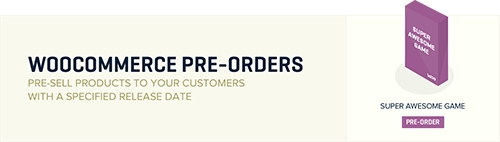
Sell pre-orders for products and services Set up pre-orders in your WooCommerce store, so customers can order products before they’re available. You can automatically or manually release and fill orders when you’re ready and let the extension handle the rest! The pre-order experience is fully customizable and supports both pre-orders charged up front and upon […]
Sell pre-orders for products and services
Set up pre-orders in your WooCommerce store, so customers can order products before they’re available. You can automatically or manually release and fill orders when you’re ready and let the extension handle the rest!
The pre-order experience is fully customizable and supports both pre-orders charged up front and upon release. If you’re using a supported payment gateway, pre-orders can be charged upon release without the customer returning and paying for their order.
Features
Set an optional date/time when the product will be available
Automatically charge orders when the product is available
Change the release date for a pre-ordered product
Email all customers who pre-ordered a product
Cancel pre-orders if the product is no longer available
Filter your pre-orders with a custom “pre-order” order status
Works with simple & variable products
Optionally charge a fee for a pre-order
Customize the Add to Cart/Place Order buttons for pre-orders
Easy pre-order customization
Control how pre-order products are displayed using built-in settings for button text, product messages, and more. Display the time remaining until a product is available anywhere on your site using a countdown time shortcode with support for customization via CSS.
Easy Pre-Order Management
Pre-Orders can be charged in two ways, up front or upon release. When charging a pre-order up front, the customer pays the entire pre-order amount during the initial checkout.
When charging a pre-order upon release, the customer’s payment method is charged when the product is released (either by reaching the availability date, if set, or manually within the Pre-Orders admin) when using a supported gateway. If a supported gateway is not available, the customer will receive an email when the pre-order is released prompting them to come back to the store and pay for their pre-order.
All pre-orders can be managed through a dedicated page. From here the admin can delay, complete, cancel, or email selected pre-orders, or use the actions section to perform the same actions for all pre-orders for given product.
Automatically Charge Pre-Orders Upon Release
When you use one of the supported payment gateways, you can automatically charge your customer’s payment method when the pre-order is available. All gateways support manual payments for pre-orders, where the customer is sent an email asking them to come back and pay for their pre-order when it’s released.











 WPExclusive