WooCommerce WooSlider is a WooCommerce Extensions being developed by Woothemes. WooSlider has many features like transitions, directions, sliding speeds and pagination controls. Slider Types You can pick various content types to create your sliders. Content Layouts Content layouts features give you control to display your slider layout Slider Settings Slider Settings features give you control to every aspect of your slide […]
WooCommerce WooSlider is a WooCommerce Extensions being developed by Woothemes. WooSlider has many features like transitions, directions, sliding speeds and pagination controls.
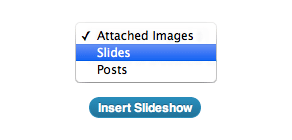
Slider Types
You can pick various content types to create your sliders.
Content Layouts
Content layouts features give you control to display your slider layout
Slider Settings
Slider Settings features give you control to every aspect of your slide show.
Minimal Style
WooSlider also comes with beautiful minimal style, eyecatching to every woocommerce themes
WooCommerce Westpac PayWay API Payment Gateway 1.3.3
WooCommerce Westpac PayWay API Payment Gateway 1.3.3
Westpac PayWay API This extension allows you to use Westpac PayWay API as a credit card processor, using their fully integrated API process. You can process Visa and Mastercard by default, and can optionally accept American Express, Diners Club and JCB after further activation by Westpac. When using the PayWay API integration, you should ensure your web server […]
Westpac PayWay API
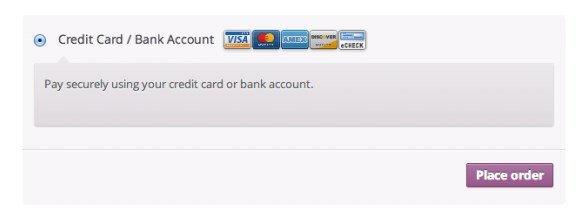
This extension allows you to use Westpac PayWay API as a credit card processor, using their fully integrated API process. You can process Visa and Mastercard by default, and can optionally accept American Express, Diners Club and JCB after further activation by Westpac.
When using the PayWay API integration, you should ensure your web server meets PCI compliance (Payment Card Industry Data Security Standards)
WooCommerce WePay Payment Gateway is a WooCommerce Extensions being developed by Woothemes. WooCommerce WePay Payment Gateway allows yours store to accept payment from credit cards and bank accounts using WePay Gateway. WePay Checkout Select WePay Iframe Checkout WePay Redirect Checkout Features : Fast Setup (Setup only take 5 minutes) You can choose iframe or redirect checkout method […]
WooCommerce WePay Payment Gateway is a WooCommerce Extensions being developed by Woothemes. WooCommerce WePay Payment Gateway allows yours store to accept payment from credit cards and bank accounts using WePay Gateway.
Keep customers happy with back-in-stock notifications Automatically notify customers when a product becomes available for purchase The WooCommerce Waitlist extension lets you track demand for out-of-stock items, making sure your customers feel informed, and therefore more likely to buy. Using a simple plugin, you can build up a waiting list of people wanting the unavailable […]
Keep customers happy with back-in-stock notifications
Automatically notify customers when a product becomes available for purchase
The WooCommerce Waitlist extension lets you track demand for out-of-stock items, making sure your customers feel informed, and therefore more likely to buy.
Using a simple plugin, you can build up a waiting list of people wanting the unavailable item, then notify these customers automatically when products come back in stock.
Set up in seconds
It’s really easy to install and will instantly start turning missed opportunities into future sales.
Customers register for an email alert to let them know when a product is back in stock, increasing the likelihood they’ll wait and shop with you instead of going to a competitor.
It makes people feel valued by your business, and allows you to replenish stock intelligently based on demand.
Key features
allow customers to be notified when they can purchase an item that is currently out of stock
easily identify ‘most wanted’ products to prioritise re-stocking
allow customers to easily review and edit their waiting lists
maintain a record of users that have been emailed an in-stock notification
easily manage your waitlists from the WordPress admin
add the waitlist elements for any product anywhere you choose using our shortcode
plug-and-play functionality – just install, activate and go!
How it works
It takes seconds for customers to join a waiting list via a button on the product listing of your WooCommerce store.
An out-of-stock product showing the option to join it’s waitlist
As soon as you update your stock numbers on the site, everyone on the list automatically gets an email with a link to the product, making it super-simple for them to buy.
WooCommerce Waitlist fully supports simple products, product variations and the children of grouped products.
See who’s waiting for what
With WooCommerce Waitlist, shop managers can sort products by number of customers on their waiting list. This allows them to quickly prioritize which products to re-stock.
An example of the added Waitlist column
Shop managers can also view, manage and contact those on the waiting list for each product directly from the Edit Product screen through a custom product tab.
Here, it is easy to add/remove users from the waiting list, see archived lists, export a CSV of users on a waiting list/archive and adjust the waiting list options for this product.
Allow users to manage their own waiting lists
Users can view any products they have joined the waiting list for on the “Your Waitlists” tab on their “My Account” page. This allows users to conveniently manage all their waiting lists in one place
The default “Your Waitlists” tab shown on the “my account” page
Get it working your way
WooCommerce Waitlist comes with plenty of options for you to get the most from the plugin, including the following:
options to display opt-in elements when users sign up to a waitlist
options to also display waitlist buttons on archive pages (e.g. the shop page/product category pages)
options to add google analytic tracking codes to WooCommerce Waitlist emails
options to email a site administrator when a customer joins a waitlist
options to set a minimum stock before WooCommerce Waitlist in-stock notifications are sent out
and more…
Extend and customizehttps://woocommerce.com/products/woocommerce-waitlist/
The default setup is ‘plug and play’, but WooCommerce Waitlist adds a large number of WordPress action and filter hooks allowing you to customize it to suit your exact needs (See documentation for more information). Customizations include:
Choosing the wording for notification emails
Tweaking the design of ‘join waiting list’ buttons
Hooking in extra functionality when users are added to/removed from a waiting list
Altering the design of the “Your Waitlists” page added to the “My Account” section
WooCommerce Virtual Card Services is a WooCommerce Extensions being developed by Woothemes. WooCommerce Virtual Card Services allow your store to accepting payments using the South African payment processing platform, Virtual Card Services. WooCommerce Virtual Card Services allows customers to pay for their purchase via an easy-to-use credit card processing system. When a user elects to pay for their order […]
WooCommerce Virtual Card Services is a WooCommerce Extensions being developed by Woothemes. WooCommerce Virtual Card Services allow your store to accepting payments using the South African payment processing platform, Virtual Card Services.
WooCommerce Virtual Card Services allows customers to pay for their purchase via an easy-to-use credit card processing system. When a user elects to pay for their order using Virtual Card Services, they are redirected to your merchant account on the Virtual Card Services website where they are requested to make payment via their credit card.
Replace dropdown fields on your variable products with WooCommerce Color and Image Swatches Using color and image swatches provides a much nicer way to display variations of a product, available styles, available sizes, or pretty much anything else you can display using an image or color. Shoppers appreciate visual representations of product attributes when using your […]
Replace dropdown fields on your variable products with WooCommerce Color and Image Swatches
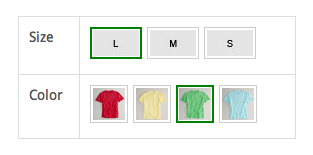
Using color and image swatches provides a much nicer way to display variations of a product, available styles, available sizes, or pretty much anything else you can display using an image or color.
Shoppers appreciate visual representations of product attributes when using your store, and it can help present a polished and clean look. WooCommerce Color and Image swatches is the answer if you are looking to edge out the competition.
The admin interface allows you define colors and images at attribute level or product level:
Custom swatches for a product
To see live examples and plugin in action, go to demos.
Get real-time rates from the largest shipping network in the US Show your customers accurate shipping rates automatically with our integration for USPS, the largest delivery network in United States. Your store must use US Dollars for its currency and the United States, US Virgin Islands or Puerto Rico as the base country. It works […]
Get real-time rates from the largest shipping network in the US
Show your customers accurate shipping rates automatically with our integration for USPS, the largest delivery network in United States.
Your store must use US Dollars for its currency and the United States, US Virgin Islands or Puerto Rico as the base country. It works with inches (in) and pounds (lbs), but other units can be converted automatically.
USPS calculates quotes worldwide.
DOMESTIC
INTERNATIONAL
First Class
Flat Rate
Priority Mail
Priority Mail Express
Standard Post
Media Mail
Library Mail
First Class Mail® International Letters and Envelopes
Global Express Guaranteed (GXG)
Priority Mail International
Priority Mail International Flat Rate
International Postcards
We recommend using this extension in combination with our free service WooCommerce Shipping, which creates discounted shipping labels right from your WooCommerce dashboard.
Other features:
Enable/disable, edit the names of, and add costs to services
Pack items individually or using the built in box packer
Easily accept credit cards with USA ePay The WooCommerce USA ePay extension provides a completely integrated checkout experience between WooCommerce and USA ePay. Payments take place directly on your website so you have maximum control over what the checkout looks like, and customers never have to leave your site to make a payment. Why WooCommerce […]
Easily accept credit cards with USA ePay
The WooCommerce USA ePay extension provides a completely integrated checkout experience between WooCommerce and USA ePay. Payments take place directly on your website so you have maximum control over what the checkout looks like, and customers never have to leave your site to make a payment.
Why WooCommerce USA ePay?
WooCommerce USA ePay has added lots of useful new features in version 2.0:
Process refunds / voids automatically from within WooCommerce NEW
Capture prior authorized transactions right from the WooCommerce edit order screen NEW
Force charges for orders with only virtual items instead of authorizing them NEW
Automatically capture transactions when order status changes to a paid status NEW
Updated payment form at checkout with retina icons
Adds a mobile-friendly checkout with numerical inputs for card type and security code
Show detailed decline messages at checkout instead of generic errors NEW
Customers never leave your site during checkout
Accept Major Credit Cards / Debit Cards – Visa®, MasterCard®, American Express®, Discover®, Diner’s, JCB
Simple, Integrated Checkout
Using the USA ePay extension allows you to decide what your checkout process will look like, while keeping the customer on your site for the entire process. This gives you maximum control over this experience, providing a slick checkout process for the user and maximum customizability for the business owner.
Mobile checkout is enhanced as well, offering automated card formatting and numerical (tel type) fields for easier input.
You can now opt to show detailed decline messages to your customers, no more “an error occurred” error messages!
Support for Automatic Refunds & Voids
Shop employees can now process refunds for an order paid for with USA ePay directly from within WooCommerce — no more logging into your merchant account to process refunds! Speed up your store management by creating full or partial refunds from the “Edit Order” screen and sending the transaction automatically to USA ePay by clicking “Refund via Credit Card”.
If the transaction has not been captured or settled, a transaction void will be performed automatically instead to cancel the order.
Capture Charges directly from WooCommerce
Some users choose to set the payment gateway to only authorize charges rather than authorize & capture them. However, this requires the user to then log into the payment gateway admin to capture charges.
Version 2.0+ of this extension allow you to optionally capture previously authorized transactions directly from the WooCommerce Edit Order screen rather than logging into your USA ePay control panel to do so. Simply edit the order, select the “Capture Charge” action, and charges will be captured through USA ePay.
US Export Compliance US shop owners selling goods and services are required to comply with export regulations published by several US departments, such as the Department of Commerce, the Department of the Treasury and the Department of of State. Each department provides its own screening list, sometimes even more than one, and all the entries, […]
US Export Compliance
US shop owners selling goods and services are required to comply with export regulations published by several US departments, such as the Department of Commerce, the Department of the Treasury and the Department of of State.
Each department provides its own screening list, sometimes even more than one, and all the entries, individuals, companies and others count almost 30.000 records.
“In the event that a company, entity or person on the list appears to match a party potentially involved in your export transaction, additional due diligence should be conducted before proceeding. There may be a strict export prohibition, requirement for seeking a license application, evaluation of the end-use or user to ensure it does not result in an activity prohibited by any U.S. export regulations, or other restriction.”
(source: export.gov web site)
How do you provide enough confidence and security to your online business?
How shall you deal with the US Export requirements within your existing workflow?
Does this all mean that you shall manually check each and every order against such long and always changing list of entries?
The WooCommerce US Export compliance extension comes to rescue by seamlessly integrating within your shops workflow:
WooCommerce US Export compliance includes the following features:
Controlling for every placed order customers data against the screening list
If a customer is not on the screening list, the order is placed as usual
If a customer is on the screening list, the order is put on-hold for manual verification as required by the authorities
Updating daily the screening list from the official sources
Extend or Automate your Coupons with WooCommerce URL Coupons The URL Coupons extension allows you to add a unique URL to any coupon in your WooCommerce store. When this URL is used or clicked on, it automatically applies the coupon discount and can (optionally) add products to the customer’s shopping cart. URL coupons gives you the perfect […]
Extend or Automate your Coupons with WooCommerce URL Coupons
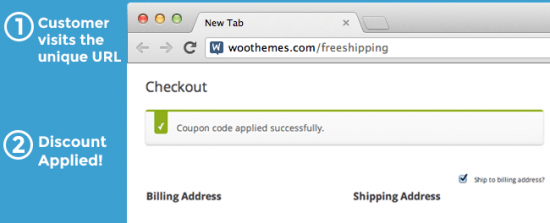
The URL Coupons extension allows you to add a unique URL to any coupon in your WooCommerce store. When this URL is used or clicked on, it automatically applies the coupon discount and can (optionally) add products to the customer’s shopping cart.
URL coupons gives you the perfect way to make your print advertising actionable, or you can also help customers remember coupons so that they actually complete purchases. Measure the success of your pay-per-click ad campaigns by using a coupon URL, or use the plugin to only allow URL coupons.
Increase Conversions by Removing Coupon Fields
Studies from major analytics companies like KISSmetrics have shown that coupon boxes are conversion killers. Customers leave your site to search for coupons, and may not return. URL coupons gives you the flexibility to be your only coupon method.
You can allow the plugin to hide your coupon code fields in the cart and/or checkout so that only URL coupons can be used. This way, customers with coupons automatically have them applied by visiting your URL, while other customers never leave to go coupon hunting.
Hide Coupon Fields
Automatically Apply Coupons for Visitors
You can use the URL of an existing page or post on your site to trigger coupons. This means that you can trigger a coupon for anyone who reads a particular blog post or visits your landing page. This is a great way to reward your fans, brand loyalists, or customers that interact with you blog by providing an automatic discount.
Redirect customers after coupon application
You can redirect customers if you choose once they’ve visited a coupon URL. This allows you to optionally add products to the cart when the URL is visited and immediately send customers somewhere, such as the cart or checkout. This reduces as many barriers to purchasing as possible, and can even be used with WooCommerce One Page Checkout for a completely seamless, one-page coupon application and purchasing experience.
Personalize Your Coupon URLs to Reward Customers
You can use a generic coupon URL, such as mystore.com/coupon/thanks, that will apply a “thank you” coupon. However, since this coupon URL doesn’t use a trailing slash, you can also use this to personalize the experience for your customers, as the URLs mystore.com/coupon/thanks-john or mystore.com/coupon/thanksjane will also work for this coupon.
You can also disable this behavior by using a trailing slash like mystore.com/coupon/thanks/ if you’d prefer to use one definite URL for coupons instead.
Other Ways to Elevate Your Coupons
use a unique URL or QR code on business cards to reward potential clients for checking in on you with a discount.
make it easier for current customers to share your products or services by simply giving them a link to send to their friends so they visit your site and get a discount at the same time!
prevent coupon hunting by only allowing URL coupons to be used.
give out personalized URL coupons, such as mysite.com/thanks-jen, to connect with your customers.
automatically apply coupons for customers who visit a particular page or post.
Key WooCommerce URL Coupons Features
Set a unique URL for a coupon that applies the coupon when the URL is visited
Optionally set one or more products that will be added to the customer’s cart when the unique URL is visited
Control if and where the customer is redirected to after visiting the URL
Track and increase conversions from your online and print advertisements
Improve conversions by automating action when the customer clicks
Help current customers remember, share, and use coupons
Use WooCommerce One Page Checkout with URL coupons to provide a complete one-page coupon application and purchasing experience. NEW
Reduce purchase barriers by applying discounts and adding items to the cart automatically
Set coupon minimum amounts, expiration dates, or usage limits
Set a Unique URL and other Coupon Options
Stop customers from abandoning your checkout to go coupon hunting. Improve conversions of your advertising campaigns by automating discounts to encourage purchasing. Help current customers access and share the discounts you offer. Automatically apply coupons for page or post visitors to provide “easter eggs” and rewards. URL Coupons can help you integrate your coupons throughout your site and provide advanced ways to use them.















 WPExclusive